
What Is GitOps and How Does It Automate Deployments
So, what exactly is GitOps? At its heart, it’s a way to run your entire system from an automated instruction manual. Instead of logging into servers and manually tweaking configurations, you describe the exact state you want your system to be in—and you write it all down in a Git repository.
That repository becomes your single source of truth. From there, a specialized software agent takes over, working tirelessly to make sure your live environment perfectly mirrors what’s in that manual.
From Manual Uploads To Automated Perfection

While GitOps gives us a reliable way to manage today’s complex systems, it’s a huge departure from how we used to handle deployments. The term was officially coined back in 2017 by Alexis Richardson, the CEO of Weaveworks, who saw an opportunity to build on the foundations of Kubernetes and Infrastructure as Code (IaC).
To really get what makes GitOps so powerful, it helps to look back at how we got here. The journey from those old-school manual updates to today’s automated approach was a long one, as you can read more about in CNCF’s 2025 retrospective.
The Evolution of Deployments
Not too long ago, managing infrastructure was a hands-on—and often stressful—job.
- 1990s & Early 2000s: Deployments meant manually uploading files with FTP from your own computer straight to a live server. Versioning was practically nonexistent, and the risk of breaking something was incredibly high.
- Mid-2000s: Tools like Subversion brought source control into the picture, which was a step up. Still, updates required someone to run risky manual commands directly on the server.
- Late 2000s & 2010s: CI/CD and configuration management tools started automating parts of the process. But they often relied on “push-based” scripts that needed direct, privileged access to production environments, which was a major security concern.
GitOps is a natural evolution of the broader DevOps movement. It takes those great ideas and provides a more structured, secure path to continuous delivery. By using Git to declare the desired state, it creates a transparent and auditable workflow that just runs. These improved DevOps practices drastically cut down on human error and make the entire operation more predictable.
A great analogy is a self-managing kitchen. Your Git repository is the official recipe book. An automated chef—your GitOps agent—is constantly checking to make sure every dish being served (your live system) perfectly matches the recipes. If anything is out of place, the chef automatically fixes it without anyone needing to step in.
Understanding the Four Pillars of GitOps
To really get what GitOps is all about, you need to know the four core ideas that make it work. These aren’t just buzzwords; they’re practical rules that, when combined, create a remarkably stable and transparent way to manage systems.
1. The Entire System Is Described Declaratively
First, everything in your system must be described declaratively. This means you write configuration files that state what you want the end result to be, not the step-by-step commands to get there.
Think of it like giving a blueprint to a construction crew. The blueprint shows the finished building, but it doesn’t say, “First, pour the foundation, then frame the walls…” The crew (your automation tools) figures out the how. This declarative approach makes your system’s desired state crystal clear and easy for anyone on the team to understand.
2. Git Is the Single Source of Truth
So you have these declarative config files. Where do they live? That brings us to the second pillar: Git is the single source of truth. Every single configuration for your applications and infrastructure gets stored and versioned in a Git repository. If it’s not in Git, it’s not part of the system. Period.
This is the absolute cornerstone of GitOps. When Git is your undisputed source of truth, you get a complete, time-stamped audit trail of every single change. Rolling back a bad deployment can be as simple as a
git revert.
This elevates Git from a simple developer tool to the central control panel for your entire operations. It all hinges on solid Source Code Management practices, allowing your team to review changes through pull requests and maintain a clear history for compliance.
3. Approved Changes Are Automatically Applied
Once a change to a configuration file is reviewed, approved, and merged into the main branch, it must be automatically applied to the live environment. No more manual steps. No one needs to SSH into a server or remember to run kubectl apply.
This is a huge deal. Automating the sync between Git and your live system eliminates one of the biggest causes of production outages: human error. It closes the loop, ensuring the state you declared in Git is the state that’s actually running.
4. Software Agents Ensure Correctness and Alert on Divergence
That brings us to the final, crucial piece of the puzzle: continuous reconciliation. Special software agents, like Flux or Argo CD, run inside your Kubernetes cluster or environment. Their only job is to constantly compare the live system state with the desired state defined in Git.
When these agents spot a difference—what we call “drift”—they spring into action.
- Self-Healing: In most cases, the agent will automatically revert the unauthorized change, forcing the live system back into the state described in Git.
- Alerting: If it can’t fix the drift on its own, it immediately alerts the team that the live environment is out of sync with the source of truth.
This constant feedback loop is what makes a GitOps system so resilient. It’s always watching, always correcting, and always ensuring your infrastructure remains stable and predictable.
How a Typical GitOps Workflow Actually Works
The theory behind GitOps is great, but what does it look like on a Monday morning? Let’s walk through a real-world scenario to see how these principles come together.
Imagine a developer needs to push a new version of an application. Instead of SSHing into a server or clicking around in a cloud console, their entire job boils down to changing a single line in a text file. That’s it. They’ll update the container image tag in a YAML manifest, and GitOps handles the rest.
From Pull Request to Automated Deployment
The developer doesn’t just push this change straight to production. They follow a battle-tested Git workflow that’s probably already familiar to your team:
- Create a Branch: They start by creating a new branch in the Git repository that holds all the environment configurations.
- Commit the Change: The updated YAML file is committed with a clear message, like “Update web-app to v1.2.5”.
- Open a Pull Request (PR): Finally, they open a pull request to merge their change into the main branch, which represents the desired state of your live environment.
This pull request is where the action happens. It’s not just code—it’s a formal proposal to alter your infrastructure. For a great refresher on the mechanics, check out our guide on how GitHub pull and merge requests work.
The pull request becomes the single source of truth for the change. It kicks off automated checks—linting the config files, running security scans, and maybe even spinning up a preview environment. Your team can review the exact change, discuss its impact, and give a thumbs-up before it goes anywhere.
The Magic of Automated Reconciliation
Once everyone is happy and the PR is merged into the main branch, the hands-on work is done. This is where the GitOps agent takes over and the real “magic” begins.
This diagram shows how the process flows in a continuous loop: Git holds the declarative state, it gets versioned, an automated agent pulls it, and the system is constantly reconciled.
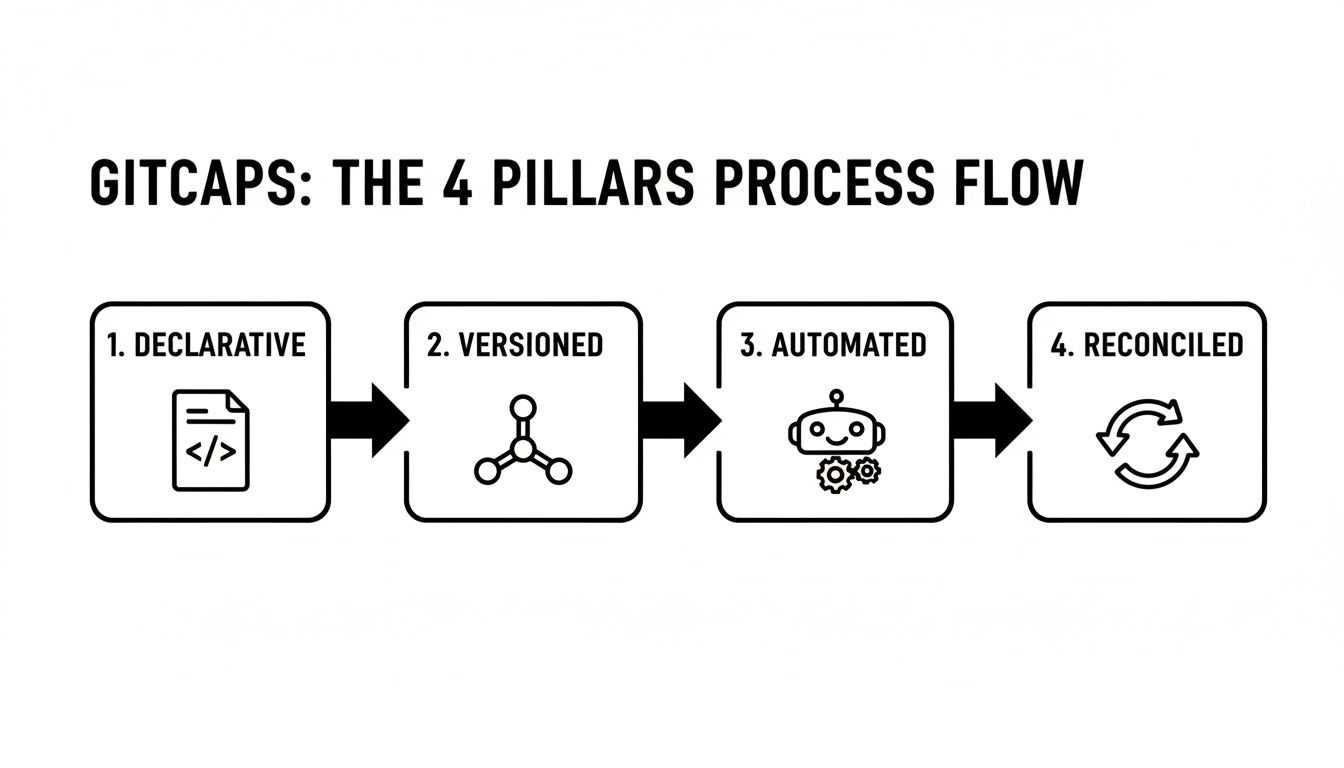
The key thing to notice is that everything after the merge is completely automated.
A GitOps agent, like the popular tools Argo CD or Flux, is always watching that main branch. The moment your PR is merged, the agent springs into action:
- Detection: It immediately sees the new commit.
- Pull: It pulls the latest version of the configuration files from Git.
- Comparison: The agent then compares the desired state described in the new files with the actual, live state of your Kubernetes cluster.
- Reconciliation: It spots the difference—the cluster is running the old container, but the repo says to run the new one—and automatically applies the change to start the new version.
Just like that, the cluster’s state matches what’s in Git. Your entire infrastructure history is now a clean, easy-to-read Git log, giving you a perfect audit trail. This self-healing, automated reconciliation is what makes GitOps so incredibly reliable and powerful.
Alright, so you’ve decided to take the plunge into GitOps. The next question every team asks is, “Which tool should we use?” While there are a few options out there, the conversation almost always boils down to two heavyweights: Flux and Argo CD.
Both are powerhouse projects, graduated from the CNCF, and built to handle the pull-based workflows at the heart of GitOps. But they come at the problem from completely different angles. Picking the right one depends less on which is “better” and more on what fits your team’s culture and technical needs.
Think of it this way: your GitOps tool is the engine that connects your Git repository to your clusters. It needs to fit neatly into your existing setup, whether you’re using simple CI/CD platforms or managing a complex web of microservices.
Let’s break down what makes each tool unique.
Flux: The Modular Toolkit
Originally from the folks at Weaveworks, Flux is best described as a flexible, do-it-yourself toolkit. It isn’t a single, monolithic application. Instead, it’s a collection of specialized controllers you can assemble like Lego pieces to build the exact GitOps system you need.
This modularity makes it a huge favorite among platform engineers who want granular control. The entire experience is CLI-first, which appeals to teams who live in the terminal. You can sync not just from Git, but also from Helm repositories and even S3-compatible storage buckets. This flexibility is why you’ll often find Flux’s components embedded directly into major cloud provider services from AWS and Azure.
Argo CD: The All-in-One Experience
Argo CD goes in the opposite direction. It offers a batteries-included, all-in-one experience that feels more like a polished product. Its main attraction is a fantastic web UI that gives you a crystal-clear, real-time view of all your applications, sync statuses, and deployment histories.
This visual-first approach is a game-changer for teams that want to lower the barrier to entry. New developers can get a handle on what’s happening in the cluster without having to master kubectl commands first. Argo CD also shines when it comes to managing the entire application lifecycle, and with Argo Rollouts, it has powerful progressive delivery strategies built right in.
GitOps empowers scaling teams by turning developers into full-stack operators, which cuts down on the need for specialized Kubernetes administrators. With change failure rates dropping by up to 60% thanks to peer-reviewed PRs and easy rollbacks, the operational benefits are clear. Discover more about these GitOps architecture patterns and their impact.
Flux vs Argo CD: A Feature Comparison
So, how do you choose? It really comes down to your team’s workflow preferences. Do you want a highly configurable set of building blocks, or a single application that just works out of the box? This table puts their philosophies side-by-side.
| Feature | Flux | Argo CD |
|---|---|---|
| Design Philosophy | Modular and extensible toolkit | All-in-one application manager |
| User Interface | Primarily CLI-driven; UIs are optional | Rich, built-in web UI is central |
| Multi-Tenancy | Managed via native Kubernetes RBAC | Handled through built-in Projects feature |
| Out-of-the-Box Feel | Minimalist; you add what you need | Feature-rich; everything is included |
If your team loves composability, lives in the command line, and wants to build a bespoke platform, Flux is probably your best bet. If you have a mixed-experience team that would benefit from a great UI and an integrated experience, Argo CD is an easy choice.
Your GitOps Tooling Scorecard
Use this scorecard to evaluate and select the right GitOps tool for your team's needs.
📊 Core Metrics
- Setup Time — Hours from initial install to first successful sync.
- UI Adoption Rate — Percentage of team members actively using the web UI vs. CLI.
- Multi-Cluster Syncs — Total number of clusters managed from a single control plane.
🕹️ My Cheatcodes
- 🌱 Flux for Flexibility — Choose it when you need a highly modular, CLI-first toolkit for custom platforms.
- 🎨 Argo for UI — Opt for it when a rich, all-in-one visual dashboard is a priority for your team.
- ⚡ Start with One — Don't over-analyze; pick one tool for a pilot project and measure its fit.
📈 Reflection Points
- 💡 Does our team prefer a CLI-driven or UI-driven workflow?
- 🧩 How important is multi-tenancy and granular access control for our use case?
- 📘 Will a modular toolkit or an all-in-one solution reduce our operational burden more?
The Real-World Payoffs of Adopting GitOps
Switching to a new model like GitOps is more than just a technical tweak—it’s a strategic move that pays real dividends. So, why should your team bother? The truth is, the benefits show up everywhere, from development all the way to production, making your entire delivery process faster, safer, and far more predictable.
This isn’t some niche trend; it’s happening right now. With 85% of organizations already running Kubernetes in production, many are turning to GitOps to get a handle on the complexity. This approach flips traditional CI/CD on its head. Instead of pushing changes out, an agent inside your cluster pulls them in from Git, which is a huge win for security. This whole everything-as-code movement is gaining serious traction for good reason.
A Better Life for Developers
At its heart, GitOps lets developers manage both applications and infrastructure using the tool they already live in all day: Git.
When your team can define and deploy everything through a familiar pull request, you’ll see productivity and a sense of ownership shoot up. It removes the operational roadblocks, letting developers get back to what they do best—shipping features. This directly translates to a faster deployment frequency, a hallmark of any high-performing engineering team.
Rock-Solid Stability and Reliability
One of the biggest wins with GitOps is how much more stable your systems become. Every single change is reviewed by a peer, run through automated tests, and permanently logged in your Git history.
- Painless Rollbacks: If a new deploy goes sideways, fixing it is as simple as running a
git revert. This can slash your Mean Time to Recovery (MTTR) from a stressful few hours to just a few minutes. - Fewer Failed Changes: Because you have a crystal-clear audit trail and automated gates, the percentage of deployments that cause production failures drops like a rock.
The core idea is that your Git history becomes a perfect, auditable log of your cluster’s entire operational history. This transparency is a game-changer for troubleshooting and ensuring reliability.
Tighter Security and Easier Compliance
From a security standpoint, GitOps is a fundamentally better model. In a pull-based setup, you never have to expose your cluster’s credentials to an external CI system, which is a common weak point. The GitOps agent lives inside the cluster and is the only thing that needs permission to deploy.
This architecture also makes life easier for auditors. You can just give them read-only access to the Git repository. There, they can see a complete, unchangeable record of every change: who approved it, what it did, and when it was applied. If you want to dive deeper into measuring these improvements, check out our guide on the most important metrics for DevOps.
Of course. Here is the rewritten section, designed to sound natural and human-written, as if from an experienced expert.
Clearing Up Common Questions About GitOps
When teams first start digging into GitOps, the same few questions always pop up. They’re great questions, and getting them sorted out is key to feeling confident about making the switch. Let’s walk through the answers.
“Is GitOps Just for Kubernetes?”
It’s easy to see why people think this, but the answer is a definite no. Kubernetes and GitOps certainly grew up together, and they work beautifully as a pair. But the principles behind GitOps are much bigger than just one platform.
At its core, GitOps is simply about having a single source of truth (your Git repo) that declaratively describes your system. Then, an automated agent works tirelessly to make sure your live environment matches that description. You can apply that same idea to all sorts of things:
- Virtual Machines: You can manage everything from VM configurations to the software installed on them.
- Infrastructure as Code: This is a perfect fit. You can use tools like Terraform within a GitOps workflow to manage your entire cloud footprint.
- Serverless Functions: Define and deploy functions, their triggers, and their permissions, all from Git.
The truth is, the ecosystem is always growing to cover more and more targets. GitOps is a methodology, not a specific tool for a specific platform.
“What’s the Difference Between GitOps and CI/CD?”
This is another big one. GitOps doesn’t get rid of your CI/CD pipeline—it just makes the “CD” part smarter and more secure.
Your CI (Continuous Integration) process looks exactly the same. Developers push code, a pipeline runs tests, builds container images, and stores those artifacts. No changes there.
The big shift happens with CD (Continuous Delivery). Instead of your CI pipeline pushing changes directly into your production environment, it pushes a simple configuration change to your Git repository—like updating an image tag in a YAML file. From there, the GitOps agent inside your cluster notices the change and pulls it in.
This small change is a game-changer. It creates a clean separation between your build and deployment processes and massively boosts security. Your CI system no longer needs powerful credentials to access production.
“How Do We Handle Secrets Safely?”
You should never, ever store secrets like API keys or database passwords in plaintext in a Git repository. That’s a huge security hole waiting to happen.
The standard and safest approach in a GitOps workflow is to commit encrypted secrets to Git. Your repository holds a scrambled, unreadable version of the secret that is perfectly safe to store publicly.
Tools like Bitnami Sealed Secrets or integrations with a secret manager like HashiCorp Vault were built for exactly this. Only the GitOps agent, running securely inside your cluster, has the private key to decrypt and use the secrets when deploying an application. This keeps your sensitive data locked down tight.
Master Your GitOps Workflow
Use the core principles of GitOps to build a deployment process that is faster, safer, and far more predictable.
📊 Core Metrics
- Deployment Frequency — Total deployments per week; higher is better.
- Change Failure Rate — Percentage of deploys causing an outage; lower is better.
- Mean Time to Recovery (MTTR) — Time to restore service after failure, ideally via `git revert`.
🕹️ My Cheatcodes
- 🌱 Declare Everything — Your entire system state (apps, infra, policies) must live in Git.
- 🔒 Pull, Don't Push — Use an in-cluster agent (Flux, Argo CD) to pull changes for better security.
- 🤖 Automate Reconciliation — Ensure the agent constantly corrects drift between Git and your live state.
✅ Before Merging
- 🔍 Verify config changes against best practices.
- 🚦 Confirm all automated CI checks have passed.
- 🔑 Double-check for any plaintext secrets.
- 🔄 Ensure the rollback plan (`git revert`) is clear.
Gallery
Lemon shots



