
What Is a Code Smell and How Can You Fix It?
A code smell is a hint—a surface-level sign that there might be a deeper, structural problem lurking in your source code. It’s not a bug, mind you. The code still works, it passes the tests, and it does what it’s supposed to do. But it’s a warning sign that the code is becoming brittle, confusing, and a real headache to maintain or modify down the road.
What Is a Code Smell Anyway?

The best way to think about a code smell is to imagine a strange noise coming from your car’s engine. The car still drives just fine; it gets you from point A to point B without a problem. But that persistent rattle or faint whistle is telling you something under the hood isn’t quite right.
You could ignore that noise for a while, and maybe nothing bad will happen. But eventually, it could lead to a more serious, expensive breakdown. A code smell works on the exact same principle. It’s a symptom, not the disease itself.
This idea isn’t new. In fact, these sneaky patterns have been a thorn in developers’ sides since Martin Fowler first coined the term in his classic 1999 book, Refactoring. You can dive deeper into the history and ongoing impact of these patterns in recent studies on software engineering.
Code Smells vs. Bugs: What’s the Difference?
Before we go further, let’s clear up a common point of confusion. A code smell is fundamentally different from a bug. While a bug is an outright error that causes your program to behave incorrectly, a code smell is more of a design flaw that makes the code hard to work with.
Here’s a quick breakdown to help illustrate the difference:
Code Smells vs Bugs At a Glance
| Characteristic | Code Smell | Bug |
|---|---|---|
| Functionality | Code works as intended. | Code produces incorrect or unexpected results. |
| Primary Concern | Maintainability, readability, and future changes. | Correctness and reliability right now. |
| Immediate Impact | Slows down developers, increases technical debt. | Breaks features, causes crashes, annoys users. |
| Example | A 500-line function that does ten different things. | A calculation error that shows the wrong price. |
Ultimately, a bug demands an immediate fix, while a code smell suggests an opportunity for improvement. Addressing smells is about playing the long game to keep your codebase healthy.
The Goal of Smell Detection
The point of identifying a code smell isn’t to criticize or assign blame. It’s a proactive, constructive practice that’s all about improving the long-term health of a codebase. By learning to “sniff out” these issues early, development teams can:
- Build more resilient software: Code that’s easy to read and logically structured is far less likely to break when new features are added.
- Improve team collaboration: Clean, intuitive code is much easier for new developers to get up to speed on, slashing onboarding time.
- Accelerate future development: When your code isn’t a tangled mess, adding functionality or fixing actual bugs becomes faster and more predictable.
A code smell is any characteristic in the source code of a program that possibly indicates a deeper problem. The key word here is possibly. It’s a prompt for investigation, not a command to immediately refactor.
At the end of the day, spotting code smells is a skill that shifts the focus from just asking “does it work?” to asking “is it well-crafted?”. It’s about building software that not only functions correctly today but is also a pleasure for you and your team to work with tomorrow. This approach ensures your codebase remains an asset, not a liability.
Why Code Smells Silently Sabotage Your Projects
Ignoring a code smell is like ignoring a tiny leak in your roof. It doesn’t seem like a big deal at first, but leave it alone, and you’ll eventually have a massive, expensive problem on your hands. In software, these little issues are a primary driver of technical debt—a concept every engineering team needs to understand inside and out.
Think of it this way: every time you leave a code smell unaddressed, you’re taking out a small loan on your codebase. At some point, you have to pay it back, and the “interest” comes in the form of wasted time, frustrated developers, and slower progress. These smells are a huge part of understanding what is technical debt and how it quietly kills productivity.
The Hidden Costs of Smelly Code
The real damage from code smells isn’t always obvious. It’s a slow burn that shows up in missed deadlines, buggy releases, and a general feeling of wading through mud just to get anything done. Both the technical and financial costs add up quickly.
Here are some of the most common ways smelly code will cost you:
- Increased Cognitive Load: Code that’s hard to read is hard to work with. When a developer has to spend twenty minutes just trying to figure out what a function does before they can even start to change it, that’s time down the drain.
- Slower Onboarding: Dropping a new hire into a codebase full of tangled logic and confusing structures is a recipe for a long, painful ramp-up period. It takes them ages to feel confident enough to contribute meaningfully.
- Higher Bug Frequency: Let’s be honest, confusing code is a bug factory. A small change in one spot can cause unexpected chaos somewhere else. This means your team is stuck in a reactive cycle of fixing bugs instead of building cool new things.
This isn’t just a feeling; the numbers back it up. Studies show that developers lose between 23% and 42% of their time trying to navigate messy code. Worse, the most problematic codebases often have 15 times more defects, which directly impacts your ability to ship features.
Technical debt is the implied cost of rework caused by choosing an easy (limited) solution now instead of using a better approach that would take longer. Code smells are the daily deposits into that debt account.
Why Addressing Smells Is an Investment, Not a Chore
Fixing code smells isn’t just “cleanup.” It’s a direct investment in your team’s speed and your product’s long-term health. When you take the time to refactor smelly code, you’re paving a smoother road for everyone who comes after you.
This proactive mindset pays off big time. By prioritizing code health, you make all future development work easier, which is a massive part of reducing technical debt before it gets out of hand. In the end, it’s simple: clean code lets your team spend less time fighting fires and more time building features that actually matter to your customers.
5 Common Code Smells and How to Spot Them
Alright, so we’ve covered the “why” behind code smells. Now for the fun part: learning how to actually spot them in the wild. Think of it like a mechanic listening to an engine—after a while, you just know when something doesn’t sound right. Developing that instinct for code quality is what separates good developers from great ones.
When you let these little issues pile up, they create some serious headaches down the line.
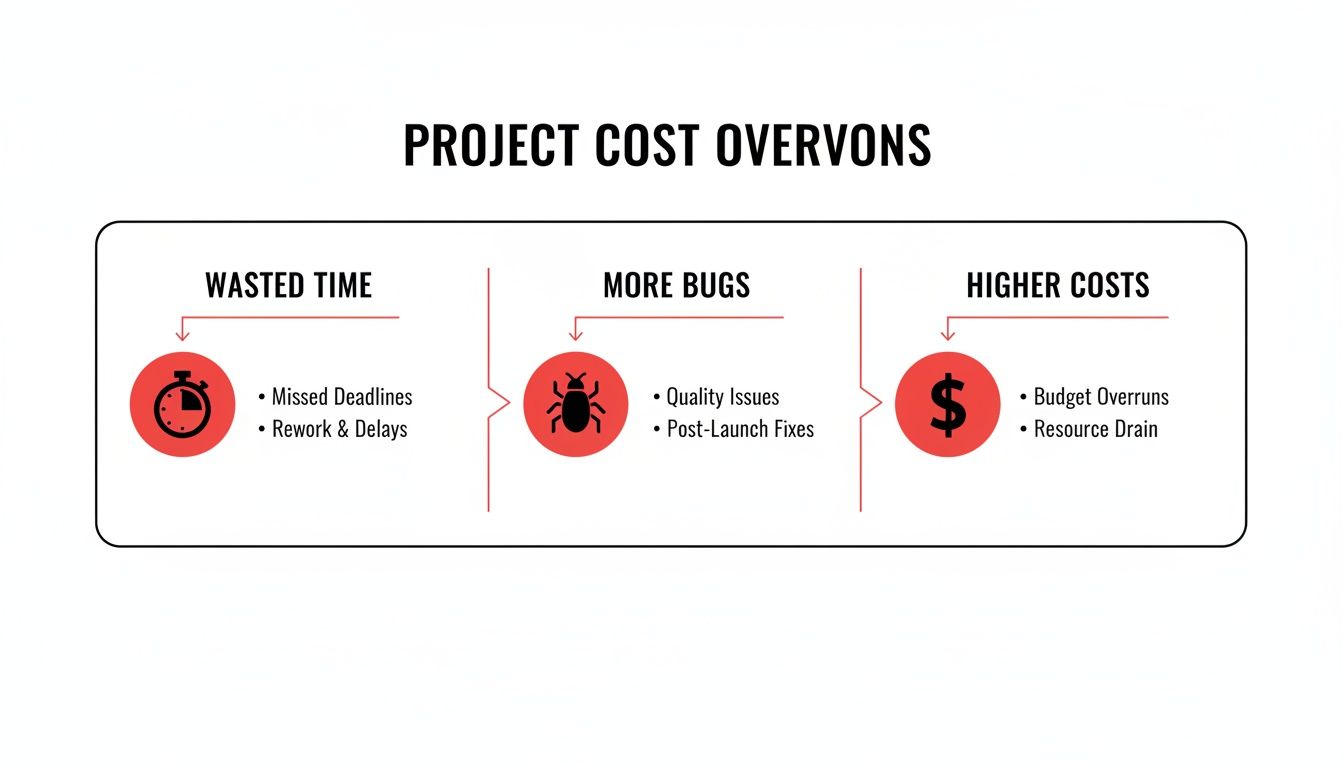
Wasted developer hours, a spike in bugs, and budgets that spiral out of control—these problems often trace back to a few repeat offenders in the codebase.
Let’s break down five of the most common smells you’ll run into. We’ll look at what they are, why they’re such a pain, and show a quick code snippet so you’ll recognize them instantly.
Top 4 Code Smells and Their Symptoms
Before diving deep, this table gives you a quick overview of some of the most frequent offenders and the trouble they cause.
| Code Smell | Primary Symptom | Common Impact |
|---|---|---|
| Long Method | A single function is hundreds of lines long and does multiple, unrelated tasks. | Impossible to test, hard to understand, and a nightmare to debug. |
| Large Class | A class has too many variables and methods, trying to be a “do-it-all” God Object. | Creates tight coupling; changing one thing breaks ten others. |
| Duplicated Code | The same block of logic is copied and pasted in multiple places. | A maintenance trap; fixing a bug in one place means you have to find all the copies. |
| Feature Envy | A method is more interested in another class’s data than its own. | Poor encapsulation; logic is in the wrong place, making the code confusing. |
These are just a handful of the signs that your codebase might need some attention.
1. The Long Method
A Long Method is exactly what it sounds like: a function that has ballooned to an unmanageable size. It’s the coding equivalent of a run-on sentence that just keeps going, trying to do way too much at once.
Why it’s a problem: These monoliths are a nightmare to understand, let alone test or reuse. When one method is juggling a dozen different tasks, fixing a bug in one part can easily break something completely unrelated. They’re bug magnets.
How to spot it: If you have to scroll… and scroll… and scroll to read a single function, you’ve found one. Another dead giveaway is when you feel the need to add comments to break the function into different logical sections.
// Before: One giant method handles validation, saving, and emailing function processUserData(user) { // Section 1: Validate email format if (!user.email.includes(‘@’)) { console.log(“Invalid email”); return; }
// Section 2: Check if password is strong enough if (user.password.length < 8) { console.log(“Password too weak”); return; }
// Section 3: Save user to the database
console.log(Saving ${user.name} to the database...);
// … database logic here …
// Section 4: Send a welcome email
console.log(Sending welcome email to ${user.email}...);
// … email logic here …
}
2. The Large Class
Just like a Long Method, a Large Class has taken on far too many responsibilities. It’s often called a “God Class” because it knows everything and does everything, completely ignoring the Single Responsibility Principle.
Why it’s a problem: These classes weave a tangled web of dependencies. Since so many other parts of the application rely on this one massive class, any small change becomes a high-stakes, risky operation.
How to spot it: Look for classes with a ridiculous number of instance variables and methods. Filenames like MainController, OrderManager, or SuperUtility are often red flags.
3. Duplicated Code
This one is probably the most common and easiest to understand. Duplicated Code is when you see the exact same (or very similar) logic copied and pasted across your codebase.
Why it’s a problem: It’s a maintenance disaster waiting to happen. If you find a bug or need to update the logic, you have to hunt down every single copy. If you miss just one, you’ve introduced a subtle, hard-to-find inconsistency.
How to spot it: The moment you feel the urge to copy and paste a few lines of code, stop. That’s your signal. This smell is so obvious that static analysis tools are fantastic at catching it for you.
4. Feature Envy
Feature Envy is a bit more subtle. It happens when a method seems way more interested in the data of another class than its own. You’ll see it constantly calling getter methods on another object just to do its work.
The method essentially “envies” the other class and wishes it was defined there instead.
Why it’s a problem: This smell tells you that a piece of logic is in the wrong place. The behavior should almost always live in the same class as the data it operates on. Moving it improves encapsulation and makes your code’s structure much clearer.
// Before: The Order class is ‘envious’ of the Customer class’s details. class Customer { constructor(name, address) { this.name = name; this.address = address; } // … other customer methods }
class Order { constructor(customer, items) { this.customer = customer; this.items = items; }
// This method has Feature Envy
getShippingLabel() {
// It’s constantly reaching into the customer object
const name = this.customer.name;
const street = this.customer.address.street;
const city = this.customer.address.city;
return ${name}\n${street}\n${city};
}
}
5. Comments as Deodorant
This might sound weird, but an excessive amount of comments is a classic code smell. Good comments explain why a piece of code exists—maybe to clarify a tricky business rule. Bad comments are just there to explain what a chunk of confusing code does.
Why it’s a problem: The truth is, comments lie. They get out of sync with the code as soon as someone makes a change, leading to major confusion for the next person who comes along. If your code is so complex that it needs a paragraph of explanation, the code itself is the problem.
How to spot it: Watch out for comments that just repeat what the code is doing (e.g., // loop through the items) or entire blocks of “dead code” that have been commented out. That’s what version control is for.
Your Toolkit for Detecting and Fixing Code Smells
Alright, you know what code smells are and you can spot some of the usual suspects. So, what’s next? It’s time to build a solid action plan for sniffing them out and cleaning them up for good.
The best strategy isn’t about choosing between a human touch and a powerful tool—it’s about combining them to create a tough defense against technical debt.
It all starts with a pair of human eyes. Peer code reviews are your secret weapon, especially for catching those subtle, context-heavy smells that automated tools just can’t see. A teammate brings a fresh perspective, asking the “why” behind a design choice or pointing out a section of convoluted logic that seemed perfectly clear when you wrote it.
But let’s be realistic. Relying only on manual reviews is slow and just doesn’t scale. That’s where automated tools step in to become your first line of defense.
Automated Detection: Your First Line of Defense
Automated tools are the tireless sentinels of your codebase. They scan thousands of lines in seconds, never get tired, and apply the same rules consistently, every single time.
You’ll generally rely on two main types of tools:
- Linters: Think of tools like ESLint (for JavaScript) or Pylint (for Python). Their main job is to enforce a consistent style guide and catch the simple stuff, like lines that are too long or variables you forgot to use. They’re fantastic for keeping the codebase looking uniform.
- Static Analysis Platforms: These are the heavy hitters. Platforms like SonarQube or CodeClimate do a much deeper dive into your code without actually running it. They can spot complex structural problems like duplicated logic or high cyclomatic complexity that linters would miss.
Even with these powerful tools, our own biases can get in the way. A fascinating study on developer perception found that even experienced developers only identified 18% of certain complex code smells, even when they agreed the smells were severe. This just goes to show why we can’t rely on gut feelings alone; a combined human-and-tool approach is simply more effective.
Practical Fixes: The Art of Refactoring
Once a tool or a teammate flags a smell, it’s time to refactor. This is the art of restructuring your code to improve it internally without changing what it does on the outside. It’s the cure for the common code smell.
Refactoring is the process of changing a software system in such a way that it does not alter the external behavior of the code yet improves its internal structure. It is a disciplined way to clean up code that minimizes the chances of introducing bugs.
Let’s go back to the five smells we talked about earlier and see how a little refactoring can turn them into clean, easy-to-manage code. For a deeper look, check out our guide on how automatic code review can accelerate this process.
Here are the “after” versions, showing clear improvements.
1. Fixing a Long Method
Instead of one giant function, we’ve broken processUserData into smaller, focused helpers. Now, each piece does exactly one thing, making it a breeze to understand, test, and debug.
// After: Each task has its own function function validateUser(user) { // … validation logic … }
function saveUser(user) { // … database logic … }
function sendWelcomeEmail(user) { // … email logic … }
function processUserData(user) { validateUser(user); saveUser(user); sendWelcomeEmail(user); }
2. Fixing Feature Envy
The fix is simple: move the logic to the class that actually owns the data. We’ve relocated the getShippingLabel method right into the Customer class, which is where it should have been all along.
// After: The method is moved to the Customer class class Customer { constructor(name, address) { this.name = name; this.address = address; }
getShippingLabel() {
return ${this.name}\n${this.address.street}\n${this.address.city};
}
}
class Order { // … the order no longer needs that method }
Building a Culture of Code Quality
Fixing a single code smell is a good start, but it’s just one battle. Winning the war against technical debt requires a bigger, more strategic shift in how your team thinks and works. We’re not talking about a one-off cleanup project; we’re talking about weaving quality into the very fabric of your team’s culture.
The goal is to move from a reactive state of constantly putting out fires to a proactive one where those fires never even start. This happens when code quality becomes everyone’s job—not just a task for a senior dev or a QA engineer. It’s about making clean code the natural, easy choice in your day-to-day workflow.
From Individual Fixes to Team Habits
The best way to manage code quality is to make it a small, consistent part of your daily routine. Waiting for a massive, dedicated “refactoring sprint” is almost always a sign that it’s too little, too late. Small, continuous improvements are what really move the needle.
This is more important than ever now that AI-generated code is part of the mix. AI assistants are incredible for boosting speed, but they can easily introduce subtle and complex smells if left unchecked. A team that values quality knows how to guide these tools to produce clean, maintainable code, not just code that works right now.
Don’t Change Hearts, Change Workflows. Hearts are fickle, CI failures are forever.
This idea gets right to the point. Instead of trying to convince every single person to “care more” about quality, build systems and processes that make doing the right thing the easiest thing.
Using AI to Build a Proactive Culture
The right tools can turn code quality from a vague idea into something you can see and measure every day. This is where AI-powered workflow managers like Zest come in, giving teams the visibility they need to build lasting habits.
Here’s how it works in practice:
- Surface Issues Early: AI hints can flag potential problems as they’re being written, especially in code generated by other AIs. This allows for a quick fix before a smell ever gets committed to the repository.
- Give Managers Visibility: For the first time, engineering leads can get a clear picture of how the team is using AI. AI metrics help track code health over time and pinpoint exactly where the team might need more training or support, turning vague feelings about quality into solid, actionable data.
- Collaborate on Complexity: Team rituals like AI Standups create a space to talk about tricky issues related to code complexity. When the system flags a particularly nasty refactoring challenge, the team can tackle it together.
- Standardize Excellence: This is the game-changer. When a developer finds a prompt that consistently generates clean, elegant code, they can save it as a “cheatcode” for the whole team. This instantly turns one person’s best practice into a shared standard, raising the bar for everyone.
By building these practices into your workflow, you stop just reacting to what is a code smell and start proactively building a codebase that’s an asset. To go deeper on creating effective team processes, check out these code review good practices. This cultural foundation ensures your code can scale right along with your team and your product, without becoming a bottleneck.
Frequently Asked Questions About Code Smells
When you start getting serious about the long-term health of your code, a few common questions always pop up. It’s one thing to know the definition of a code smell, but it’s another to handle them in the real world. Let’s tackle some of the most frequent ones.
Are All Code Smells Bad? Do We Have to Fix Every Single One?
Not at all. Think of a code smell as a yellow flag, not a red card. It’s a signal to take a closer look, but it doesn’t automatically mean something is broken. Context is everything here.
Sometimes, what appears to be a smell is actually a clever, pragmatic solution to a tricky problem. This is especially true in older legacy systems or in performance-critical code where the “clean” way would simply be too slow. The key is to weigh the trade-offs. If a smell makes the code hard to read and future changes feel risky, it’s probably worth refactoring. But if it’s in a stable part of the codebase that nobody ever touches, you might just document it as technical debt and move on. The goal is steady improvement, not absolute perfection.
How Can I Get My Team on Board with Fixing Code Smells?
This is a classic challenge. The trick is to stop talking about technical purity and start talking about business impact. Frame the conversation around things the whole team and management care about: development speed, bug counts, and the cost of maintenance down the line.
Explain that refactoring isn’t just “cleaning up”—it’s a direct investment in your ability to build and ship features faster and with fewer headaches.
The best way to get buy-in is to connect the dots between code quality, team productivity, and a stable product. Show them how tangled code leads to bugs and missed deadlines; don’t just tell them.
A great way to start is by adopting the “boy scout rule”: always leave the code a little cleaner than you found it. You can also use code quality metrics to show how unhealthy patterns are measurably slowing the team down. Hard data makes the problem impossible to ignore.
Can Automated Tools Find All Code Smells for Us?
Nope, and it’s important to understand why. Automated tools are fantastic at what they do. They’ll catch clear-cut, syntactic smells like long methods, copy-pasted code, or functions with way too many parameters. They should absolutely be your first line of defense.
But they can’t catch everything because they lack human context. A linter can’t tell you if a class is doing a job that belongs to another class (Feature Envy) or if an abstraction doesn’t really fit the business problem you’re solving. That kind of insight still requires a human brain. For that, nothing beats a good old-fashioned code review.
The most effective strategy combines automated static analysis with thoughtful peer review. This gives you the best of both worlds—the tireless precision of a machine and the nuanced understanding of an experienced developer.
Master Code Smell Detection
Turn code smell detection into a proactive habit that accelerates development and reduces technical debt.
📊 Core Metrics
- Smells Detected vs. Fixed — The ratio of new issues identified to those refactored per sprint.
- Code Complexity Trend — Is the cognitive load of key modules decreasing over time?
- Time Lost to Rework — Percentage of developer hours spent debugging vs. building new features.
🕹️ My Cheatcodes
- 🌱 Symptom, Not Disease — A smell indicates a deeper structural problem, not just a surface-level bug.
- 🦎 Automate First — Use linters and static analysis as your first line of defense to catch the obvious issues.
- ⚡ Context is King — A smell is a prompt for investigation, not an immediate command to refactor.
✅ Before Merging
- 🔍 Scan for common offenders (Long Method, Duplicated Code).
- 📊 Check if changes increased complexity scores.
- 🧭 Verify code is easier to understand than before.
- 📈 Document any deliberate technical debt.
Gallery
Lemon shots



