
A Clear Unit Testing Definition for Modern Developers

Forget the textbook definitions for a moment. At its heart, unit testing is about one simple thing: proving that a tiny piece of your code works exactly as you expect.
Think of it like quality control for a single LEGO brick. You want to make sure that one specific 2x4 piece is perfectly formed before you start snapping it together with hundreds of others to build your Millennium Falcon. It’s the first, most fundamental step in building software you can trust.
What Is a Unit Test Really?

A unit test focuses on the smallest possible piece of testable code—what we call a “unit.” This is usually a single function, a method within a class, or some other self-contained component.
The real magic, though, is isolation. The goal is to check that this one unit works perfectly on its own, completely disconnected from other parts of your application. That means no database calls, no network requests, and no filesystem reads.
By testing just one thing at a time, you gain incredible precision. If a test for your calculateDiscount() function fails, you know the bug is right there in that function—not lurking somewhere in the payment gateway or the user authentication logic. It’s the difference between using a scalpel and a sledgehammer to find a problem.
What Makes a Good Unit Test?
A passing test is one thing, but a great unit test gives you clear, immediate, and trustworthy feedback. I’ve found that the best tests, the ones that teams actually rely on, all share a few key traits.
A core principle of unit testing is that each test should have a single, clear reason to fail. This makes debugging incredibly efficient because a failing test points directly to a specific broken behavior.
These traits aren’t just academic ideals; they are what make a test suite a reliable safety net, giving you the confidence to refactor code or add new features without breaking what already works.
To help you get started, here’s a quick summary of what every solid unit test should look like.
Characteristics of an Effective Unit Test
| Characteristic | Description |
|---|---|
| Isolated | The test does not rely on external systems like databases, networks, or file systems. |
| Fast | It should run in milliseconds. A full suite of hundreds or thousands of tests should complete in seconds. |
| Repeatable | It produces the same result every time it’s run, without any random or intermittent failures. |
| Self-Contained | The test sets up its own data and does not depend on the state of any other test. |
When your tests consistently hit these four marks, they stop being a chore and start becoming one of your most valuable development tools.
Why Modern Developers Swear by Unit Testing

So, we know what unit testing is. But the real question is, why should you care? It’s easy to see testing as extra work, but experienced developers know it’s one of the best investments you can make for a project’s quality, speed, and your own peace of mind.
Think of your test suite as a digital safety net. It’s what gives you the courage to refactor a messy chunk of code, add a brand-new feature, or update a core dependency without that nagging fear of breaking everything. If a change causes a problem, a test fails instantly, telling you exactly where to look.
This is a game-changer for teamwork. When tests are automatically run as part of a continuous integration workflow, you can catch bugs long before they ever get near production.
Accelerate Development with Rapid Feedback
It’s a common myth that writing tests slows you down. The reality is the exact opposite. Automated unit tests provide feedback in seconds, saving you from the slow, painful cycle of firing up your app and manually clicking around to see if your latest tweak worked.
This fast feedback loop helps you stay in the flow. You can code with confidence, make changes boldly, and iterate much faster because you know the tests are watching your back.
Improve Your Code Design
Here’s a secret: you can’t easily test poorly designed code. The very act of writing a unit test forces you to write better, more modular code. Suddenly, you’re thinking about how to break down complex functions into smaller, single-purpose ones.
Unit testing forces you to think about dependencies, clear inputs, and predictable outputs. This leads to cleaner, more maintainable code architecture by design, not by accident.
It’s a fantastic side effect. The discipline of writing tests naturally guides you toward solid software design principles, making you a better developer in the process.
Create Living Documentation
A good test suite is the best kind of documentation—it’s living documentation. A new developer joining your team (or you, six months from now) can look at a function’s tests and immediately understand what it does, how to use it, and what edge cases it handles.
Unlike a forgotten wiki page, this documentation can’t become stale. If the code’s behavior changes, the old tests will fail, forcing an update. This ensures the documentation always reflects the code as it exists today. It’s a pragmatic and reliable way to keep everyone on the same page.
The Structure of a Perfect Unit Test
So, what makes a unit test good? It’s not just about making sure code doesn’t break. A truly great test is clean, readable, and tells a clear story. To get there, most experienced developers rely on a simple, three-step pattern known as Arrange-Act-Assert (AAA).
Think of it as a recipe for writing tests. Once you get the hang of it, you can quickly understand what any test is doing and write your own with confidence. This isn’t just a stuffy “best practice”—it’s a framework that forces you to focus on testing one single thing at a time.
Arrange: Set the Stage
First, you Arrange. This is all about getting the scene ready for the action. You create any objects, define your inputs, and set up any “mocks” or “stubs” you need to isolate the piece of code you’re actually testing.
Imagine you’re testing a calculateTotal() function in a shopping cart. The Arrange step is where you’d create a list of products, each with a specific price. You’re building a controlled, predictable little world for your test to run in.
Act: Perform the Action
Next, you Act. This part is usually just a single line of code, but it’s the main event. Here, you call the method or function that you’re trying to test, using the setup you created in the Arrange phase.
In our shopping cart example, the Act would simply be calling calculateTotal() and passing it the list of products. The goal is to do one thing and capture what happens.
Assert: Check the Outcome
Finally, you Assert. This is the moment of truth. You take the result from the Act step—the total price, in our case—and check it against the value you know is correct. If the actual result matches your expected result, the test passes. If not, it fails.
A failed assertion isn’t a problem—it’s a signal. It tells you that the code’s behavior has deviated from its specification, giving you a precise starting point for your investigation.
Following our example, you’d assert that the output of calculateTotal() equals the sum you calculated by hand. For a deeper look at this in practice, check out this other example of unit testing. Consistently using the AAA pattern turns every test into a clear, focused story about what one small part of your code is supposed to do.
Finding the Right Tools for the Job
The good news is you don’t have to build a testing system from the ground up. There’s a whole world of frameworks and tools out there designed to make unit testing a natural part of any developer’s workflow, no matter what language you’re coding in.
Think of these frameworks as a complete toolbox. They give you the essentials, like test runners to execute your checks and assertion libraries to verify the results are what you expected. They handle the boilerplate so you can focus on writing good tests. To get a broader view of the landscape, checking out some of the best testing and QA tools can help you find software that fits your team’s specific needs.
Popular Unit Testing Frameworks by Language
Just about every programming language has its own go-to testing framework, so you can always find a tool that feels right at home in your project. These frameworks are purpose-built for their ecosystems, meaning they integrate cleanly and are supported by a huge community of developers.
| Language | Framework | Key Feature |
|---|---|---|
| JavaScript/TypeScript | Jest | Known for its “zero-config” setup and built-in mocking. |
| Python | Pytest | Loved for its simple syntax and powerful fixtures for test setup. |
| Java | JUnit | The long-standing, robust standard in the Java ecosystem. |
| C# | NUnit/xUnit.net | Both offer strong features; choice often comes down to team preference. |
| Ruby | RSpec | Focuses on Behavior-Driven Development (BDD) with readable syntax. |
While this list covers some of the biggest names, nearly every language has a solid option. For instance, if you’re a C# developer, our guide on unit testing in C# dives much deeper into the tools and patterns specific to that environment.
All these frameworks generally follow a simple but powerful pattern for structuring tests: Arrange, Act, Assert (AAA).
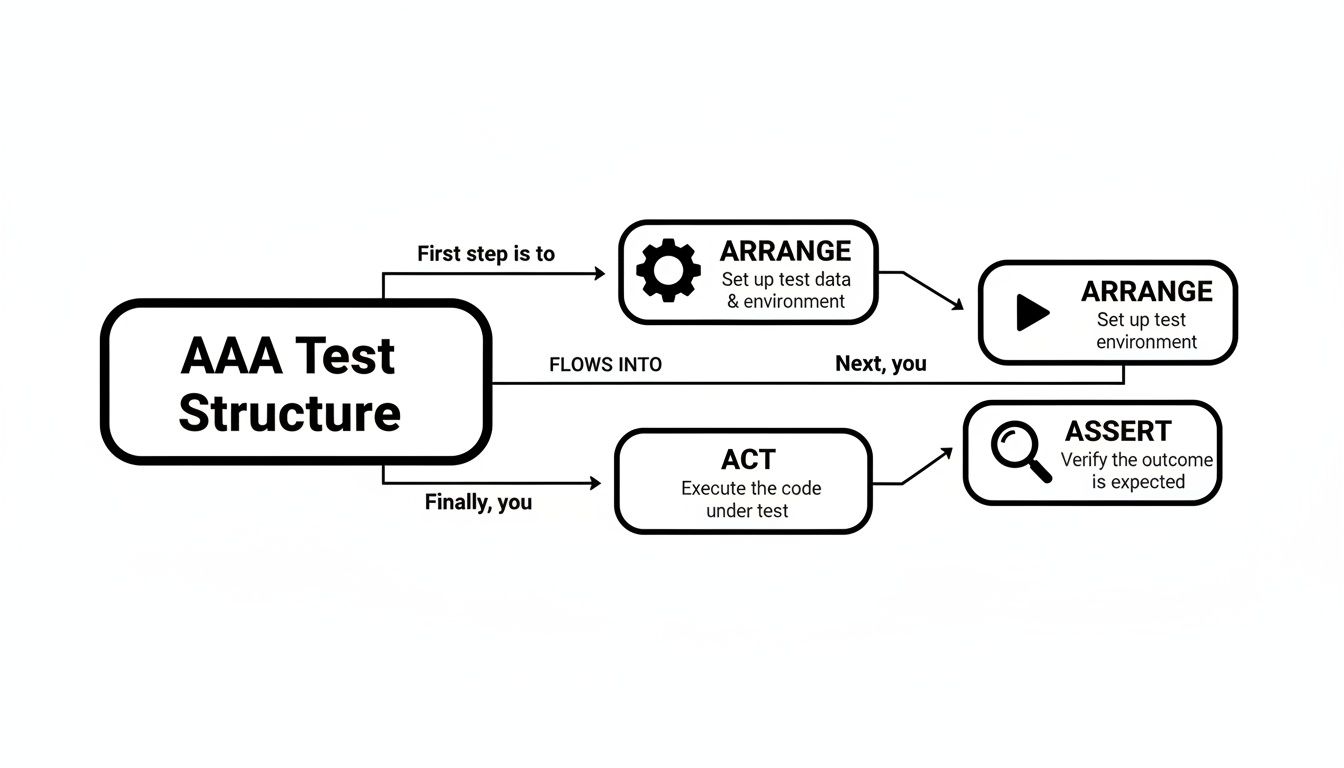
This structure is fantastic because it makes your tests predictable and easy to read. You first Arrange all the necessary preconditions and inputs. Then, you Act by calling the method you want to test. Finally, you Assert that the outcome is what you expected. It’s a clean, logical flow that keeps your tests maintainable.
Ultimately, don’t get hung up on finding the single “best” tool. The right choice is the one that fits your team’s skills, your project’s language, and your overall workflow. With so many great options available, getting started has never been easier.
Unit Testing in the Age of AI Coders

AI coding assistants like GitHub Copilot are incredible tools. They churn out code at a dizzying pace, but that speed comes with a question that keeps many developers up at night: how can you trust code you didn’t personally write? This is where the old-school discipline of unit testing suddenly feels more critical than ever.
Think of it this way: AI helpers are brilliant, but they’re not infallible. They can dream up a perfect function one minute and introduce a sneaky, hard-to-find bug the next. Unit tests are your personal, automated fact-checkers. They give you solid proof that the logic generated by an AI is not just clever, but actually correct.
The big paradox with AI-assisted coding is that it demands more rigorous testing, not less. The faster you can generate code, the more you need that automated safety net to catch mistakes.
This new reality has put a spotlight on building a strong testing culture. In fact, many top engineering teams now track unit test adoption as a key measure of success. When developers are consistently writing tests, it’s a powerful sign of overall software quality and team maturity. You can get a deeper dive into this by exploring what is unit testing and why it’s so fundamental.
Turning AI Speed into a Reliable Advantage
When you get right down to it, unit tests are what make AI’s incredible speed a true asset instead of a gamble. Rather than painstakingly reading every single line of AI-generated code, you can just run your test suite for immediate, trustworthy feedback.
This simple habit ensures every snippet of machine-written code is:
- Validated: It does exactly what you expect it to do.
- Trustworthy: You can merge it into your codebase with confidence.
- Production-Ready: It’s already passed a clear, objective quality check.
By pairing the raw power of AI code generation with the discipline of unit testing, you build a development workflow that’s both incredibly fast and reliably sound. It’s how you build better software, faster.
How to Actually Start Unit Testing
So, where do you go from here? We’ve covered what a unit test is, why it’s a game-changer, and the basic steps to write one. But the most important thing to remember is that unit testing isn’t just another box to check—it’s a professional habit that gives you the confidence to build better, more reliable software. And it all starts with your very first test.
The best way to make this stick is to start small and be consistent. Don’t try to boil the ocean by adding tests to your entire codebase overnight. Instead, find a single, simple function in your current project. Pick one with clear inputs and outputs, and just commit to writing one unit test for it. Today.
That small first step is everything. It takes the mystery out of the process and starts building the muscle memory you need to make testing a natural part of your workflow.
Think of it as a skill that compounds over time. Each test you write makes the next one a little easier. Before you know it, you’ll be a more effective and confident developer, ready to tackle complex bugs and even safely use AI coding assistants. To keep the momentum going, dive deeper with our guide on unit testing best practices.
By writing just one test, you’re not just improving one tiny function; you’re investing in your craft and building a more professional way to develop software.
Common Questions About Unit Testing
If you’re just getting into unit testing, you probably have a few questions. Don’t worry, everyone does. It’s totally normal to hit a few confusing spots when you’re starting out.
Let’s clear up some of the most common questions that trip developers up.
What Is the Difference Between Unit and Integration Testing?
Think of your code like a pile of LEGOs.
A unit test is where you pick up a single, individual brick and make sure it’s perfect—no cracks, no weird shapes, just a solid, reliable piece. In code, this means testing one function or method in total isolation. Any dependencies, like a database or an API call, are faked with “mocks” so you can focus only on that one piece of logic.
An integration test, on the other hand, is about snapping a few of those bricks together. You’re not checking the individual bricks anymore; you’re making sure they connect properly and form the structure you intended. This type of test verifies that different parts of your system—like your application and your database—can actually talk to each other correctly.
You need both. One makes sure the parts are good, and the other makes sure the parts work together.
How Much Code Coverage Should I Aim For?
This is a classic question, and the answer might surprise you: chasing 100% code coverage is almost always a waste of time. While it sounds impressive, it often leads to writing a lot of low-value tests just to bump up a number.
A much healthier and more practical goal is to aim for around 70-80% coverage. The key isn’t the percentage itself, but what that percentage represents. It’s far better to have great tests covering 80% of your critical business logic than it is to have flimsy tests covering 100% of your codebase, including dead-simple functions. Focus on quality, not just quantity.
Can I Write Unit Tests for Existing Legacy Code?
Yes, you can and you absolutely should! But you have to be smart about it. Diving into a tangled legacy codebase and trying to test everything at once is a recipe for frustration. The code is often so tightly connected that it’s nearly impossible to test one thing without pulling in everything else.
So, start small.
The next time you have to fix a bug or add a small feature, write tests for the code you’re about to touch first. This creates a small safety net right where you need it. Over time, this “characterization testing” approach gradually builds up test coverage without a massive, upfront effort.
Should I Test Simple Getters and Setters?
For the most part, no. A good rule of thumb is to test behavior, not just data. If a getter simply returns a value or a setter just assigns one, there’s no real logic or behavior to check. Testing it adds noise without adding any real value.
The exception is when these simple functions have logic hidden inside them. If your setter validates an email format or your getter transforms a date before returning it, then it’s doing more than just moving data around. It contains logic, and that logic should be tested. Save your energy for the parts of your code that actually think and make decisions.
Master the Unit Testing Habit
Turn the professional habit of unit testing into a core part of your daily development workflow for more reliable software.
📊 Core Metrics
- Code Coverage — Percentage of your codebase executed by tests. Aim for 70-80% on critical logic.
- Test Execution Time — A full test suite should run in seconds, not minutes, to maintain a fast feedback loop.
- Bug Regression Rate — Number of old bugs that reappear, indicating weak test coverage for fixes.
🕹️ My Cheatcodes
- 🧱 Isolate Everything — Your unit test should never touch a real database, network, or filesystem.
- 🏗️ Arrange-Act-Assert — Structure every test with this AAA pattern for readability and focus.
- 🤖 Test AI-Generated Code — Use unit tests as the ultimate fact-checker for code written by AI assistants.
✅ Before Merging Code
- 🔍 Run the full test suite.
- 📊 Ensure new features have test coverage.
- 🧭 Confirm tests are fast and repeatable.
- 📈 Verify tests for bug fixes are included.
Gallery
Lemon shots



