
Master Sprint Planning with Jira for Agile Teams

Getting sprint planning right in Jira is what separates the teams that consistently deliver from those who are just constantly busy. When you nail this process, you get everyone on the same page, manage your capacity realistically, and stop shipping surprises. It turns the whole sprint cycle from a chaotic guessing game into a predictable, well-oiled machine.
Building a Foundation for Predictable Sprints in Jira
For too many agile teams, sprint planning feels like a chore. You all jump on a call, stare at a giant backlog, and try to make a two-week commitment with your fingers crossed. It’s a recipe for missed deadlines, burnout, and a plan that unravels by day three.
But it doesn’t have to be that way. When you use Jira as more than just a digital ticket dispenser, it becomes the backbone of a truly predictable process. It can be your team’s single source of truth, connecting high-level goals directly to the individual tasks everyone is working on.
Why a Structured Approach in Jira Matters
Bringing discipline to your sprint planning inside Jira pays off almost immediately. It sparks the right conversations and brings potential roadblocks to the surface long before they can derail a sprint.
Here’s what you stand to gain:
- Real Team Alignment: Everyone gets a crystal-clear understanding of the sprint goal and exactly how their work contributes to it.
- Honest Capacity Planning: Visualizing the workload and leaning on historical data like velocity helps you stop overcommitting and burning out your team.
- Clearer Transparency: Stakeholders can actually see what the team is working on and why certain tasks were prioritized for the sprint.
- Less Scope Creep: When a sprint backlog is set and agreed upon, it’s much easier to fend off those “quick” additions that throw everything off track.
This is what effective planning looks like—a team huddled around a shared plan, aligned on their commitments.

This kind of focused collaboration is the goal. It’s about using the tool to bring the team together.
Moving Beyond Basic Ticketing
Here’s a telling statistic: while 86% of organizations hold sprint planning meetings for every single iteration, a staggering 59% still do their actual planning in spreadsheets. This reveals a huge disconnect. Teams are going through the motions of the ceremony but aren’t using their most powerful tool—Jira—to make it meaningful.
To create a rock-solid foundation for your sprints, it helps to understand the full scope of Project Management in Jira. When you centralize everything from backlog grooming to execution in one place, the work just flows better.
The real aim is to make Jira the central nervous system for your sprints, not just a passive list of tasks. A well-configured project should actively guide your team toward making smart commitments they can actually deliver on.
To bring it all together, here’s a quick look at the core components that make up a strong sprint planning session in Jira.
Core Components of Jira Sprint Planning
These pillars are the essentials. When you get these right, your sprint planning becomes a powerful strategic tool rather than just a meeting.
| Component | Objective | Key Jira Feature |
|---|---|---|
| Well-Groomed Backlog | Have a prioritized list of “ready” user stories with clear acceptance criteria. | Backlog View |
| Clear Sprint Goal | Define a single, measurable outcome for the sprint that provides focus. | Sprint Goal Field |
| Capacity-Based Plan | Commit to a realistic amount of work based on the team’s historical velocity. | Velocity Chart, Reports |
| Task Breakdown & Est. | Break down stories into sub-tasks and estimate the effort for each item. | Story Points, Sub-tasks |
| Team Commitment | Gain verbal buy-in from the entire team that the sprint plan is achievable. | Start Sprint button |
With these elements in place, you’re ready to move from simply tracking work to strategically planning and executing it. The next sections will walk you through how to do just that, starting with the most critical piece of the puzzle: a clean and ready backlog.
How to Refine Your Backlog for Flawless Sprint Planning
A messy backlog is the number one reason sprint planning meetings go off the rails. If your backlog is a chaotic dumping ground for half-formed ideas, your planning session will quickly devolve into a long, painful debate instead of a quick, decisive meeting.
A great sprint plan is built long before anyone walks into the room. It’s the direct result of continuous backlog refinement—what many of us used to call grooming. This isn’t a one-time cleanup; it’s an ongoing process of reviewing, prioritizing, and adding detail to your work items. When you get this right, sprint planning becomes incredibly efficient. When you don’t, you’re setting the team up for confusion and a lack of commitment.

Configuring Your Jira Backlog for Clarity
You can’t organize what you can’t see clearly. Jira’s backlog view is fantastic, but the out-of-the-box settings often need a few tweaks to really work for a busy team.
A simple but powerful change is to customize the issue detail view. By default, it’s cluttered with fields you probably don’t care about during refinement. Hop into your project settings and trim that layout down. All you really need to see are the essentials: Assignee, Story Points, Epic Link, and maybe a custom field like a “Ready” checkbox. This cuts through the noise and keeps the conversation focused.
From there, get smart with Components and Labels.
- Components: Think of these as the big buckets for your product. Grouping issues into components like “User Authentication,” “API,” or “Reporting Dashboard” lets you filter the backlog and focus on one part of the system at a time.
- Labels: These are your flexible, ad-hoc tags. They’re perfect for tracking things that cut across components, like “tech-debt,” “ux-review-needed,” or a temporary tag like “q3-priority.”
Using both gives you some serious filtering power. You can instantly see things like, “all high-priority bugs in the User Authentication component,” which makes the job of prioritization so much easier.
Prioritization Techniques That Actually Work
Once your backlog is clean and organized, it’s time to put things in order. A flat list of tasks just creates decision paralysis. You need a system. Over the years, I’ve found that MoSCoW and stack ranking are two of the most practical methods.
MoSCoW Prioritization (Must-have, Should-have, Could-have, Won’t-have):
This technique forces a conversation about what’s truly essential. By categorizing work, you clarify its importance for the next business goal. I like to use Jira labels for this (e.g., moscow-must, moscow-should), making it obvious which items are non-negotiable for the upcoming sprint.
A well-prioritized backlog doesn’t just guide the next sprint; it communicates the product strategy to the entire team. Every item’s position should tell a story about what the business values right now.
Stack Ranking: This is as simple as it gets, and that’s its superpower. You literally drag and drop issues in the backlog view until the single most important item is at the very top, the second most important is next, and so on down the list. There are no ties. This forces tough, honest decisions and gives the development team a crystal-clear order of operations. The rule is simple: the team pulls from the top.
Defining Your Team’s Definition of Ready
The last piece of the puzzle is agreeing on a “Definition of Ready” (DoR). This is the gatekeeper for your sprint. An item is only “ready” if the team can pull it into a sprint and start working immediately, without needing a follow-up meeting to ask, “So… what does this actually mean?”
Your team’s DoR is a simple checklist that everyone agrees on. It’s a shared understanding of what a “good” user story looks like. A solid DoR usually includes:
- A Clear User Story: The who, what, and why are well-understood.
- Defined Acceptance Criteria: The story lists specific, testable outcomes.
- Team-Based Estimate: The story has been discussed and assigned story points.
- Dependencies Identified: Any blockers or reliance on other tasks is noted.
- UX/Design Attached: All necessary mockups and design files are linked and approved.
When every story at the top of your backlog meets this standard, your sprint planning meetings transform. The conversation shifts from “What is this?” to “Can we commit to this?”—and that’s a much more valuable discussion to have.
Let’s be honest—estimation is often the most dreaded part of sprint planning. It’s where good intentions can quickly sour into arguments over hidden complexities, unspoken assumptions, or just plain old guesswork.
But it doesn’t have to be a battle. When you shift from individuals throwing out numbers to a true group exercise, estimation transforms into one of your most powerful alignment tools. The goal isn’t to land on a single “correct” number. It’s about getting everyone—devs, QA, designers, the product owner—to build a shared picture of what the work actually is. It’s in these conversations that you unearth the nasty surprises one person working alone would almost certainly miss.
Why Story Points Beat Estimating in Hours
For a lot of teams, the first real breakthrough comes when they stop estimating in hours or days. Time-based estimates feel concrete and safe, but they’re incredibly fragile. They just can’t account for the single biggest constant in software development: uncertainty.
An “eight-hour” task can easily blow up into a two-day ordeal because of a cryptic bug or a third-party library that refuses to cooperate. This is exactly why story points are a better fit. They’re an abstract measure of effort that bundles three key factors into one number:
- Complexity: How mentally taxing is this to build?
- Uncertainty: How many unknowns are we dealing with?
- Volume: How much “stuff” is there to do?
Instead of guessing hours, teams use a relative scale (the Fibonacci sequence: 1, 2, 3, 5, 8, 13…) to compare new work to things they’ve already done. A “5-point” story isn’t necessarily twice the work of a “3-point” story; it’s just a gut feeling that it’s significantly more involved. This approach acknowledges that we can’t predict the future, but we can make pretty good judgments based on relative effort.
How to Run Planning Poker in Jira
Planning Poker is hands-down the most popular way to estimate collaboratively. It’s a simple, consensus-driven game that makes sure everyone on the team gets a say. You can run it right inside your Jira environment, with or without a special tool.
With a Dedicated Plugin The easiest way is to grab a Planning Poker app from the Jira Marketplace. These tools plug right into your backlog. During the meeting, you bring up a story, and each team member privately picks a story point value. Then, all the votes are revealed at the same time.
If you see a huge split—say, one person voted 3 and another voted 13—that’s your cue to talk. The people with the high and low estimates share their reasoning, the team discusses, and then you vote again. You just repeat this until the numbers get closer together.
Without a Plugin You absolutely don’t need a plugin to do this. You can run a perfectly good Planning Poker session with a bit of creativity. Just have everyone type their estimate into a private chat message or hold up a numbered card. Reveal them all at once and kick off the same discussion.
Once the team lands on a number, the Scrum Master or Product Owner simply types it into the Story Point field on the Jira issue. Remember, the tool isn’t what matters—the conversation is.
The real magic of Planning Poker isn’t the number you end up with. It’s the rich discussion that happens when estimates are far apart. Those conversations are where you discover hidden risks, dependencies, and brilliant solutions.
It’s surprising how few teams actually do this. Recent research shows only 31% of teams use collaborative techniques like Planning Poker. What’s more, 55% of teams are still estimating work in units of time instead of complexity. This gap helps explain why so many sprint forecasts feel like a shot in the dark—they’re built on shaky ground. If you want to dig deeper into the data, you can explore the full team collaboration research on EasyAgile’s blog. Closing this estimation gap is one of the fastest ways to make your delivery promises more reliable.
Collaborative Jira Estimation Scorecard
Use this to turn estimation from a guessing game into a genuine team alignment exercise.
📊 Core Metrics
- One-and-Done Rate — What percentage of stories do we estimate in a single round of voting?
- Say/Do Ratio — How many story points did we commit to vs. how many did we actually complete?
- Outlier Discussions — Are we stopping to discuss when votes are far apart? Count how many times this happens.
🕹️ My Cheatcodes
- 🌱 Estimate the Fog, Not the Hours — Use story points to capture complexity and uncertainty. It’s about relative effort.
- 🦎 Vote, Talk, Vote Again — Use the Planning Poker cycle to force conversations and find common ground.
- ⚡ Listen to the Outliers — The highest and lowest estimates are gold. They almost always point to something important the rest of the team missed.
📈 Reflection Points
- 💡 Is one person's voice dominating our estimates, or is this truly a group effort?
- 🧩 Are we just trying to agree on a number quickly, or are we digging into the *why* behind the votes?
- 📘 Is our "Definition of Ready" solid enough? Are stories actually clear enough to estimate with confidence?
All that prep work—grooming the backlog, estimating stories—it all comes down to this: the sprint planning meeting. This is where the plan gets real and your team commits. When you run the meeting right inside Jira, it becomes your single source of truth. Everyone is literally on the same page, which keeps the conversation grounded and the decisions transparent.
The whole point isn’t to just stuff the sprint with work. It’s about crafting a realistic plan that the entire team actually believes they can accomplish. If you’re running the meeting, whether as a Scrum Master or a manager, your job is to keep the discussion on track, make sure everyone gets a say, and use Jira to build the plan live as decisions are made.
First Things First: Set the Sprint Goal
Before a single ticket gets pulled into the sprint, the team absolutely must agree on a sprint goal. I’ve seen so many teams rush this or skip it altogether, and it’s a huge mistake. A sprint goal is just a simple, one-sentence summary of what you’re trying to achieve. Think of it as the team’s mission for the next couple of weeks.
A solid sprint goal is:
- Specific and Tangible: “Launch the V1 of the user profile page” is a goal. “Work on user profiles” is just a vague activity.
- Focused on Value: It should articulate a clear benefit for the user or the business, not just be a laundry list of technical tasks.
- Your North Star: When unexpected work inevitably pops up mid-sprint, the team has a simple filter: “Does this help us hit our sprint goal?” If not, it’s much easier to say “not now.”
You can add the sprint goal right in Jira when you create the sprint. Keep it visible. While some recent Jira updates have unfortunately tucked the goal behind a button, many teams I know rely on it for daily focus. As one person on the Atlassian community forums mentioned, “The team checks the sprint goal daily,” which shows just how important it is for alignment. If it’s hidden, you lose that power, so make a point to call it out during standups.
Building Out the Sprint Backlog
With your goal locked in, it’s time to pull in the work. This is where your well-groomed backlog really shines. Starting from the top, the Product Owner should walk through each story, giving a quick refresher on the “what” and the “why.”
The team then decides together if they can commit to it. Since you’ve already estimated the work, there shouldn’t be too many surprises about complexity. As you talk through each item, just drag it from the backlog over to the sprint panel on the right.
This is where Jira gives you that crucial, immediate feedback. As you add stories, you’ll see the story point total at the top of the sprint panel go up. This is your reality check against overcommitting. If your team’s average velocity is 30 points and you’re already looking at 35 points of work, that’s your cue to pause and have a frank discussion about what’s realistic.
This flow—from good prep to collaborative estimation to a solid forecast—is what makes for a smooth planning session.
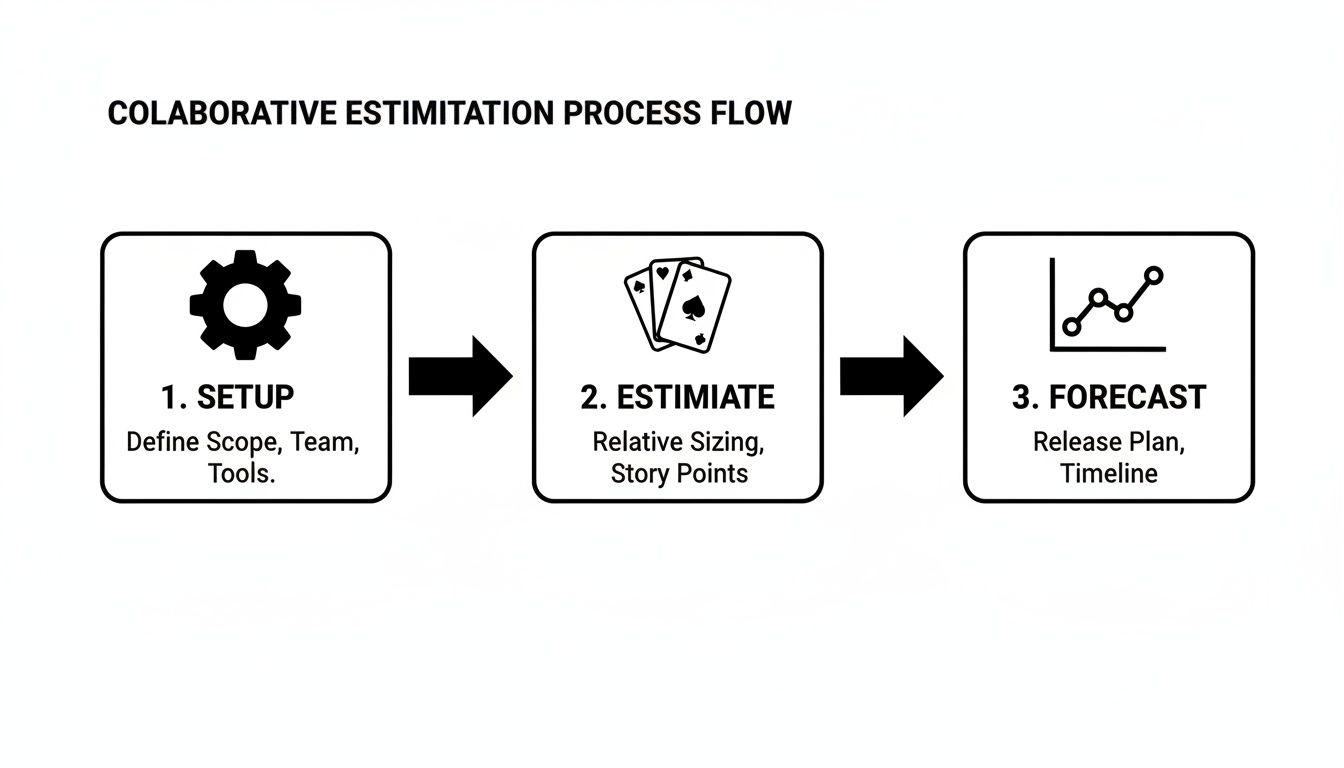
This process really highlights how thinking ahead and estimating as a team leads to a forecast you can actually trust.
Pro-Tip: Don’t let invisible work derail your sprint. You have to account for things like bug fixes, on-call duties, team meetings, and code reviews. Some teams create a specific “Sprint Overhead” ticket with points assigned to it; others just lower their target capacity for the sprint. Whatever you do, don’t ignore it. Pretending that time doesn’t exist is the fastest way to fail a sprint.
Finalizing the Plan and Hitting “Start”
Once the team feels good about the stories and agrees they all support the sprint goal, you’re in the home stretch. Take a final look at the sprint backlog as a whole. Does it feel like a cohesive body of work? Does everyone know where to start?
This is also a great time to make sure your tools are connected and ready to go. If your workflow depends on seeing code changes alongside tickets, for instance, you’ll want to make sure you link GitHub with Jira to keep everything visible in one place.
Before you wrap up, this is the last call for anyone to voice concerns. As the facilitator, you should explicitly ask something like, “Looking at this plan, does everyone feel confident we can achieve our goal and finish this work?” Getting that verbal confirmation from everyone is a powerful way to build shared ownership.
With that final buy-in, it’s time to hit the “Start Sprint” button in Jira. A little box will pop up for you to confirm the sprint name, duration, dates, and the all-important sprint goal. Fill it out, click “Start,” and watch your active sprint board come to life. The meeting’s over, the plan is set—now the real work can begin.
Jira Sprint Planning Scorecard
Turn every sprint planning session into a predictable launchpad for your team's success.
📊 Core Metrics
- Sprint Goal Agreement — A 1-5 team rating on the clarity and achievability of the sprint goal.
- Capacity Utilization — The ratio of committed story points to the team's historical average velocity.
- Plan Finalization Time — Total time spent in the meeting from start to clicking "Start Sprint".
🕹️ My Cheatcodes
- 🌱 Goal Before Scope — Always define and agree on a clear sprint goal before selecting any stories.
- 🦎 Drag, Drop, and Discuss — Use Jira's real-time interface to build the plan visually as a team.
- ⚡ Trust The Velocity — Use the story point total as a data-driven guardrail to prevent overcommitment.
📈 Reflection Points
- 💡 Did we account for non-coding time like meetings, support, and code reviews in our plan?
- 🧩 Does every story pulled into the sprint directly contribute to the sprint goal?
- 📘 Did we explicitly ask for and receive verbal buy-in from every team member on the final plan?
✅ Before Starting the Sprint
- 🔍 Confirm the sprint goal is documented in the Jira sprint details.
- 📊 Verify that committed points are at or below the team's average velocity.
- 🧭 Ensure every story has clear acceptance criteria and an owner.
- 📈 Double-check that the sprint start and end dates are correct.
Integrating AI Workflows to Inform Sprint Planning
Getting sprint planning right in Jira is a huge win. But even the best plans tend to focus on the what and the how much. A truly modern workflow also has to understand the how—as in, how is the work actually getting done? With AI assistants becoming a staple in every developer’s toolkit, there’s a whole new layer of activity that your traditional Jira metrics simply can’t see.
Your sprint plan might look perfect on paper. But if one of your developers spends half a day stuck in a frustrating loop of bad prompts or wrestling with an AI-generated bug, that reality won’t show up in your velocity chart until it’s way too late. This is why you need a feedback loop that connects what happens during execution back to the planning stage. Jira sets the intention, but you need real-time workflow insights to tell you the story of what actually happened.
Creating a Data Feedback Loop for Jira
The trick is to bridge the gap between your planning environment (Jira) and the execution environment where your team is using AI tools. This creates a powerful cycle: you plan in Jira, your team gets to work with their AI assistants, and a tool like Zest captures the nitty-gritty details from those work sessions. That data then flows right back to inform your next round of planning.
Think about this common scenario: a task estimated at 5 story points ends up taking a developer twice as long as anyone expected. In a normal setup, you might not uncover the why until the sprint retrospective. With an AI workflow manager, you can see the data behind the delay almost immediately. Zest can show you that the developer spent hours stuck, trying one prompt after another with their AI assistant to crack a tough problem.
This isn’t about micromanaging; it’s about making hidden roadblocks visible. Once you can see this granular data, you can:
- Refine Future Estimates: The next time a similar-looking task comes up, the team can confidently say, “Hey, that’s more complex than it looks,” and estimate it more accurately.
- Spot Skill Gaps: If a developer consistently struggles with certain kinds of prompts, it’s a clear signal that they might need some training or that the team needs to establish better shared practices.
- Build a Knowledge Base: That one successful prompt that finally solved the problem? You can capture it as a “cheatcode” and share it with the team, preventing anyone else from hitting the same wall.
For a deeper look into building out these capabilities, a resource like an Artificial Intelligence Enablement Playbook can provide some excellent strategic guidance.
From Reactive Adjustments to Proactive Planning
This data-driven approach is what shifts a team from being reactive to proactive. Instead of just course-correcting after a sprint goes off the rails, you’re using hard evidence from AI-assisted work to make smarter commitments from the very beginning.
The goal is to close the gap between the plan in Jira and the reality in the developer’s editor. When you can see how AI tools are impacting focus time, blockers, and overall effort, your capacity planning becomes grounded in data, not just gut feelings.
For example, Zest’s AI Metrics can consolidate every task, tool, and minute into a single, easy-to-read feed. During your next sprint planning meeting, you can pull this up to have a much more informed discussion. You might notice that tasks involving a new, unfamiliar API consistently take 25% longer than estimated, even with AI help. Armed with that knowledge, you can budget extra time for those tasks in the next sprint or decide to dedicate a session to building some reusable prompts for that specific API.
This fusion of Jira for structured planning and execution insights for a real-world gut check is the key to mastering modern sprint planning with Jira. You can explore more about how this works by checking out other AI workflow automation tools that are changing how development teams operate. It’s all about building a smarter, more resilient process where your plans are constantly improved by the reality of how your team builds software.
AI-Powered Jira Planning Scorecard
Use AI-generated execution data to transform your sprint commitments from forecasts to facts.
📊 Core Metrics
- Estimate vs. Actual Focus Time — How does planned effort in story points compare to the actual developer focus time captured?
- Prompt Effectiveness Score — The ratio of successful, code-generating prompts to total prompts used during a task.
- AI-Related Blockers — Number of times developers get stuck for extended periods while using AI assistants.
🕹️ My Cheatcodes
- 🌱 Plan in Jira, Learn in Zest — Use Jira for sprint commitments and Zest to capture the real-world execution data.
- 🦎 Review AI Metrics Pre-Planning — Before the sprint meeting, analyze focus time and blocker data from the previous sprint to inform capacity.
- ⚡ Capture Winning Prompts — Turn effective prompts from difficult tasks into shared “cheatcodes” for the whole team.
📈 Reflection Points
- 💡 Did our story point estimates account for the complexity of AI-assisted tasks?
- 🧩 Where did developers get stuck, and can we create a reusable prompt to prevent it next time?
- 📘 Are we using real data on focus time and blockers to adjust our team’s capacity?
Here’s a look at some of the most common mistakes I’ve seen teams make during Jira sprint planning—and more importantly, how you can sidestep them.
Even the sharpest teams run into trouble. When it comes to sprint planning in Jira, a few common missteps can turn a good plan into a two-week scramble. The good news? I’ve seen these issues derail sprints countless times, and for every problem, there’s a practical fix you can implement right away.
Let’s walk through them.
The Vague Sprint Goal
The biggest red flag for me is a fuzzy sprint goal. I often see teams start with something like, “Work on the new dashboard.” That’s not a goal; it’s a vague direction. It gives the team no real focus, and when surprises pop up mid-sprint (which they always do), it’s impossible to make smart trade-offs.
- How to Fix It: A sprint goal needs to be a short, measurable outcome—not a list of tasks. Before you pull a single issue into the sprint, get everyone to agree on a clear statement. For example: “Launch V1 of the user profile page so customers can update their own contact information.” Put this right into Jira’s sprint goal field. This statement becomes your team’s North Star for the entire iteration.
Unchecked Scope Creep
Scope creep is the quiet killer of sprints. It usually starts small. Someone asks for a “quick little task” on day three. Then another on day five. Before you know it, the team is sidetracked, the original plan is a distant memory, and the sprint goal is at risk.
- How to Fix It: You have to treat the active sprint backlog as a firm commitment. When new requests come in, the default response should be, “Great idea, let’s add it to the product backlog and we can prioritize it for a future sprint.” This isn’t about being rigid—it’s about protecting the team’s focus and honoring the commitment they made. Your backlog is the buffer, not the active sprint.
A sprint isn’t just a container for two weeks of work; it’s a commitment to a specific outcome. Protecting that commitment from mid-sprint changes is crucial for building trust and predictability.
Overlooking the Velocity Chart
So many teams fall into the trap of “optimistic planning.” They commit to a workload based on a gut feeling of what they think they can accomplish. This almost always leads to overcommitment, burnout, and stories rolling over into the next sprint, which just creates a vicious cycle.
- How to Fix It: Look at the data. Your Velocity Chart in Jira is your reality check. It shows you exactly how many story points the team has consistently completed in past sprints. During planning, use this average as your guide. If the team’s average velocity is 30 points, don’t let them pull in 45. Grounding your capacity in real data turns planning from guesswork into a reliable forecast.
Pulling in Oversized Stories
This one is a classic. A team pulls a massive user story or epic into the sprint that has no realistic chance of being finished in time. These “too big to fail” issues are black holes—they hide complexity, introduce risk, and just suck up all the team’s time and energy.
- How to Fix It: Break things down before the sprint starts. A user story should be small enough to go from “To Do” to “Done” in just a few days. During backlog grooming, use Jira’s sub-tasks to split large stories into smaller, more manageable pieces. If you’re looking at a story and can’t figure out how to break it down, that’s a huge sign it’s not well understood and definitely not “Ready” for the sprint.
Jira Sprint Planning Troubleshooting
Use this scorecard to diagnose and fix the common issues that derail even the best-laid sprint plans.
📊 Core Metrics
- Story Rollover Rate — Percentage of committed story points not completed and moved to the next sprint.
- Scope Creep Count — Number of stories added to the sprint after it has officially started.
- Goal-to-Task Alignment — Team vote (1-5) on how well each story in the sprint supports the stated goal.
🕹️ My Cheatcodes
- 🌱 The Goal is the Guardrail — Define a specific, measurable sprint goal before selecting any work.
- 🦎 Trust the Data, Not the Gut — Use the team's historical velocity as the primary guide for capacity.
- ⚡ Break It Down or Push It Out — If a story is too big to complete in a sprint, it's not ready to be pulled in.
📈 Reflection Points
- 💡 Did we protect the sprint backlog from unplanned additions?
- 🧩 Is every story small enough to be completed by one or two people in a few days?
- 📘 Did our sprint goal provide clear direction when priorities were questioned?
Your Jira Sprint Planning Scorecard for Success
At the end of the day, great sprint planning in Jira isn’t about following a rigid script. It’s a skill your team builds together, blending a solid process with the right tools and a real commitment to getting better each time. We’ve gone through the whole process, from wrestling a messy backlog into shape to building a focused, data-driven sprint plan you can actually stand behind.
This kind of structured approach is what finally gets your team out of chaotic planning sessions and into a rhythm of predictable delivery. The trick is to treat Jira as more than just a ticket bucket; it needs to be the living framework for your team’s commitments. When you combine that with insights from a tool like Zest, you create a powerful feedback loop. Each sprint teaches you something that makes the next one smarter.
To help you get there, I’ve put together a simple scorecard. Use it as a quick cheat sheet during your next planning meeting. Focusing on real data, like your team’s historical velocity, keeps the conversation grounded and realistic. You can learn more about how to calculate and use velocity in Scrum to make your forecasts more reliable.
A great plan is about more than just story points. It’s about the whole team believing in the goal and trusting their ability to hit it. This scorecard is your starting point for turning every planning session into a launchpad for a successful sprint.
Master Jira Sprint Planning
Turn every planning session into a launchpad for a successful, predictable sprint.
📊 Core Metrics
- Backlog Readiness Score — % of stories considered for the sprint that are fully groomed and estimated.
- Commitment vs. Velocity — Ratio of committed story points vs. the team's historical average velocity.
- Sprint Goal Clarity — Team's 1-5 rating on how well the sprint's main objective is understood.
🕹️ My Cheatcodes
- 🌱 Groom Before You Plan — Never pull a story into a sprint unless it's 100% 'Ready'.
- 🦎 Estimate as a Team — Use collaborative methods like Planning Poker to uncover hidden work and align.
- ⚡ Goal First, Scope Second — Define a crystal-clear sprint goal before selecting any stories.
✅ Before Starting the Sprint
- 🔍 The sprint goal is published and visible in Jira.
- 📊 Total committed story points are in line with the team's known velocity.
- 🧭 Every story has a clear owner and solid acceptance criteria.
- 📈 The sprint start and end dates are finalized and correct.
Gallery
Lemon shots



