
A Practical Guide to Software Developer Productivity
When we talk about software developer productivity, we’re not just talking about how many lines of code someone writes or how many tickets they close. That’s an old, broken way of thinking. True productivity is about delivering high-quality, impactful work efficiently. The goal is sustainable speed, not a race to burnout.
Redefining How We See Productivity

For far too long, engineering leaders have been stuck trying to measure output without making their teams feel like they’re under a microscope. The classic approach of counting commits or tickets almost always backfires, pushing people toward busywork instead of real progress. To actually get a handle on software developer productivity, we need a much broader perspective.
Think of it this way: a chef’s value isn’t measured by how many onions they chop (lines of code) or how many orders they push out (tickets closed). It’s judged by the quality of the final dish (impactful features), the elegance of their process (workflow), and how happy their customers are (user value).
This shift in thinking moves the focus from raw activity to valuable outcomes. It recognizes that the best developers are often the ones who think deeply, collaborate well, and write clean, maintainable code—things simple metrics will never catch.
To get a complete picture, it helps to break productivity down into a few key areas. It’s not just about speed, but also about the quality and impact of the work being done.
The Four Dimensions of Developer Productivity
| Dimension | What It Measures | Example Metric |
|---|---|---|
| Code Volume & Throughput | The amount of work being completed. | Code Commits, Story Points |
| Code Quality & Impact | The reliability and business value of the work. | Bug Rate, Feature Adoption |
| Efficiency & Flow | How smoothly work moves through the system. | Cycle Time, Pull Request Size |
| Culture & Well-being | The health and satisfaction of the team. | Developer Satisfaction, Team Morale |
Looking at productivity through these four lenses helps us move past simplistic metrics and start seeing the whole system.
The Real Barriers to Flow
The problem usually isn’t that developers are lazy or slow; it’s that their day is a mess of interruptions. Context switching, meetings, and clunky systems constantly pull them out of the “flow state” they need to solve complex problems.
The goal is to build a system where the path of least resistance is also the path of highest impact. This means removing friction, not just measuring activity.
The data backs this up. One survey found that developers spend only 43% of their time actually writing code. The rest is eaten up by meetings, code reviews, and just waiting around. Another study revealed that 38% of developers point to waiting on other people as a major bottleneck.
A Framework for Sustainable Growth
Instead of focusing on individual performance metrics, the best leaders work on improving the entire development environment. They start asking better questions:
- Where are the bottlenecks in our code review process?
- How can we speed up our build and deployment times?
- Are our tools actually helping, or are they just getting in the way?
- How can we use AI to automate the boring stuff and free people up for creative work?
Tackling these system-level problems is what builds a foundation for sustainable speed and keeps your developers happy. It changes the conversation from “Are you working hard enough?” to “How can we make it easier for you to do great work?” For a deeper dive into this approach, check out How to Improve Developer Productivity: A Modern CTO’s Playbook.
This guide will lay the groundwork for a practical framework that boosts focus, eliminates friction, and uses AI to amplify the incredible work your team was hired to do.
How to Measure Productivity Without Harming Morale
Measuring software developer productivity is a delicate dance. Get it wrong, and it feels like surveillance. It breeds resentment and quickly teaches developers to game the system instead of doing their best work. Chasing vanity metrics like lines of code or commit frequency is a race to the bottom, leading to bloated PRs and a flurry of trivial changes instead of thoughtful, high-impact work.
The goal should never be to track every keystroke. It’s about understanding the health and efficiency of your entire development process. Instead of asking, “Is this developer busy?” the real question is, “What’s stopping our team from delivering value smoothly?” This simple shift—from individual monitoring to system-level optimization—is the key to measuring productivity without breaking trust.
This isn’t just about good management; it’s a strategic necessity. The global software market is exploding, projected to jump from $659.01 billion in 2023 to over $898 billion by 2028. At the same time, a serious talent shortage is on the horizon, with an estimated 4 million developer roles expected to go unfilled by 2025. Keeping and empowering the talent you already have isn’t just a nice-to-have; it’s critical for survival.
Moving Beyond Flawed Metrics
Traditional metrics fail because they track activity, not outcomes. They can’t tell the difference between a developer shipping a critical new feature and one who is just refactoring code to bump up their commit count. To get a real sense of productivity, we need to look at frameworks that give us a much more complete picture.
The most effective measurement frameworks focus on team and system performance, shining a light on the bottlenecks that affect everyone. They change the conversation from “who is slow” to “what is slow,” building a culture of collective problem-solving.
Two of the most respected frameworks for this are DORA and SPACE. They offer a balanced view that considers speed, quality, and developer well-being all at once.
DORA Metrics: A Health Check for Your Delivery Pipeline
The DORA (DevOps Research and Assessment) metrics are four key indicators that measure the health of your software delivery process. Think of them as the vital signs for your engineering team.
- Deployment Frequency: How often do you successfully release code to production? A higher frequency usually points to smaller, less risky changes and a more agile workflow.
- Lead Time for Changes: How long does it take for committed code to actually make it into production? A shorter lead time means you’re delivering value to users faster.
- Mean Time to Recovery (MTTR): When a production failure happens, how long does it take to restore service? This is a crucial measure of your system’s stability and resilience.
- Change Failure Rate: What percentage of your deployments result in a production failure? A low rate is a strong signal of high-quality work and a reliable delivery pipeline.
DORA metrics are so powerful because they are team-focused and incredibly hard to game. You can’t fake a better MTTR; you have to genuinely improve your incident response and system architecture.
The SPACE Framework: A Holistic View of Developer Experience
While DORA zeroes in on system output, the SPACE framework gives us a multi-dimensional view of what actually influences productivity. It’s a great reminder that developers are creative professionals, not cogs in a machine.
SPACE is an acronym for:
- Satisfaction and Well-being: Are your developers happy and healthy? This can be measured with surveys and by looking at retention rates.
- Performance: How well do your software and systems actually perform? This covers reliability, the absence of bugs, and overall quality.
- Activity: What are developers actually doing? This includes design work, coding, code reviews, and deployments.
- Communication and Collaboration: How well do people and teams work together? Look at things like the quality of documentation and how quickly new hires get up to speed.
- Efficiency and Flow: Can developers get their work done with minimal friction and interruptions? This is all about their ability to get into a state of deep work and move tasks along without getting stuck.
By blending insights from DORA and SPACE, you can create a comprehensive picture of both system performance and team health. This practical guide to engineering productivity measurement from DeepDocs is a fantastic resource for diving deeper. And for more on this topic, check out our comprehensive guide on developer productivity metrics.
How AI Is Reshaping the Way Developers Work

AI coding assistants have quickly moved from a cool concept to a core part of the modern developer’s toolkit. Tools like GitHub Copilot aren’t just hype; they’re becoming genuine partners in the creative process of building software. This shift is a huge leap forward in the quest for better software developer productivity.
The real magic of these AI partners is their ability to take on the repetitive, predictable, and frankly, boring parts of coding. This frees up a developer’s brainpower to focus on what humans are uniquely good at: designing elegant architecture, solving tricky problems, and creating amazing user experiences.
The New Reality of AI-Assisted Work
Think about it. Instead of losing an hour digging through old documentation or stitching together boilerplate code from a past project, a developer can now get the same result in minutes with a smart prompt. This opens up a massive opportunity for teams to ship faster and spend more time on work that truly matters.
And the data backs this up. A controlled experiment by GitHub found that developers using Copilot finished a coding task an incredible 55% faster than those without it. This isn’t an isolated case. A staggering 72% of software engineers now use generative AI in their day-to-day work, with 23% of them reporting productivity boosts of 50% or more.
This new way of working automates the low-value tasks and supercharges the high-value ones. It’s a powerful multiplier effect on a developer’s time and mental energy.
Where AI Delivers the Biggest Wins
AI assistance really shines when it comes to the recurring activities that have always been major time drains. By offloading these chores, AI tools act as a constant support system, helping developers stay in a state of flow and focus.
Here are a few key areas where AI is making a real difference:
- Writing Boilerplate Code: Instantly generating the basic structure for files, classes, or functions.
- Generating Unit Tests: Creating a whole suite of tests, including edge cases, from a simple request.
- Explaining Complex Code: Translating an unfamiliar or legacy codebase into plain, easy-to-understand English.
- Debugging and Refactoring: Suggesting fixes for bugs or offering cleaner, more efficient ways to structure existing code.
AI doesn’t just write code; it provides context, accelerates learning, and removes the friction that leads to context switching. It acts as a tireless pair programmer that’s always available to help.
The small wins add up fast. Shaving a few minutes off dozens of tasks each day frees up hours of focus time every week, which directly boosts a team’s velocity and keeps morale high. You can dive deeper into how this works in our guide to the intersection of AI and software engineering.
Comparing Common Developer Tasks With and Without AI
To see just how much has changed, it helps to put the old and new ways of working side-by-side. The table below shows the tangible benefits of AI assistance across everyday development activities.
| Task | Traditional Approach (Effort) | AI-Assisted Approach (Effort) | Productivity Gain |
|---|---|---|---|
| Implement a New API Endpoint | Manual setup of controller, service, and validation logic. High cognitive load. | Prompt-driven generation of boilerplate and core logic. Low cognitive load. | High |
| Write Unit Tests for a Function | Manually writing test cases for success, failure, and edge conditions. Time-consuming. | AI generates a full test suite in seconds, which the developer reviews and refines. | Very High |
| Understand Legacy Code | Reading through files, tracing function calls, and documenting logic. Slow and difficult. | AI provides a summary, explains logic, and answers specific questions. Fast and easy. | High |
| Debug a Complex Issue | Setting breakpoints, stepping through code, and analyzing logs. Requires deep focus. | AI analyzes the error and suggests potential causes and fixes. Reduces guesswork. | Medium |
At the end of the day, bringing AI into the development workflow isn’t just about going faster. It’s about creating a more creative, less frustrating, and more productive environment where developers can truly do their best work.
Actionable Strategies to Boost Team Productivity
Knowing your metrics and using AI are great starting points, but real, lasting gains in software developer productivity come from making deliberate changes to how your team actually works. It’s all about creating an environment where developers can do their best work with the least amount of friction.
Frankly, the most powerful changes often have less to do with shiny new tech and more to do with protecting a developer’s most precious resource: their focused time.
Here are three proven strategies your team can start using right away to build a high-performance culture.
Protect Deep Work at All Costs
Deep work—the ability to concentrate on a hard problem without getting sidetracked—is a developer’s superpower. Unfortunately, it’s constantly under attack from a firehose of notifications, context switching, and “quick” meetings.
Protecting this time is the single most effective thing you can do to boost your team’s output. Think about it: a developer pulled out of a complex task can take over 20 minutes just to get back to where they were.
To fight back, the best teams put clear policies in place:
- Create “No Meeting” Blocks: Carve out specific hours or even whole days (like a “Flow Wednesday”) where meetings are simply not allowed. This gives everyone predictable, uninterrupted time for tough problems.
- Go Asynchronous First: Make tools like Slack or Microsoft Teams the default for non-urgent questions. This lets developers respond when they hit a natural pause, not when their focus is broken by a shoulder tap.
- Audit Your Meetings Ruthlessly: Every meeting invite needs a clear agenda and a goal. If it doesn’t have one, it’s completely fair to decline or ask for more details. Push for shorter, more focused discussions.
Optimize the Code Review Process
Code reviews are essential for quality, but they can easily become a major bottleneck. When a pull request just sits there for days, it grinds everything to a halt, forces developers to switch context yet again when feedback finally comes, and is just plain frustrating.
A snappy review process doesn’t just get code shipped faster; it’s a powerful way to share knowledge across the team.
A fast and thorough code review culture is a sign of a healthy engineering team. It signals mutual respect for each other’s time and a shared commitment to quality and velocity.
Try building these habits for a better review cycle:
- Keep Pull Requests Small: It’s so much easier to review a small, focused PR than a massive one. This means faster feedback and less risk tied to a single big change.
- Set Clear Expectations for Review Time: Agree on a team norm for how quickly PRs get reviewed (for example, within 24 hours). This stops work from getting stuck in limbo.
- Automate the Boring Stuff: Use automated tools for linting and style checks. This ends the pointless debates over formatting and lets human reviewers focus on what matters: the logic, the architecture, and potential bugs. These are some of the most common issues in engineering that automation can easily solve.
Invest in Superior Tooling
A developer’s tools are their direct connection to the code. A slow laptop, a flaky test environment, or a long build time aren’t just minor annoyances—they are productivity killers.
Every minute a developer spends waiting is a minute they aren’t creating value. The constant frustration of fighting with bad tools also leads straight to burnout.
Investing in good infrastructure pays for itself almost immediately. I’ve seen teams where a simple laptop upgrade cut build times so much that it saved each developer several hours a week. Across a whole team, that adds up to thousands of hours of productive time reclaimed over a year.
This goes beyond hardware. Giving your team access to premium AI coding assistants, powerful debuggers, and smart workflow managers like Zest helps them work smarter, not harder. When you get rid of frustrating delays and automate tedious tasks, you help developers stay in a state of flow and focus on what they do best.
Scaling Wins From Individuals to the Entire Team
A single developer figuring out a faster way to work is a nice, small victory. But when that discovery gets shared and the whole team starts doing it? That’s when things really change.
The biggest leaps in software developer productivity don’t come from individual heroics. They come from turning one person’s smart idea into the new standard for everyone. It’s about building a system where breakthroughs don’t just stay with the person who had them, but become part of the team’s DNA.
This means creating a shared playbook of what actually works—from the perfect AI prompt for a common bug to a slick debugging shortcut that saves hours of hair-pulling. The real challenge isn’t finding these tricks; it’s getting them out of one person’s head and into the team’s collective toolkit. It’s how you make excellence the default, not the exception.
Creating a Culture of Sharing
So, what’s stopping this from happening naturally? Culture, mostly. Developers are heads-down, focused on their tickets. Stopping to document a new technique feels like a chore that pulls them away from their real work.
To fix this, sharing can’t be an afterthought. It has to be woven right into the daily workflow.
It could be as simple as a dedicated Slack channel like #dev-wins or #ai-prompts-of-the-day. When someone posts, “Just used this prompt to refactor a messy service in 10 minutes,” it’s not just a tip for others. It’s a small celebration that reinforces the act of sharing itself.
Another great play is the informal “demo day” or “brown bag” lunch. These aren’t for stuffy project updates. They’re for showing off a cool trick, a new tool, or a clever solution someone stumbled upon. When it’s peer-led and casual, the information feels more authentic and immediately useful.
The goal is to lower the barrier to sharing so that it feels easier to pass on a good idea than to keep it to yourself. When knowledge flows freely, the entire team gets smarter, faster.
Capturing and Standardizing What Works
While informal chats are a great start, you need a way to make these insights stick around. You have to capture these fleeting moments of brilliance and turn them into a durable, searchable resource. This is where a shared “playbook” or knowledge base comes in.
Don’t think of this as writing massive, boring documents. Think of it as a living library of what works.
- Prompt Libraries: Keep a shared doc or repo of high-performing AI prompts. Group them by task, like “generating unit tests,” “explaining legacy code,” or “optimizing database queries.”
- Workflow Snippets: Use tools that let developers save and share little workflow automations or specific debugging configurations that proved to be a lifesaver.
- “How We Work” Guides: Document your team’s best practices for things like the perfect pull request structure or the steps for spinning up a new service. This gets everyone on the same page, using the most efficient methods.
Tools that give you visibility into how the team actually works are gold here. For example, Zest lets teams capture and share “cheatcodes”—reusable prompts and strategies—directly from real coding sessions. This closes the gap between finding a better way and sharing it, making it dead simple to spread good habits. By seeing the patterns in how your top performers use AI, you can spot what’s working and make it the standard for everyone.
Making Improvement a Team Sport
Ultimately, scaling wins is about moving from a “me” mindset to a “we” mindset. It’s about building an environment where every developer feels responsible for the team’s overall velocity.
Leaders can fuel this by celebrating and rewarding not just individual output, but also the contributions that make the whole team better.
When you create a system where one person’s breakthrough is instantly available to everyone, you kickstart a powerful flywheel. Each small win adds to the collective knowledge, raising the bar for the entire team. This is how you stop being a group with a few high-performers and start becoming a truly high-velocity engineering organization.
Building Your Productivity Flywheel
Boosting software developer productivity isn’t a one-and-done project. It’s a continuous process of learning and refining. The best engineering teams I’ve seen treat it like a flywheel—a self-reinforcing cycle where every small improvement adds momentum for the next one. This model is a simple but powerful way to think about sustainable growth.
The whole idea isn’t to make one massive, disruptive change. Instead, you commit to a rhythm of small, consistent improvements that build on each other. This turns productivity from a vague, hard-to-pin-down goal into a real, repeatable process that everyone on the team can see and contribute to.
The Four Stages of Continuous Improvement
The productivity flywheel has four clear stages, and each one logically feeds into the next. As a team moves through this cycle, it naturally gets faster, smarter, and more efficient.
-
Measure What Matters: You have to start with data. Using balanced frameworks like DORA and SPACE gives you an honest look at where you stand right now. Where are the real bottlenecks? What’s actually slowing people down? This isn’t about judging individual performance; it’s about checking the health of your entire development system.
-
Identify and Remove Friction: Once you have clear metrics, you can zero in on the biggest points of friction in your workflow. Maybe it’s painfully slow build times, a clunky code review process, or just too many meetings killing any chance for deep work. The goal is to find that one thing that, if you fixed it, would make the biggest difference.
-
Introduce and Test Solutions: After you’ve identified a problem, you can bring in a focused solution. This could be anything from adopting a new AI coding assistant, restructuring your team’s calendar to protect focus time, or automating a tedious manual task. The trick is to treat it like a small experiment and measure its impact.
-
Scale What Works: When you find a solution that genuinely works, the final step is to share and scale it across the team. This is where an individual’s “win” becomes a new best practice for everyone. This stage is absolutely critical—it’s how you lock in the gains and use that new energy to power the next turn of the flywheel, starting the cycle over with a better baseline.
This visual shows exactly how an individual success can be scaled up to lift the entire team.
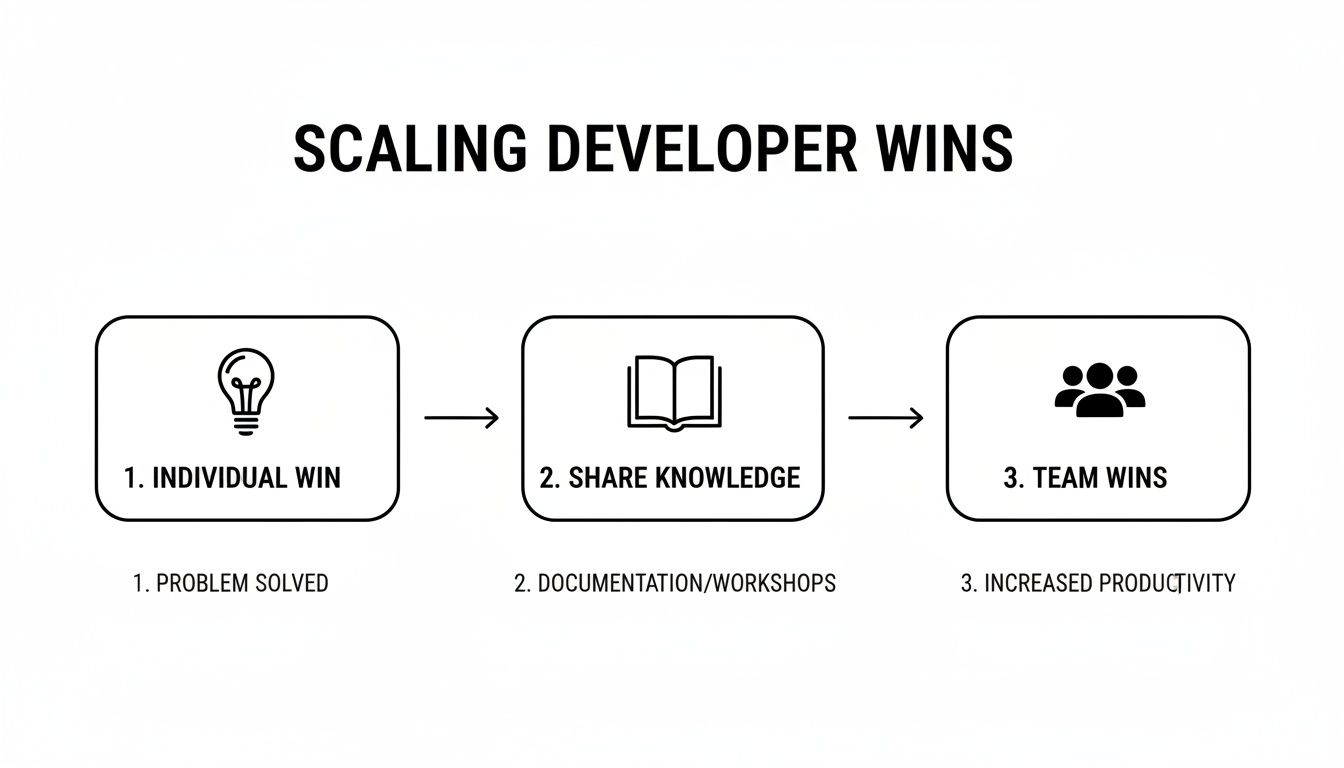
This simple loop—discover, share, and standardize—is the engine that keeps the productivity flywheel spinning.
Starting Your Flywheel
Achieving lasting software developer productivity is a journey, not a destination. The flywheel model gives you both a map and an engine for that journey. It takes the fuzzy idea of “getting better” and turns it into a concrete, actionable loop you can run over and over.
The most important step? Just start. Begin by understanding where you are today, pick one small point of friction to work on, and commit to the cycle. Every little improvement you make adds a bit more energy to the flywheel, making the next turn just a little bit easier and a little bit faster.
Frequently Asked Questions
When you start digging into software developer productivity, a few questions always seem to pop up. Let’s tackle three of the most common ones with some straightforward answers.
How Do You Measure Productivity for Remote Teams?
When your team is remote, the old rules go out the window. Forget tracking online status or counting hours—that’s just a fast track to micromanagement and burnout. The key is to shift your focus from presence to output.
Success hinges on trust and outcome-based metrics that work asynchronously, just like your team. You should actually focus on the same core principles that work for any great team, whether they’re in an office or spread across the globe:
- Throughput: Is work flowing smoothly? Metrics like cycle time are perfect for this. They tell you exactly how long it takes an idea to go from “in progress” to “done,” without ever needing to know where someone was logged in.
- Impact: Is the work actually making a difference? Keep an eye on metrics like feature adoption or how quickly bug reports are declining. This ensures all that effort is creating real value.
- Collaboration Quality: How well is the team communicating? In a remote setting, strong asynchronous communication is gold. Well-documented pull requests, clear comments, and thoughtful design docs are all signs of a healthy, high-functioning team.
Will AI Coding Assistants Replace Software Developers?
Short answer: no. Think of AI coding assistants less as a replacement and more as the ultimate pair programmer. They are incredibly powerful tools for augmenting a developer’s skills, not making them obsolete.
AI is fantastic at handling the tedious, repetitive, and boilerplate code that can bog developers down. By taking over that grunt work, AI frees up engineers to focus on the things humans do best: strategic thinking, architecting complex systems, creative problem-solving, and mentoring others. The future isn’t about human vs. machine; it’s about human creativity supercharged by AI efficiency.
What Is the Biggest Productivity Killer for Dev Teams?
If there’s one villain in the productivity story, it’s context switching. Hands down. Every time a developer gets pulled out of deep focus—whether it’s for an unplanned meeting, a “quick question” on Slack, or a random notification—their momentum just shatters.
It’s not just a minor annoyance. Research shows it can take over 20 minutes to get back into a state of deep concentration after just one interruption. Imagine that happening multiple times a day. The lost time adds up incredibly fast. This is exactly why the best productivity strategies all come back to a single, critical mission: fiercely protecting a developer’s time for uninterrupted deep work.
Your Dev Productivity Scorecard
Apply this framework to move from measuring activity to enabling high-impact, sustainable developer flow.
📊 Core Metrics
- Cycle Time — How long it takes to move work from commit to production.
- Developer Focus Time — Percentage of the day spent in deep, uninterrupted work.
- Friction Points Resolved — Number of systemic bottlenecks (e.g., slow builds) eliminated.
🕹️ My Cheatcodes
- 🌱 Measure Systems, Not People — Use frameworks like DORA & SPACE to find bottlenecks.
- 🦎 Protect Deep Work — Make uninterrupted focus time a non-negotiable team policy.
- ⚡ Scale Individual Wins — Create a process for sharing and standardizing effective habits.
📈 Reflection Points
- 💡 What is the single biggest source of context switching for our team?
- 🧩 Are our code reviews a bottleneck or a knowledge-sharing accelerator?
- 📘 If we could upgrade one tool or process, which would have the greatest impact?
Gallery
Lemon shots



