
A Guide to JavaScript Type Check Methods in 2026

In JavaScript, a javascript type check is simply how you figure out what kind of data you’re working with. Is that variable a string, a number, or something else entirely? Answering this question is crucial for writing stable code, especially in a language that lets variables change their type on the fly.
Why JavaScript Type Checking Matters More Than Ever

Think of it this way: building a complex app without type checking is like trying to assemble a machine with a pile of unlabeled parts. You might accidentally use a bolt where a screw should go, and everything seems fine until the whole thing collapses. That’s JavaScript’s dynamic nature for you—it’s flexible, but it’s also where those tricky, hard-to-find bugs like TypeError: Cannot read properties of undefined love to hide.
The First Line of Defense Against Bugs
A solid javascript type check is your best defense against these kinds of issues. As your projects get bigger and more people join the team, just assuming a variable holds the right type of data becomes a huge gamble. Getting a handle on type validation is the first step toward writing predictable and scalable code. It’s how you guarantee your functions get the data they expect, making your entire application more resilient.
Sticking to consistent type checking gives you a few major wins:
- Fewer Runtime Errors: You can catch a whole class of common bugs before they ever make it to your users.
- Improved Code Readability: When you check a type, you’re also leaving a clue for the next developer. It makes it obvious what kind of data a function is supposed to work with.
- Safer Refactoring: Knowing the data types flowing through your app gives you the confidence to refactor and improve your code without worrying about breaking something unexpectedly.
Building Scalable and Predictable Code
With AI coding assistants and large, distributed teams becoming the norm, writing predictable code is no longer a “nice-to-have.” It’s a necessity. That’s why fundamental tools like typeof and instanceof are skills every JavaScript developer needs to master. They let you build guards and assertions right into your code, enforcing data integrity from the ground up.
As you build more robust applications, it’s also worth considering how other tools interact with your code. For instance, using a JavaScript Obfuscator can make your code harder to reverse-engineer, but rigorous type validation is still key to ensuring it remains debuggable and functions as intended.
Ultimately, mastering type checking isn’t just about making your code work today. It’s about writing code that your team can maintain, scale, and trust for years to come. And if you’re curious about automating these checks, you might be interested in learning what is linter and how it can help.
Using The typeof Operator For Primitive Types

When you’re starting out with type checking in JavaScript, the typeof operator is your first and most basic tool. It’s built right into the language, it’s fast, and for a lot of day-to-day tasks, it gets the job done perfectly. Think of it as your go-to for identifying primitive types.
Using it couldn’t be simpler: just put typeof in front of any variable or value. For most primitives, it gives you a handy lowercase string telling you exactly what you’re looking at.
typeof "Hello, world!"; // "string"
typeof 42;               // "number"
typeof true;             // "boolean"
typeof undefined;        // "undefined"
typeof 123n;             // "bigint"
typeof Symbol("id");     // "symbol"
This makes typeof incredibly useful for simple guard clauses or conditional logic. You can quickly make sure a function argument is a string or a number before you try to operate on it.
Where typeof Shines and Where It Stumbles
Interestingly, typeof also has a special case for functions. Even though functions are technically objects in JavaScript, the operator gives them their own unique category.
typeof function() {}; // "function"
This is the most reliable way to check if a variable is actually a callable function. It’s a great way to avoid those all-too-common TypeError: myVar is not a function errors that can crash your app.
But here’s where things get tricky. typeof comes with some historical baggage—quirks that can, and will, bite you if you’re not aware of them.
The most infamous quirk is that
typeof nullreturns"object". This is a well-known bug from the earliest days of JavaScript that was never fixed to prevent breaking tons of existing code across the web.
Because of this, you should never use typeof to check for null. The only safe and reliable way is a strict equality check: myVariable === null.
The Big ‘Object’ Problem
The other major blind spot for typeof is how it handles almost every other kind of object. Whether you pass it an array, a date, or a custom object you created, it just throws its hands up and calls them all the same thing.
typeof [1, 2, 3]; // "object"
typeof new Date();  // "object"
typeof { a: 1 };  // "object"
This makes typeof pretty much useless when you need to tell the difference between an array and a plain object, which is something you’ll need to do all the time. This is exactly why we need other, more precise methods in our toolbox.
typeof Operator Behavior and Quirks
Here’s a quick reference table that breaks down how typeof behaves with different values, including its famous exceptions. It’s a handy cheat sheet for remembering where it works and where it will lead you astray.
| Value | Result of typeof |
Note |
|---|---|---|
"hello" |
"string" |
Works perfectly for strings. |
100 |
"number" |
Works perfectly for numbers. |
true |
"boolean" |
Works perfectly for booleans. |
undefined |
"undefined" |
Reliably identifies undefined. |
function() {} |
"function" |
The best way to check for a function. |
null |
"object" |
The infamous bug. Never use typeof for null. |
[] (an array) |
"object" |
Cannot distinguish arrays from other objects. |
{} (an object) |
"object" |
The general fallback for non-primitive types. |
new Date() |
"object" |
Also gets lumped in with all other objects. |
So, what’s the bottom line? Use typeof with confidence for primitives (except null) and functions. For anything else, especially when you need to know the specific kind of object you’re dealing with, you’ll need to reach for a different tool.
Navigating Complex Objects With instanceof
While typeof is a decent starting point for primitives, it gets pretty vague with anything more complex. As we saw, it lumps arrays, dates, and plain objects all under the same 'object' label. That’s not very helpful. This is where the instanceof operator comes in, giving us a much sharper tool for a javascript type check.
Think of instanceof as asking an object about its ancestry. It checks if an object was built from a specific blueprint (a constructor). It does this by walking up the object’s prototype chain to see if the constructor’s prototype shows up anywhere in its family tree.
This makes it the perfect tool for telling one kind of object from another.
const today = new Date();
const names = ['Alice', 'Bob'];
const user = { name: 'Charlie' };

console.log(today instanceof Date);   // true
console.log(names instanceof Array);  // true
console.log(user instanceof Object);  // true

// It correctly tells us that `names` is not a Date object.
console.log(names instanceof Date);   // false
Checking Custom Class Instances
The real magic of instanceof happens when you start working with your own custom classes. It’s the go-to method for making sure an object is what you think it is before you try to use its specific features. This is a cornerstone of object-oriented programming in JavaScript.
For instance, if you have a User class, you can use instanceof to safely verify you’re dealing with a User object before calling one of its methods.
class User {
  constructor(name) {
    this.name = name;
  }
  sayHi() {
    console.log(`Hi, I'm ${this.name}`);
  }
}

const user1 = new User('David');
const notAUser = { name: 'Eve' };

console.log(user1 instanceof User);    // true
console.log(notAUser instanceof User); // false
The Limitations and Edge Cases
Now, for the “gotchas.” As useful as instanceof is, it has a couple of significant blind spots. First, it’s completely useless for primitive values. Primitives don’t have a prototype chain, so trying to check a string or a number will always return false.
console.log('hello' instanceof String); // false
console.log(42 instanceof Number);      // false
But there’s a trickier problem you might run into: code that operates across different browser windows or
iframes. Each frame has its own separate world, with its ownArray,Object, and other global constructors. This means an array from one frame won’t be considered aninstanceofArrayin another frame, leading to confusing bugs.
Because of this cross-frame issue, instanceof isn’t always the bulletproof solution for checking built-in types like arrays. For that, we need to reach for an even more reliable method that isn’t fooled by these different JavaScript contexts.
The Most Reliable Check With Object.prototype.toString.call()

So, we’ve seen how both typeof and instanceof can trip you up. You’re probably wondering if there’s any truly bulletproof way to do a javascript type check. Good news: there is. While its name is a total mouthful, Object.prototype.toString.call() is what many seasoned developers consider the gold standard.
At first glance, this technique looks overly complicated and weird. But its power comes from the fact that it completely ignores the constructor and the prototype chain. Instead, it taps into a special, hidden internal property that every JavaScript value has, known as [[Class]].
The Internal [[Class]] Property
Every single object in JavaScript has this internal [[Class]] property, which is just a string identifying what it really is. The only reliable way to get this value is by calling the original Object.prototype.toString method, but forcing it to run on the value you want to inspect using .call().
When you do this, you get a consistently formatted string: "[object Type]", where Type is the precise, unambiguous type of the value.
This one method neatly sidesteps all the issues we ran into earlier. It correctly identifies null, tells the difference between various object types, and isn’t thrown off when working with code from different browser frames.
Let’s see just how effective it is:
Object.prototype.toString.call("hello")returns"[object String]"Object.prototype.toString.call(42)returns"[object Number]"Object.prototype.toString.call(null)returns"[object Null]"Object.prototype.toString.call([1, 2])returns"[object Array]"Object.prototype.toString.call(new Date())returns"[object Date]"
See that? It fixes the infamous typeof null bug and clearly spots arrays, making it far more dependable for a robust javascript type check.
Creating a Reusable Helper Function
Let’s be real, nobody wants to type Object.prototype.toString.call() all over their codebase. It’s just not practical. The common and much cleaner approach is to wrap this logic inside a simple helper function. You’ll find this exact pattern in the source code of many popular JavaScript libraries.
function getType(value) {
  return Object.prototype.toString.call(value).slice(8, -1).toLowerCase();
}

console.log(getType(null));      // "null"
console.log(getType([1, 2, 3])); // "array"
console.log(getType(new Date()));  // "date"
This little utility gives you a clean, lowercase string that tells you the exact type of anything you pass it. It’s the perfect tool for building solid type-guarding logic in your code. This kind of reliability is more important than ever. By 2026, TypeScript’s static type checking has become standard in IDEs like VS Code, with 82% of developers calling it essential for modern AI-integrated workflows. As basic support becomes a given, AI tools like Cursor and Zed are using precise types to offer advanced features, cutting down AI hallucination errors by up to 28% during code generation. You can discover more insights about this trend on the State of JS IDEs report on OpenReplay.
By abstracting away the verbose syntax into a simple
getType()function, you get all the reliability of this method without sacrificing code readability. It’s the best of both worlds.
If you’ve spent any time writing JavaScript, you’ve almost certainly run into this error: TypeError: Cannot read properties of undefined. It’s a classic, and it usually means we’ve failed to properly check for null or undefined values. Getting this right is a huge step toward writing code that doesn’t break in unexpected ways.
Even though null and undefined both represent an “empty” state, they are technically different types. The most direct way to check for them individually is with the strict equality operator (===). This is your best bet when you need to be precise and only catch one of them.
let myVar = null;

if (myVar === null) {
  console.log("This variable is strictly null.");
}

// This block won't run, because myVar is not undefined.
if (myVar === undefined) {
  console.log("This variable is strictly undefined.");
}
This strict check is perfect when your code needs to treat a variable that was intentionally set to null differently from one that was never assigned a value at all.
The Loose Equality Shortcut
But what if you don’t care about the difference? Sometimes, you just want to know if a variable is “nullish”—meaning it’s either null or undefined. For that, you can use a handy shortcut: the loose equality operator (==).
The expression
value == nullreturnstrueonly ifvalueisnullorundefined. It will correctly returnfalsefor other “falsy” values like0,""(an empty string), orfalse.
This little trick saves you from writing if (value === null || value === undefined). It’s a surprisingly safe and clean way to guard against both empty values at once.
function processValue(value) {
  // A simple check for both null and undefined.
  if (value == null) {
    console.log("Value is missing. Skipping.");
    return;
  }

  // If we get here, we know the value is safe to use.
  console.log("Processing value:", value);
}

processValue(null);      // "Value is missing. Skipping."
processValue(undefined); // "Value is missing. Skipping."
processValue(0);         // "Processing value: 0"
processValue("");        // "Processing value: "
Choosing the Right Check
So, which one should you use? It’s pretty straightforward:
- Need to find
nullspecifically? Usevalue === null. - Need to find
undefinedspecifically? Usevalue === undefined. - Need to catch either
nullorundefined? Use thevalue == nullshortcut.
Making a deliberate choice here is what separates fragile code from robust, predictable functions. It’s a habit that works hand-in-hand with good tooling. If you want to get better at spotting these issues as they happen, our guide on debugging with Visual Studio Code is a great place to start.
The Future Is Static Analysis With TypeScript
So far, all the methods we’ve looked at happen at runtime—that is, they check types while your code is actively running. This is essential, but it’s a bit like checking for a leak after the ship has already set sail. What if you could find the holes before you even leave the dock?
That’s the whole idea behind static analysis, and it’s the philosophy that makes TypeScript so powerful.
Instead of waiting for a user to hit a bug, static analysis tools read your code and spot potential problems without ever running it. For any large-scale application, this proactive approach isn’t just a nice-to-have; it’s a complete game-changer. TypeScript is the go-to for bringing this power to JavaScript. If you want to dive deeper into the concept, we have a whole guide on what is static analysis.
Shifting Checks to the Build Step
At its heart, TypeScript is just JavaScript with a powerful type system layered on top. You write your code with type “annotations,” and the TypeScript compiler checks everything for you as you work.
// This function expects a 'person' string and an 'age' number.
function greet(person: string, age: number): string {
  return `Hello, ${person}. You are ${age} years old.`;
}

// TypeScript catches this error immediately in your editor!
// Error: Argument of type 'boolean' is not assignable to parameter of type 'number'.
greet("Alice", true);
See what happened there? The error was caught right in the code editor, probably with a red squiggly line under true. You didn’t have to run the code, open the browser, and trigger the function to find the mistake. When you’re done, TypeScript just compiles it all down to clean, standard JavaScript that runs everywhere.
This isn’t some niche trend, either. It’s become a cornerstone of modern web development. The 2024 Stack Overflow Developer Survey found that over 65% of developers lean on TypeScript for their major projects. That’s a huge shift away from relying only on runtime checks, which internal studies at major tech companies estimate are responsible for up to 15-20% of production bugs in vanilla JavaScript. You can see more on why teams are choosing TypeScript over JavaScript on MarsMatics.
Beyond Just Catching Errors
The real magic of TypeScript goes far beyond a simple javascript type check. Because your code editor (like VS Code) understands the types, it can help you in some incredibly smart ways.
- Intelligent Autocompletion: The editor knows exactly what properties and methods are available on an object, so you can stop guessing and avoid typos.
- Safer Refactoring: Need to rename a function or a property? Your editor can find and update every single use of it across the entire project with near-perfect accuracy.
- Improved Readability: Those type annotations serve as living documentation. It’s instantly clear what kind of data a function needs and what it gives back.
TypeScript doesn’t replace the runtime checks we’ve discussed. Instead, it complements them. Use TypeScript to build a strong, type-safe foundation during development. Then, use runtime checks as your final line of defense for data you can’t trust—like input from an API or a user form.
In the end, adopting TypeScript is about writing code that is more robust, easier to maintain, and a lot less stressful to work with. It gives you the confidence to build complex applications by catching whole categories of bugs before they ever see the light of day. Preparing for a TypeScript-focused role? Be sure to master the Top 10 TypeScript Interview Questions to Master in 2025.
Putting It All Together: Ship Code You Can Trust
At the end of the day, knowing which javascript type check to use is more than just a party trick—it’s what separates a professional developer from a hobbyist. It’s about building code that doesn’t just work on a sunny day but stands strong when things get messy.
Choosing the right tool for the job is everything. typeof is great for quick checks on primitives, instanceof works wonders for your custom objects, and Object.prototype.toString.call() is your secret weapon for when you absolutely, positively need to know the exact type. Nailing this stuff is how you stop bugs before they ever start.
This isn’t just about catching errors. It’s about building a sense of confidence in your own code. When you’re deliberate about type validation, your logic becomes more reliable, and debugging becomes infinitely less painful.
So, when should you rely on JavaScript’s runtime checks versus a more robust, static approach? This decision tree can help clear things up.
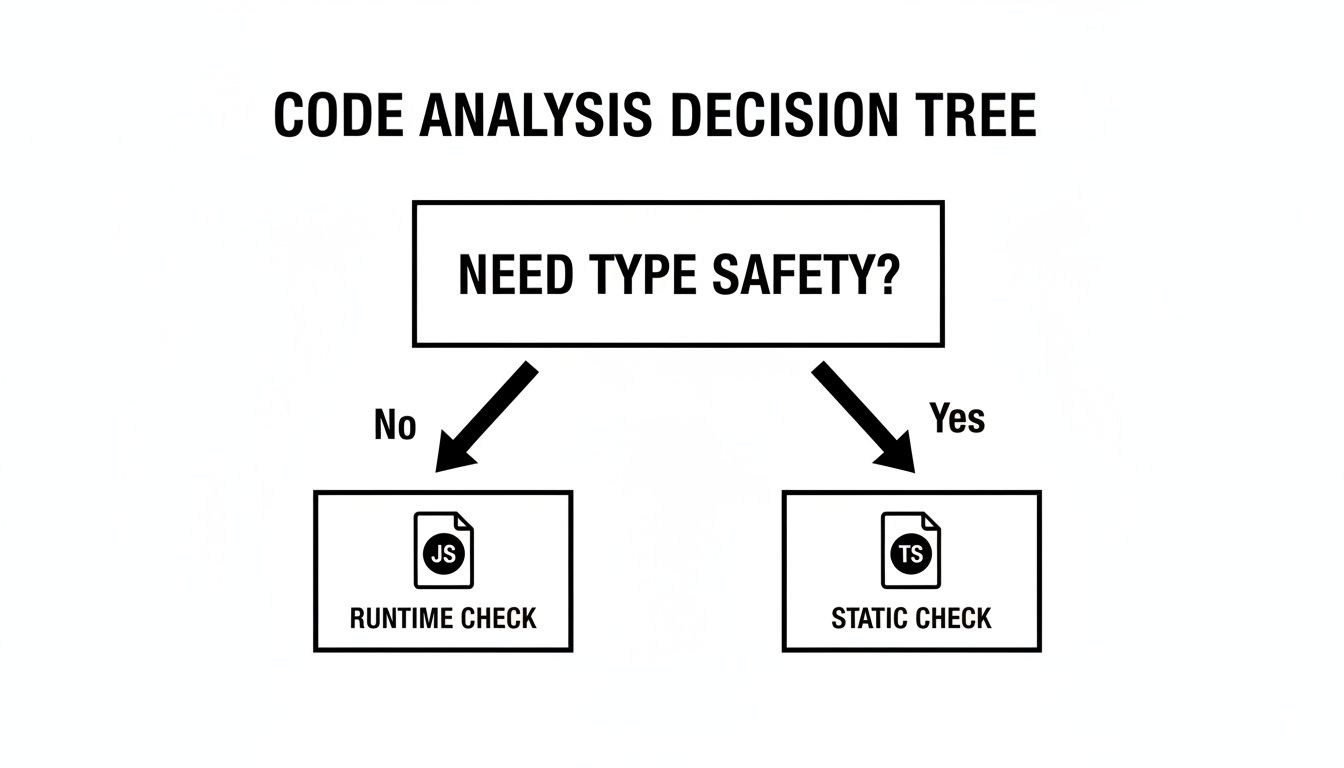
As you can see, if ironclad type safety is what you’re after, TypeScript’s static analysis is the way to go. It checks your work before the code ever runs. This is a big reason why TypeScript skills are in such high demand. If you’re prepping for interviews, you might find this guide on the Top 10 TypeScript Interview Questions to Master in 2025 incredibly useful.
The ecosystem is also making this easier. For example, Node.js’s move in 2025 to natively support TypeScript type stripping was a game-changer. It gets rid of the extra compilation step, slashing workflow friction by up to 50%. This is huge, especially considering that an estimated 22% of unchecked deployments were previously riddled with silent type errors. You can learn more about these TypeScript findings from the 2025 report.
When you master your types, you stop hoping your code works and start knowing it will. That confidence lets you ship features faster and build software that’s truly made to last.
Master JavaScript Type Checks
When you master your types, you stop hoping your code works and start knowing it will.
📊 Core Metrics
- Runtime Errors Prevented — Number of bugs stopped by validating types before operations.
- Code Reliability Score — Confidence that functions won't crash from unexpected input.
- Debugging Time Saved — Hours not spent chasing `undefined is not a function` errors.
🕹️ My Cheatcodes
- 🌱 `typeof` for Primitives — Use for `string`, `number`, `boolean`, `function`. Never for `null`.
- 🦎 `instanceof` for Objects — Perfect for custom classes and standard objects like `Array`, but beware of cross-frame issues.
- ⚡ `Object.prototype.toString.call()` for Truth — The ultimate, most reliable check for any data type, especially `null` and `Array`.
✅ Pre-Ship Checklist
- 🔍 Double-check that `typeof` isn't used to validate `null`.
- 📊 Validate all data from external sources (APIs, user forms) at runtime.
- 🧭 Avoid `instanceof` for code that might run across different browser frames.
- 📈 Wrap `Object.prototype.toString.call()` in a helper function for clean, reusable code.
Gallery
Lemon shots



