
A Guide to Boosting Cursor Developer Productivity
When we talk about cursor developer productivity, we’re looking at something much bigger than just writing code faster. The real goal is to ship high-quality, reliable features more efficiently. It’s about using AI to smooth out the entire development journey, from the first spark of an idea all the way to deployment.
Defining Real Developer Productivity

Saying a tool makes your team “faster” is easy, but what does that actually mean? True productivity isn’t just about cutting down keystrokes or spitting out code snippets in seconds. It’s a much broader measure of your team’s ability to deliver real value, consistently and predictably.
This means we have to stop looking at vanity metrics like lines of code. Instead, we need to focus on outcomes that directly push business goals forward. At its core, ‘cursor developer productivity’ is about improving the entire workflow. Of course, this builds on a strong foundation; you can explore top strategies to master software development to sharpen those core skills.
Moving Beyond Lines of Code
The old-school approach of measuring a developer’s output just doesn’t work anymore. Modern, high-performing teams track metrics that give them a complete picture of their workflow. When you bring an AI-native editor like Cursor into the mix, you need a new way to understand its impact.
This starts with setting clear Key Performance Indicators (KPIs) that capture what it truly means to be productive with an AI assistant. These metrics will be your north star, helping you measure actual improvements and make a solid case for adopting new tools.
Here’s where you should focus your measurement efforts:
- Cycle Time Reduction: How fast does an idea move from a ticket to a merged pull request? Shrinking this cycle time is one of the strongest signs of a more efficient team.
- Pull Request (PR) Throughput: Is your team merging more PRs per sprint without letting quality slip? This points to a real increase in your team’s capacity to ship features.
- Code Quality and Rework: Is the AI-assisted code causing fewer bugs or regressions down the line? Keep an eye on the rate of bug fixes or reverted PRs to see if initial code quality is improving.
The Tangible Impact of AI Agents
The data is starting to show that this new way of working gets real results. Several large-scale studies from mid–2024 to early–2025 have shown major boosts in engineering throughput for teams that adopted Cursor’s coding agent.
For example, a study affiliated with the University of Chicago discovered that teams using Cursor’s agent merged 39% more pull requests (PRs) than similar teams who didn’t. This wasn’t a small-scale test; it was a comparison over the same period, showing a clear performance difference.
Key Takeaway: True cursor developer productivity isn’t about just writing code. It’s measured by how quickly you can ship high-quality software. It’s about removing friction everywhere, from squashing bugs to collaborating on complex new features.
To get a clear picture of Cursor’s impact, teams need to track metrics that reflect the entire development process. The following table breaks down some of the most important ones.
Key Metrics to Track Cursor’s Impact
| Metric | What It Measures | Why It Matters for Productivity |
|---|---|---|
| Cycle Time | The time from first commit to deployment for a single piece of work. | A shorter cycle time means the team is moving faster and delivering value to users sooner. |
| PR Throughput | The number of pull requests merged per developer, per sprint. | An increase here, without a drop in quality, shows the team is handling more work. |
| Code Churn | The percentage of code that is rewritten or deleted shortly after being committed. | Lower churn suggests the initial AI-generated or assisted code is higher quality and needs less rework. |
| Bug Rate | The number of bugs or regressions reported after a release. | This directly measures code quality and the effectiveness of AI in preventing common errors. |
By focusing on these objective measures, you can move past just feeling faster and start using concrete data to prove the value Cursor brings to your engineering organization. A data-driven approach like this is the only way to truly understand and maximize your team’s potential.
Laying the Groundwork: How to Set Up Your Workspace for Measurement
Before you can measure anything meaningful about developer productivity, you have to get your workspace set up to capture the right signals. Think of it like setting up a lab for an experiment—if your instruments aren’t calibrated, your results will be all over the place. A consistent setup across your team is what separates clean, actionable data from just a lot of noise.
The whole point here isn’t to micromanage, but to build a feedback loop. We want to see what’s actually working, moving beyond gut feelings and anecdotes to see the real impact of AI on how we build software.
What Cursor’s Telemetry Tells You
Cursor comes with built-in telemetry that gives you a first glimpse into how your team is using the tool. It won’t tell you the whole story on its own, but it’s an essential starting point for spotting early patterns.
When you dive into the telemetry data, keep an eye out for these signals:
- Agent Request Frequency: Are developers constantly asking the AI for help? High frequency is a good sign of engagement, but we’ll need to connect it to actual outcomes later.
- Code Acceptance Rates: How much of the AI’s suggested code is actually being kept? I’ve noticed senior developers tend to have higher acceptance rates, likely because they’re better at writing effective prompts and judging the output.
- Command Usage: Are people adopting the core features? You want to see if commands like
Cmd+Kfor quick edits orCmd+Ifor chatting with your code are becoming second nature.
This data gives you a baseline. You can see who’s using the tool and how, which sets the stage for a much deeper analysis.
Connecting the Dots with Git
Your version control system is a goldmine of productivity metrics. By weaving your Cursor workflows directly into your team’s Git practices, you can link AI usage to concrete results, like pull requests.
This is where it gets interesting. When you can connect an AI-assisted coding session to a specific commit or PR, you can finally start answering the big questions: Are PRs written with AI getting merged faster? Do they need fewer revisions? This is how you prove the investment is paying off.
Here’s how you can forge that link:
- Standardize Your Commit Messages. A simple convention can make a huge difference. Encourage your team to add a quick note, like “feat: generate user auth module via AI,” for any significant AI-generated changes. This creates a searchable history of AI’s impact.
- Use Cursor to Write Commit Messages. Cursor can generate commit messages for you based on your staged changes—just look for the magic wand icon in the source control panel. It’s a small thing, but it saves time and keeps your Git log clean and descriptive.
- Keep an Eye on PR Lifecycles. The time it takes from the first commit on a branch to the final merge is one of the most powerful indicators of your team’s velocity. This “cycle time” tells you a lot about your overall efficiency.
Smooth Out the Wrinkles with Custom Keybindings
Productivity’s biggest enemy is friction. If using an AI feature feels clumsy or slow, developers simply won’t bother. Setting up custom keybindings for the most common AI actions is a low-effort, high-impact way to make the whole experience feel fluid.
I strongly recommend creating a shared keybindings.json file for your team so everyone is on the same page. Focus on the actions you use dozens of times a day:
- Chat with Selection: Give this a super-easy shortcut. It’s for opening the AI chat with the currently highlighted code as context.
- Inline Edit: A fast keybinding for the
Cmd+Kequivalent makes small refactors feel instant. - Run “Pre-PR” Checks: You can even create a custom shortcut that runs your linters, formatters, and a quick test suite. Then, you can teach developers to ask Cursor to fix any issues before they ever push their code.
By creating this standardized, optimized environment, you’re not just giving your team a better editor. You’re turning it into a fine-tuned instrument for measuring what truly improves cursor developer productivity.
How to Track Your Productivity Gains
Feeling faster is one thing, but proving it is another. To really see how an AI-native editor like Cursor changes your workflow, you need to swap out gut feelings for hard data. This is how you build a real case for your team’s improved cursor developer productivity and show a clear return on the investment.
The first step is setting a baseline. Before you can celebrate any improvements, you need to know exactly how long things took the old way. Think about common tasks: spinning up boilerplate for a new service, writing unit tests for a tricky function, or even just refactoring a piece of legacy code.
Calculating Time Saved Per Task
The most straightforward metric to start with is Time Saved Per Task. It’s a simple but incredibly revealing calculation that answers one critical question: “How much quicker did we get this done with Cursor?”
Here’s a practical way to approach this:
- Pick a common task. Find something your team does all the time, like creating a new API endpoint. This usually involves a predictable mix of boilerplate, logic, and tests.
- Time the old way. Have a developer complete the task without any AI help. Just pure, old-school coding.
- Time it with Cursor. Now, have the same developer (or someone with similar experience) tackle the same task, but this time using all the AI features Cursor offers.
- Do the math. The formula is simple:
(Manual Time - AI-Assisted Time) / Manual Time = % Time Saved.
A task that used to take 15 minutes by hand but now takes just 6 minutes with Cursor is a 60% time saving. Scale that across your entire team and their daily workload, and you start to see some seriously impressive numbers.
Quantifying Stuck Time Reduction
Another huge, but often ignored, productivity killer is “stuck time.” This is the time developers spend wrestling with a bug, trying to understand a new codebase, or just figuring out where to start. Stuck Time Reduction measures how much faster your team can get un-stuck using Cursor’s AI chat. It’s a game-changer.
To capture the data for these metrics, you need to set up your workspace correctly. This diagram shows the three key areas to focus on.
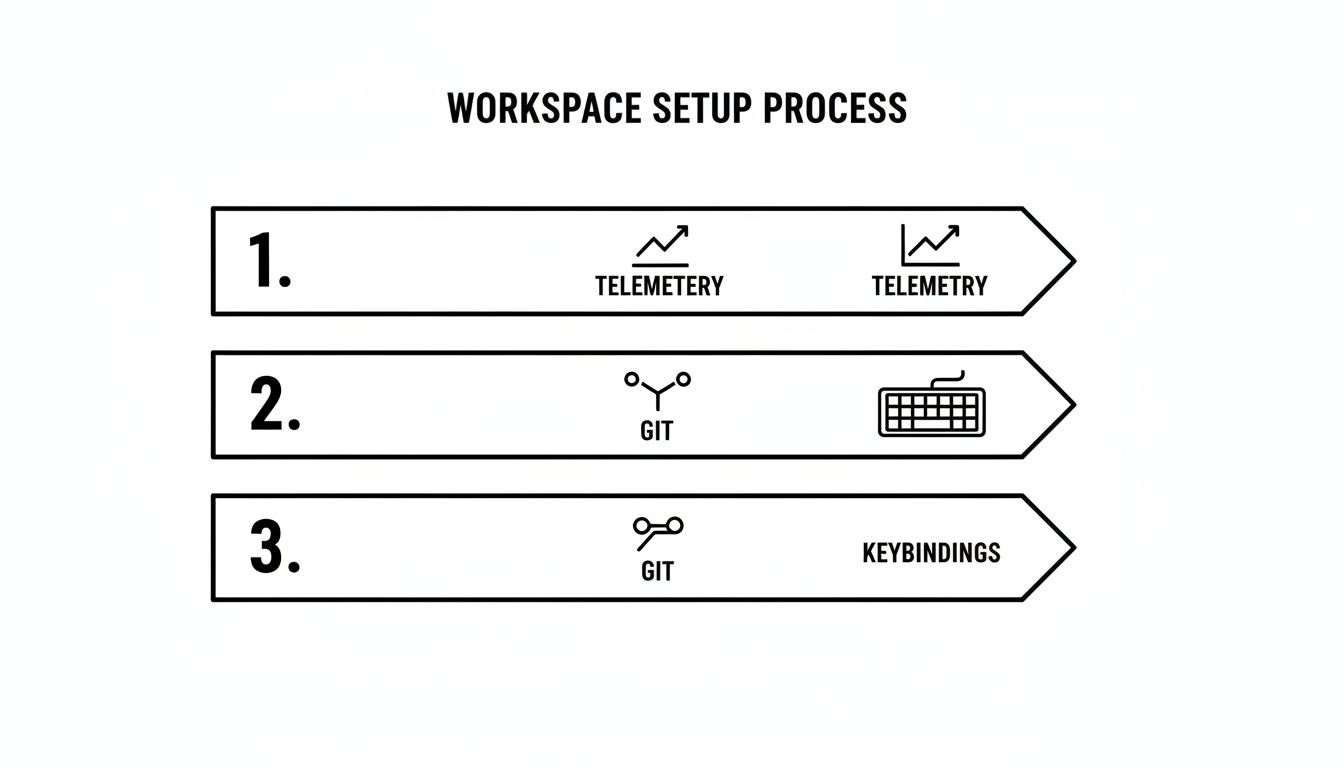
Getting this process right—from enabling telemetry to configuring Git and custom keybindings—is what ensures you’re collecting clean, consistent data. If you’re looking for more inspiration on what to track, this guide on key developer productivity metrics is a great resource.
The data backs this up. Some teams have reported 20–25% time savings on tasks like debugging and refactoring alone. Even more, they’ve seen up to a 40% reduction in context switches after getting comfortable with Cursor. By tracking these numbers for your own team, you can see exactly how these gains apply to your specific projects.
Creating a Shared Library of Team Prompts
An individual developer getting a speed boost from AI is great, but the real magic happens when the entire team levels up together. You get there by moving away from isolated experiments and building a kind of collective intelligence around what works.
The idea is to capture the best prompts and workflows—your team’s internal “cheat codes”—and make them reusable for everyone. Instead of each engineer reinventing the wheel trying to figure out the best way to ask Cursor to do something, they can pull from a library of proven templates. This not only standardizes the quality of AI-assisted work but also flattens the learning curve in a big way.
Building Your Prompt Repository
Don’t overthink this. A shared prompt library can be as simple as a page in whatever you already use for documentation, whether that’s a Notion page or a document in Confluence. The most important thing is that it’s easy to find and dead simple for anyone to contribute to.
Start by asking your team to document the prompts they find themselves using for common, recurring tasks. Good candidates are things like:
- Code Generation: “Generate a Go microservice handler with structured logging and error handling.”
- Test Creation: “Create a comprehensive Jest test suite for this React component, covering props, state changes, and user interactions.”
- Refactoring: “Refactor this Python function to be more idiomatic and add type hints.”
When you build this shared resource, you’re turning individual “aha!” moments into permanent team assets. A new hire can get up to speed almost immediately by tapping into the distilled experience of your senior engineers. It’s one of the most effective knowledge sharing best practices you can implement on a modern engineering team.
A Simple Template for Documenting Prompts
For the library to actually be useful, you need a little bit of structure. If it’s just a messy text file, nobody will use it. Ask your team to follow a basic template for every new entry so each “cheat code” is clear and ready to go.
A good, simple template should have just a few parts:
- Title/Goal: A quick, descriptive name for the task (e.g., “Create Redux Slice”).
- The Prompt: The exact text to copy and paste right into Cursor.
- Required Context: What code or files need to be selected or open for the prompt to do its job (e.g., “Select the entire component file”).
- Example Output: A small code snippet showing what a good result looks like.
- Notes/Tips: Any extra advice that might be helpful, like good follow-up prompts or things to watch out for.
This little bit of structure is what turns a random collection of text into a reliable playbook that actively boosts your team’s collective skill and day-to-day efficiency.
Using AI to Improve Team Collaboration

Boosting cursor developer productivity isn’t an individual sport—it’s a team game. The real magic happens when AI improves not just how one person writes code, but how the entire team communicates, shares knowledge, and stays aligned. Cursor has features that can fundamentally change your team’s collaborative workflows for the better.
Instead of just being another tool in a solo developer’s toolkit, Cursor becomes a shared platform for improving code quality and smoothing out communication bumps. For any team looking to get ahead, understanding how Agentic IDEs like Cursor turbocharge AI engineering is the first step toward unlocking that potential.
Transforming Code Reviews with AI
Let’s be honest: code reviews are critical, but they can also be a massive time sink. They often become a bottleneck, and sometimes, a source of friction between teammates. AI-powered suggestions in Cursor can turn this entire process from a chore into a constructive, objective learning opportunity.
When the feedback comes from an AI, it strips away the personal element that can make critiques feel subjective. It’s just a tool pointing out potential bugs, suggesting performance tweaks, or enforcing style guidelines with perfect consistency, every single time.
This approach brings some huge wins:
- Objective Feedback: The AI looks only at the code, offering suggestions based on established patterns and best practices. It’s a great way to sidestep personal bias.
- Faster Turnaround: Human reviewers can skip the nitpicking over style, syntax, and common errors. They get to focus on the high-level logic and architecture, which is where their expertise is most valuable.
- Built-in Mentorship: Junior developers get instant, clear feedback right inside their editor. This helps them learn the team’s standards and best practices in real time, not days later in a PR comment.
Streamlining Daily Standups
Daily standups are supposed to keep everyone aligned, but they can easily devolve into repetitive, inefficient status reports. AI-generated summaries can make these check-ins faster, more focused, and a whole lot more useful.
By tapping into your team’s commit history and task management tools, Cursor can help pull together quick summaries of what each person knocked out, what they’re tackling next, and where they might be getting stuck.
This simple change shifts the conversation from, “What did you do yesterday?” to “How can we solve this blocker together?” You reclaim valuable time and keep the team’s momentum high by focusing on active problem-solving.
Of course, adopting any new tool has a learning curve. A small randomized controlled trial actually found that developers new to AI tools sometimes took 19% longer to finish tasks. The key finding, though, was that this effect vanished with experience. One participant with over 50 hours in Cursor saw real speed improvements, which just goes to show how important practice is. Sharing knowledge and supporting each other during the initial adoption phase is crucial.
Ultimately, by letting AI handle routine communication and feedback, you free up your team’s brainpower to focus on the complex, creative challenges that actually move the needle on your projects.
Boost Team Productivity with AI
Use Cursor's collaborative features to turn individual gains into shared team momentum.
📊 Core Metrics
- PR Review Time — The average time from when a pull request is created to when it gets merged.
- Feedback Objectivity Score — A qualitative check on how constructive and helpful the team finds AI-driven review comments.
- Standup Efficiency — The reduction in time spent on daily status updates.
🕹️ My Cheatcodes
- 🌱 Automate Reviews First — Let the AI handle the first pass on linting, style checks, and common patterns before a human even looks at it.
- 🦎 Summarize Progress Daily — Generate AI standup notes straight from commit history to keep the conversation focused on blockers.
- ⚡ Standardize Feedback — Create shared prompts that enforce your team's specific coding standards during AI-assisted reviews.
📈 Reflection Points
- 💡 Is AI feedback genuinely helping our junior developers level up faster?
- 🧩 Are our standups more focused on solving problems instead of just reporting status?
- 📘 Have we properly accounted for the initial learning curve as we roll out these tools?
How to Roll Out Cursor Across Your Team
Getting an entire engineering team to actually use a new tool is never as simple as sending out a memo. Real adoption doesn’t come from a top-down mandate; it builds from genuine momentum. When it comes to rolling out Cursor, the trick is to start small and let the success stories do the talking for you. This is all about showing, not just telling, people how it improves cursor developer productivity.
Trying to force a new editor on everyone at once is a recipe for failure. A much better approach is to kick things off with a small pilot group of enthusiastic early adopters. Think of these folks as your “champions.” They’ll be your pathfinders, helping you smooth out the onboarding process and figuring out which workflows deliver the biggest impact for your specific tech stack.
Launch a Pilot Program
Don’t just pick names out of a hat for your pilot group. Hand-select a few developers from different teams—people you know are generally open to trying new things. Their mission is simple: use Cursor as their main editor for a sprint or two and take notes on their experience. What worked? What didn’t? What was surprisingly useful?
This strategy gives you a few major advantages right off the bat:
- Early Wins: Your champions will be the source of your first success stories. Hearing a senior engineer rave about cutting their debugging time in half is far more persuasive than any official email.
- A Real Feedback Loop: This group will inevitably find friction points you never thought of. That feedback is gold, allowing you to refine your onboarding guides before everyone else sees them.
- Custom Playbooks: They’ll naturally start discovering the best prompts and techniques for your codebase, which becomes the foundation for your team’s shared prompt library.
Create Simple, Relevant Onboarding
Once the pilot wraps up, use the feedback to build onboarding materials that are genuinely helpful. Forget the generic, out-of-the-box tutorials. You need to focus on what matters to your team.
A great starting point is a simple one-page guide. It should cover the basic setup, a few essential keybindings, and maybe three to five “must-try” prompts for your main programming language.
The goal isn’t to create an exhaustive manual. It’s to give new users an immediate “aha!” moment. Show them how to generate a unit test for a familiar component or refactor a common utility function. Quick, tangible wins are what drive adoption.
To keep the energy going, set up a dedicated Slack or Teams channel. This becomes the go-to spot for people to ask questions, share cool prompts they’ve discovered, and celebrate small wins. It turns the rollout from a formal, rigid process into something collaborative and organic. By making it easy for everyone to learn and share, you’ll naturally discover how to use Cursor effectively as a team.
When you run into the inevitable skeptics, let the data do the heavy lifting. Pointing to a 39% increase in merged pull requests from your pilot team is hard to argue with. It provides concrete proof that Cursor isn’t just another shiny new toy—it’s a tool that genuinely boosts productivity. This data-driven approach shifts the conversation from subjective opinions to measurable outcomes.
Scaling Your Cursor Adoption: A Quick Playbook
Implement a phased rollout that builds on early wins and peer-to-peer knowledge sharing.
Key Metrics to Watch
- Adoption Rate: What percentage of the engineering team is actively using Cursor on a weekly basis?
- Time to “Aha!”: How long does it take, on average, for a new user to share a big productivity win?
- Skeptic Conversion: How many of the initial naysayers have become active, positive users?
My Go-To Cheatcodes
- 🌱 Champion-Led Pilots: Start with a small, keen group to work out the kinks and generate authentic success stories.
- 🦎 Show, Don’t Tell: Use real productivity data from your pilot (like increased PR throughput) to make your case.
- ⚡ One-Page Onboarding: Create a super simple, stack-specific guide with quick wins to get people started fast.
Pre-Launch Checklist
- [ ] Identify and recruit champions for the pilot program.
- [ ] Collect baseline productivity metrics for a before-and-after comparison.
- [ ] Create a dedicated Slack/Teams channel for questions and prompt sharing.
- [ ] Draft a simple onboarding doc based on what you learned from the pilot.
Common Questions We Get About Cursor Productivity
When engineering leaders start thinking about bringing in AI tools like Cursor, the same handful of questions always pop up. It’s completely understandable. These are the big, important concerns, and getting them right is key to making any new tool a success. Let’s tackle them head-on.
What About Our Data and Code Security?
This is, without a doubt, the number one question we hear. “Is our proprietary code being shipped off to some third-party server?” The short answer is: it doesn’t have to be.
Cursor is built with this concern in mind. You have options, like self-hosting models or using their enterprise features, which are designed to keep your codebase locked down. The critical step for any team is to dig into the specific privacy policies and pick a setup that matches your company’s security posture.
How Do We Handle AI Code That Lacks Business Context?
This is a classic problem. An AI can generate perfectly valid code that completely misses the point because it doesn’t understand the years of business logic baked into your application. We’ve seen this happen a lot.
The trick is to shift the developer’s mindset. They aren’t just writing code anymore; they’re reviewing and directing.
We tell our teams to treat AI-generated code like a suggestion from a brilliant, lightning-fast junior dev who just joined the team yesterday. It’s a fantastic starting point, but it absolutely needs the review, testing, and refinement of a senior engineer who holds all the context.
This way, you get the raw speed of the AI without losing the irreplaceable knowledge your team has built over time.
Are We Trading Code Quality for Speed?
The fear that a flood of AI-generated code will tank quality and pile up technical debt is very real. But it’s not a given. In fact, if you’re intentional about it, Cursor can actually become a tool for improving code quality.
Here’s how we make sure quality stays front and center:
- Proactive Refactoring: Don’t just use it for new features. Point Cursor at existing code to spot and fix code smells, add missing type hints, or even suggest performance tweaks.
- Pair AI Logic with AI Tests: Make it a team rule. If you use the AI to write a piece of logic, you must also use it to generate a solid set of tests to go with it.
- Embed Standards into Prompts: Build your team’s coding standards and best practices directly into a shared library of prompts. This guides the AI to produce code that’s already aligned with your conventions from the get-go.
By making these practices part of your workflow, you’re not just moving faster. You’re systematically raising the bar for quality across your entire codebase.
Ready to see how this works in the real world? Zest gives you the visibility to track these improvements, share what’s working, and build a smarter, faster development process for your entire team. Turn your AI experiments into measurable wins. Learn more about how Zest can help.
How to Actually Measure Cursor Productivity Gains
Transform your team’s anecdotal “this feels faster” into hard data that proves the impact.
📊 The Core Metrics to Track
- Time Saved Per Task: What’s the percentage drop in time it takes to do common tasks like writing boilerplate, generating unit tests, or drafting a new API endpoint?
- “Stuck Time” Reduction: How much less time are developers spending stuck on a gnarly bug or a complex algorithm now that they have an AI to brainstorm with?
- AI Code Quality Score: This is a custom metric you can build. It could be based on how many revisions a PR needs or the bug rate for commits that were heavily AI-assisted.
🕹️ My Go-To Cheatcodes
- 🌱 Benchmark Everything First: Before you even start, time how long a few common tasks take the old-fashioned way. You need that “before” snapshot to see the “after” in a meaningful way.
- 🦎 Standardize Your Prompts: A shared, curated library of prompts is non-negotiable. It’s the difference between getting random, inconsistent output and reliable, high-quality code.
- ⚡ Trust, but Verify with Tests: The golden rule. Every piece of AI-generated logic must be backed by AI-generated tests. This keeps quality high and builds confidence.
📈 Questions for Your Next Retro
- 💡 Are we treating AI code like a first draft that needs review, or are we just blindly accepting it?
- 🧩 Do our cycle time metrics show a clear drop since we started using Cursor? If not, why?
- 📘 Is our shared prompt library actually getting used and updated by the team, or is it collecting dust?
Boost Your Cursor Developer Productivity
Turn your team's AI experiments into measurable wins by focusing on outcomes, not just output.
📊 Core Metrics
- Cycle Time Reduction — Measure the speed from first commit to deployment to see true velocity gains.
- PR Throughput — Track the number of pull requests merged per sprint without a dip in quality.
- Stuck Time Reduction — Quantify how quickly developers solve bugs and navigate new codebases with AI chat.
🕹️ My Cheatcodes
- 🌱 Benchmark First — Always measure task completion time without AI before introducing it to prove the value.
- 🦎 Shared Prompt Library — Turn individual "aha!" moments into reusable team assets for consistent, high-quality output.
- ⚡ Trust, but Verify — Mandate that AI-generated logic must be paired with AI-generated tests to maintain code quality.
📈 Reflection Points
- 💡 Are we treating AI code as a first draft or blindly accepting its suggestions?
- 🧩 How are we handling AI suggestions that lack crucial business context?
- 📘 Is our pilot program generating authentic success stories to drive wider team adoption?
Gallery
Lemon shots



