
12 Best Cursor Alternatives for AI-Powered Coding in 2025

Cursor pioneered the concept of an AI-native code editor, but the field has expanded dramatically.Cursor pioneered the concept of an AI-native code editor, but the field has expanded dramatically. Developers now need more than just smart autocompletion; they require intelligent workflows, deep project context, and tools that truly adapt to their coding style. The search is on for a genuine AI coding partner, not just a smarter editor. This shift has led to a surge in powerful new tools, each offering a unique approach to AI-assisted development.
This guide provides a comprehensive breakdown of the 12 best Cursor alternatives available today. We cut through the marketing noise to give you a clear, practical analysis of what each tool actually does. Whether you’re looking for a full-featured, standalone IDE like Windsurf, a powerful set of VS Code extensions, or a self-hosted solution for maximum control, you’ll find it here. To broaden the understanding of this landscape, developers can explore essential AI development tools that are increasingly vital for agencies building mobile apps.
Our goal is to help you find the right fit for your specific needs, whether you’re an individual developer, an engineering manager, or a CTO. For each alternative, we provide a concise overview, key features, honest pros and cons, pricing details, and a “best for” recommendation. We also include direct links and screenshots to help you evaluate each option quickly. By the end of this list, you’ll have a clear path to choosing an AI partner that enhances your productivity and streamlines your development process.
1. Windsurf (Codeium’s agentic IDE)
Windsurf, from the creators of Codeium, presents itself as a powerful, agentic IDE designed to feel familiar to VS Code users while offering advanced AI capabilities. It focuses on speed and deep context, providing rapid inline “Tab” autocompletions and sophisticated chat functionalities that can handle multi-file edits. This makes it a strong contender for developers looking for one of the best cursor alternatives that integrates AI deeply into the coding workflow without a steep learning curve.
What truly sets Windsurf apart is its flexible model access and agentic “Cascade” workflows. Users aren’t locked into a single ecosystem; they can leverage Windsurf’s proprietary models (like SWE-1.5) or switch to major providers like OpenAI or Anthropic. Its prompt-credit system allows you to mix and match models based on task complexity, optimizing for both performance and cost.
Key Features & Pricing
- Agentic Workflows: Utilizes a “Cascade” system and prompt credits for complex, multi-step coding tasks.
- Hybrid Model Access: Use Windsurf’s own models or tap into top-tier frontier models from other providers.
- Team Management: Enterprise tiers offer robust admin controls, usage analytics, SSO/RBAC, and centralized billing.
- Deployment Options: Higher tiers support hybrid and self-hosted deployments for enhanced security and control.
Windsurf offers a generous Pro tier at $15/month per user, which is notably lower than many competitors. However, the credit-based system means heavy users might need to purchase additional prompt credits. Enterprise features require direct sales contact for custom pricing.
Best For: Teams and individual developers who want a fast, VS Code-like experience with the flexibility to choose different AI models for different tasks, balancing cost and power effectively.
2. GitHub Copilot
As one of the most widely adopted AI assistants, GitHub Copilot integrates directly into the developer’s existing environment, including VS Code, JetBrains, and even the terminal. It provides robust inline completions, an interactive chat, and agentic capabilities for complex tasks. This deep integration and broad support make it an excellent and one of the best cursor alternatives for developers who prefer to enhance their current IDE rather than switch to a new one.

What sets GitHub Copilot apart is its seamless connection to the entire GitHub ecosystem and its straightforward, per-seat pricing model. It’s designed for easy adoption within organizations already using GitHub, simplifying procurement and management. For those seeking a deeper understanding of its capabilities and how it compares to other tools, you can learn more about GitHub Copilot and its alternatives. Paid tiers expand its power by offering access to more advanced models from OpenAI, Anthropic, and Google.
Key Features & Pricing
- Broad IDE Support: Works across VS Code, JetBrains IDEs, Visual Studio, Vim/Neovim, and terminals.
- Multi-Model Access: Paid plans provide access to premier models like the GPT-4 family, Claude, and Gemini.
- Enterprise Integration: Simplifies procurement and management for organizations already invested in the GitHub platform.
- Comprehensive Tooling: Includes inline completions, chat, an agent for multi-step tasks, and integrated code review features.
GitHub Copilot offers a Free tier for verified students, teachers, and maintainers of popular open-source projects. The Copilot Individual plan is $10/month, while the Copilot Business plan is $19/user/month, with Enterprise options available for custom pricing.
Best For: Developers and organizations deeply integrated with the GitHub ecosystem who need a powerful, widely supported AI assistant that works within their existing IDEs and workflows.
Visit GitHub Copilot’s Website
3. Amazon Q Developer (AWS)
Amazon Q Developer, the evolution of AWS CodeWhisperer, is a powerful agentic assistant designed to integrate deeply into a developer’s existing toolchain. It works across VS Code, JetBrains IDEs, Visual Studio, the command line, and directly within AWS consoles. This makes it a compelling choice for developers searching for one of the best cursor alternatives, particularly those already invested in the AWS ecosystem. It provides code suggestions, chat, security scans, and reference tracking.

What distinguishes Amazon Q is its profound understanding of AWS services. The assistant can provide guidance on AWS resources, troubleshoot issues, and even help with agentic workflows like upgrading application runtimes or implementing new features that leverage specific AWS APIs. With robust SSO and governance controls for enterprise teams, it bridges the gap between individual productivity and organizational oversight. For a deeper look at its capabilities, you can learn more about its place among the best AI for writing code.
Key Features & Pricing
- Agentic Workflows: AI-powered agents can help with tasks like code upgrades, debugging, and feature implementation with AWS context.
- Deep AWS Integration: Get expert guidance on AWS services, APIs, and best practices directly in your IDE.
- Multi-IDE Support: Seamlessly integrates with VS Code, JetBrains, Visual Studio, and command-line interfaces.
- Enterprise Governance: Pro tier includes SSO integration and centralized policy management for team-wide control.
Amazon Q Developer offers a perpetual Free tier for individuals. The Pro tier is priced at a simple $19/month per user, providing advanced capabilities and centralized management features for organizations.
Best For: Development teams and companies heavily reliant on the AWS cloud who need an AI assistant with deep, contextual knowledge of the AWS ecosystem and strong enterprise governance.
Visit Amazon Q Developer’s Website
4. Google Gemini Code Assist
Google Gemini Code Assist brings Google’s powerful foundation models directly into VS Code and JetBrains IDEs. It provides core AI functionalities like code completion, chat, and smart actions such as generating documentation or explaining code. As a VS Code extension, it presents a compelling alternative for developers seeking a free, high-capacity coding assistant without needing to switch editors entirely, making it a noteworthy consideration among the best cursor alternatives.
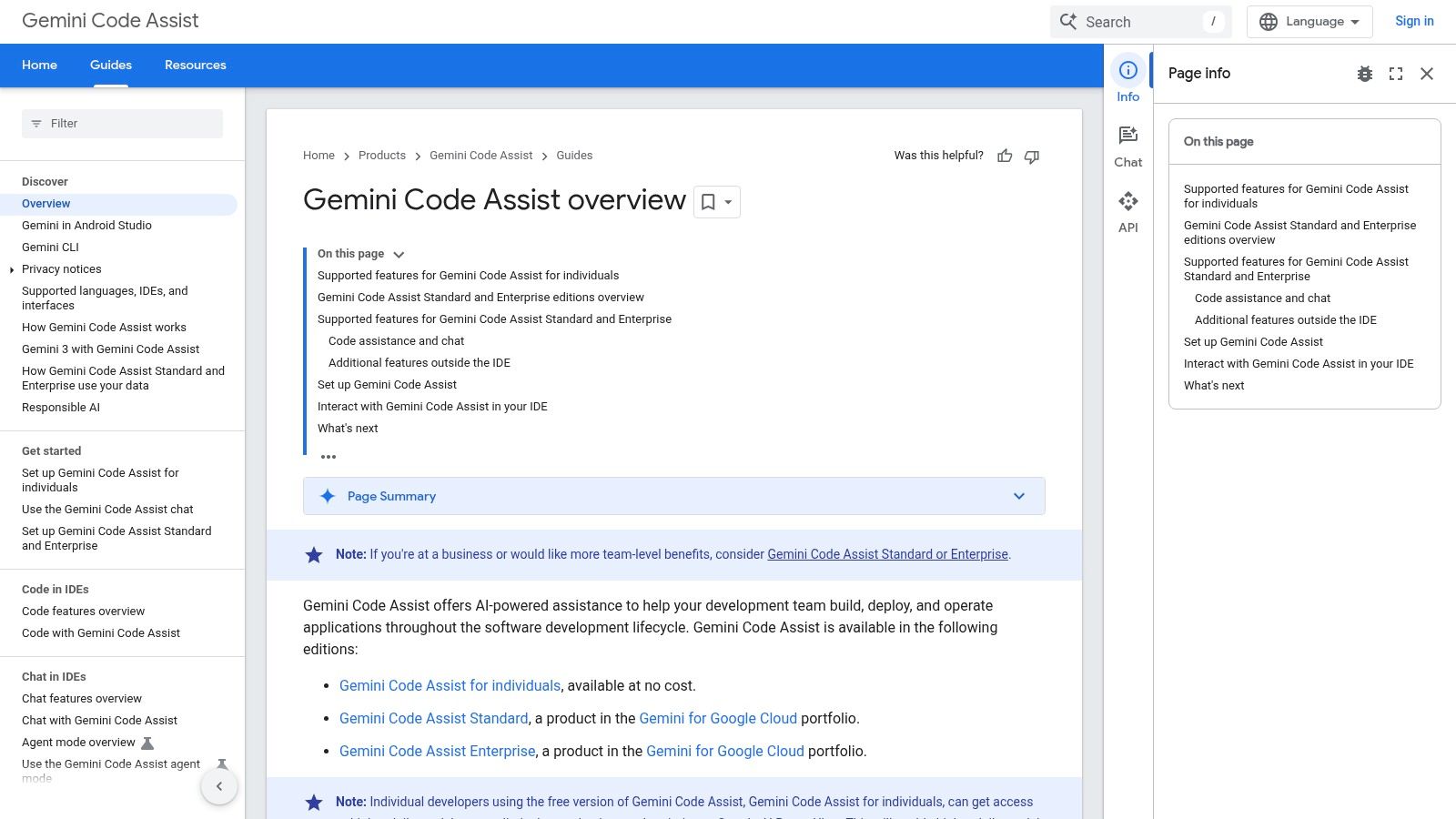
What makes Gemini Code Assist stand out is its incredibly generous free tier for individual developers, which offers a high daily request limit without any cost. This is a significant advantage over competitors that often have stricter limitations. For teams, especially those embedded in the Google Cloud ecosystem, it offers a seamless upgrade path to enterprise-grade features, though the licensing can become more complex as it’s managed through Google Cloud projects.
Key Features & Pricing
- Generous Free Tier: High daily request limits for individual users at no cost.
- Core AI Features: Includes code completion, chat, code transformations, and diff views.
- IDE Integration: Works as an extension within existing VS Code and JetBrains environments.
- Google Cloud Integration: Enterprise plans are managed via Google Cloud, offering tight integration with its services.
The individual plan is free and provides substantial usage quotas. Enterprise pricing is managed through Google Cloud, where you enable the API and are billed per active user per month, requiring a more involved setup compared to simple subscription models.
Best For: Individual developers looking for a powerful and free AI coding assistant, and for enterprise teams already invested in the Google Cloud platform who can benefit from its integrated management and security.
Visit Google Gemini Code Assist’s Website
5. Codeium
Codeium stands out as one of the best cursor alternatives by offering a powerful, Copilot-style experience with a major distinction: it’s entirely free for individual developers. It provides unlimited AI code completion and an in-IDE chat assistant that integrates directly into a vast range of editors, including VS Code, JetBrains, and more. This focus on accessibility makes it an excellent starting point for developers who want robust AI assistance without an immediate financial commitment.
While the free tier is its main draw, Codeium also provides a clear upgrade path for professional teams. The paid plans introduce essential organizational features like administrative controls, usage analytics, and enhanced security options. As the technology that powers the more advanced Windsurf IDE, Codeium’s core models are proven to be fast and effective for everyday coding tasks, from boilerplate generation to complex function creation.
Key Features & Pricing
- Unlimited Autocomplete: The free individual plan offers unlimited code completions and chat usage.
- Wide IDE Support: Extensive integrations across VS Code, JetBrains IDEs, Visual Studio, and even Jupyter notebooks.
- Team & Enterprise Tiers: Paid plans add SSO, RBAC, and analytics for professional team management.
- Self-Hosted Options: Enterprise users can opt for self-hosted or VPC deployments for maximum data privacy.
Codeium’s Individuals plan is $0, providing exceptional value. The Teams plan starts at $12/user/month (billed annually), adding team-centric features. Enterprise pricing is customized and requires sales contact.
Best For: Individual developers seeking a powerful and completely free AI coding assistant, and for teams looking to pilot an AI tool across their organization before committing to a paid plan.
6. Sourcegraph Amp
Sourcegraph Amp emerges as the company’s next-generation agentic coding tool, evolving from its predecessor, Cody. It is engineered for larger teams, leveraging Sourcegraph’s renowned code search capabilities to provide deep, repository-wide context. Amp focuses on sophisticated, multi-step agentic workflows that can tackle complex coding challenges, making it a compelling option for enterprises looking for one of the best cursor alternatives that scales.

What distinguishes Amp is its pay-as-you-go credit model, particularly for non-enterprise users, who get access to prepaid credits at cost with no markup. This transparent approach avoids flat per-seat fees, offering a potentially more cost-effective solution for teams with variable usage. For large organizations, the Enterprise tier provides critical features like SSO and a zero LLM retention policy, ensuring data security and compliance.
Key Features & Pricing
- Agentic Workflows: Designed for complex, multi-step tasks tailored for enterprise-scale development.
- Deep Code Context: Integrates directly with Sourcegraph’s powerful code search engine for repository-aware assistance.
- Pay-as-you-go Credits: Non-enterprise users can purchase prepaid credits at cost, paying only for what they use.
- Enterprise Security: Higher tiers offer SSO integration and a commitment to zero LLM data retention for enhanced privacy.
The pricing model centers on these prepaid credits rather than a simple monthly subscription, which can be a shift for teams accustomed to flat fees. While this offers flexibility, it’s important to note that the free tiers previously available with Cody have been phased out in this transition.
Best For: Large engineering organizations and enterprises that need a secure, scalable AI coding assistant with deep integration into their existing codebase and transparent, usage-based pricing.
Visit Sourcegraph Amp’s Website
7. Tabnine
Tabnine positions itself as an enterprise-grade AI coding assistant, focusing heavily on security, compliance, and flexible deployment. While it offers powerful code completions and chat functions across a wide range of IDEs, its main appeal lies in its robust governance features. This makes it a compelling choice for organizations seeking one of the best cursor alternatives that can be deployed on-premises or in a VPC and tailored to strict corporate policies.

What truly distinguishes Tabnine is its commitment to enterprise control and analytics. It supports multi-LLM environments, allowing companies to use models from OpenAI, Google, Anthropic, or even their own privately hosted LLMs. With comprehensive compliance certifications like SOC 2 and ISO 27001, plus detailed usage analytics, Tabnine provides the oversight and security that large, regulated teams require from their development tools.
Key Features & Pricing
- Multi-LLM & BYO-Model: Supports various public models and allows connection to a company’s own fine-tuned LLMs.
- Secure Deployment: Offers on-premises and Virtual Private Cloud (VPC) deployment for maximum data control.
- Agentic Tools: Provides agents for test generation, code reviews, and integrations with systems like Jira.
- Compliance & Analytics: Features SOC 2 and ISO 27001 certifications, alongside robust usage dashboards for managers.
Tabnine has a free Basic plan and a Pro plan at $12/month per user. However, its core strengths are in the Enterprise tier, which requires contacting sales for custom pricing and unlocks features like self-hosting and advanced security.
Best For: Large enterprises and regulated industries that prioritize security, compliance, and the ability to self-host or use their own AI models within a governed environment.
8. Supermaven
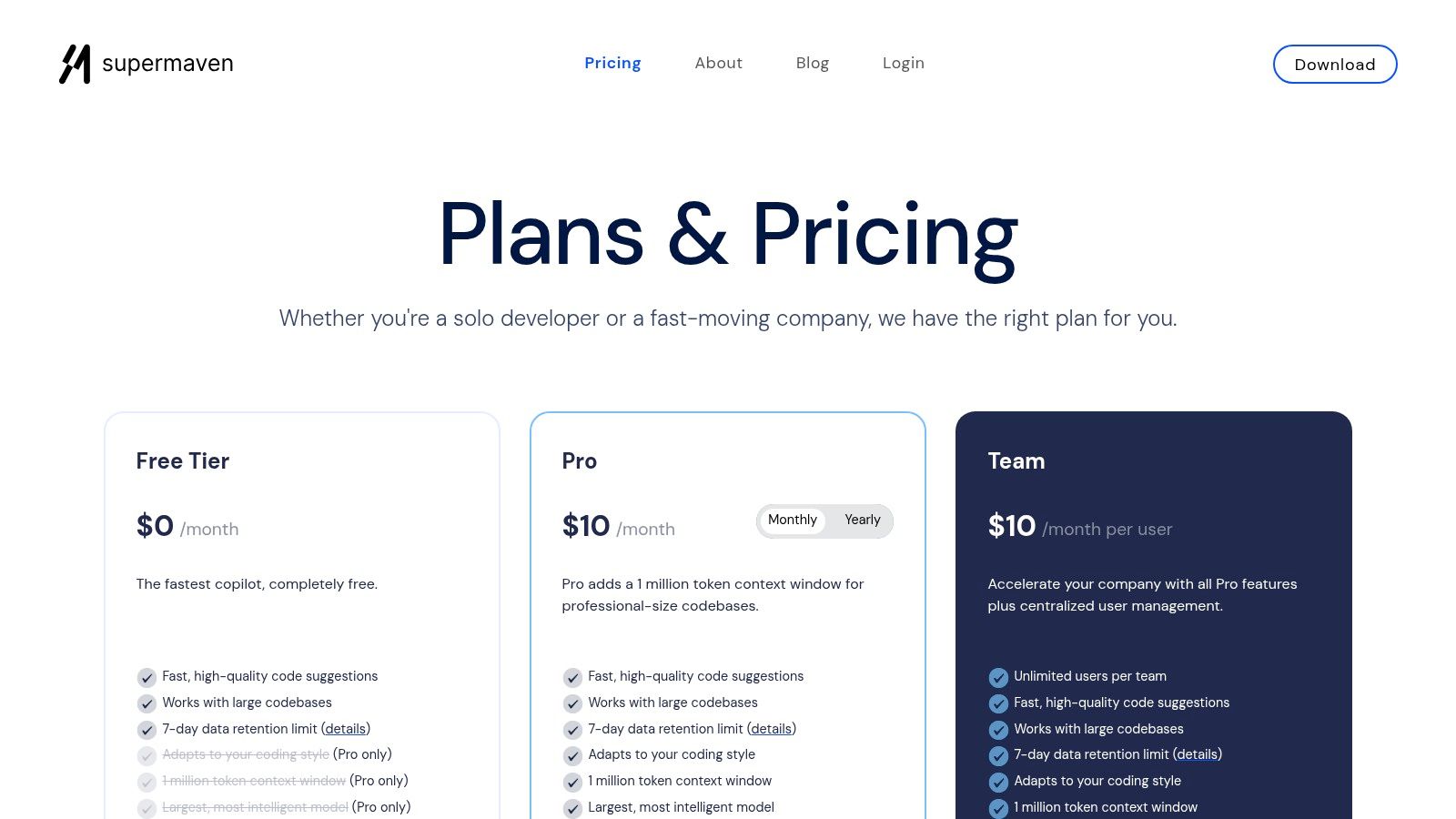
Supermaven positions itself as a specialized, high-performance code completion tool designed for speed and massive context. It integrates directly into popular IDEs as an extension, focusing on delivering extremely fast and relevant autocompletions by leveraging a massive 1-million-token context window on its paid plans. This makes it an excellent choice for developers seeking one of the best cursor alternatives that enhances their existing editor without replacing it entirely.
What makes Supermaven stand out is its singular focus on optimizing the core code completion loop. Unlike full-fledged AI IDEs, it dedicates its resources to understanding vast codebases and providing near-instant suggestions. This lightweight approach appeals to developers who are happy with their current setup but want a significant boost in AI-assisted coding speed and accuracy across large projects.
Key Features & Pricing
- Massive Context Window: Pro and Team plans feature a 1-million-token context window for highly accurate completions.
- Speed-Focused: Engineered for minimal latency to ensure autocompletions feel instantaneous.
- Broad IDE Support: Works as an extension in popular editors, enhancing existing workflows.
- Simple Pricing: Offers a straightforward and affordable pricing model with a generous 30-day trial.
Supermaven’s Pro plan is priced at $10/month per user, with a Team plan at $12/month that adds centralized billing. While it lacks the deep, agentic workflows of integrated IDEs, its value lies in its exceptional speed and contextual awareness.
Best For: Developers who love their current IDE but want a faster, more contextually-aware code completion assistant than standard offerings, especially when working on large and complex codebases.
9. JetBrains AI Assistant
For developers deeply embedded in the JetBrains ecosystem, the AI Assistant offers one of the best cursor alternatives by integrating directly into familiar IDEs like IntelliJ IDEA, PyCharm, and Rider. Instead of a separate application, it enhances the existing coding environment with powerful AI features, including context-aware code completion, AI chat for queries and refactoring, and multi-file editing capabilities. This native integration ensures a seamless workflow without the need to switch contexts.
What makes the JetBrains AI Assistant stand out is its deep, project-aware context. It understands the structure of your code, dependencies, and language-specific conventions far better than a generic tool. Its licensing is managed through a flexible credit system, allowing users to consume AI resources as needed. While this model can initially seem complex, it provides granular control over spending, especially for teams.
Key Features & Pricing
- Deep IDE Integration: Works natively within all major JetBrains IDEs, leveraging existing project indexing for superior context.
- AI-Powered Workflows: Offers AI chat, multi-file edits, documentation generation, and test generation directly in the editor.
- Flexible Credit System: AI features are consumed via AI Credits, with options for monthly quotas and top-ups for heavy usage.
- Enterprise Ready: Provides centralized license management, SSO, and on-premises options for organizations with strict security needs.
JetBrains AI Assistant is included with active commercial subscriptions for IDEs like IntelliJ IDEA Ultimate and others. A standalone Pro subscription is available for $10/month, which includes a generous quota of AI credits. Enterprise pricing is customized upon request.
Best For: Developers and teams already using JetBrains IDEs who want a deeply integrated AI assistant that leverages their project’s full context for maximum accuracy and relevance.
Visit JetBrains AI Assistant’s Website
10. Continue.dev
Continue.dev offers a unique, open-source approach for developers seeking one of the best cursor alternatives that prioritizes control and flexibility. Instead of a standalone IDE, it integrates directly into VS Code and JetBrains, acting as a highly customizable AI coding assistant. Its core philosophy is “bring your own model,” allowing you to connect your own API keys from providers like OpenAI, Anthropic, or even locally-run models via Ollama, giving you complete control over your data and costs.

What makes Continue.dev stand out is its emphasis on developer and team empowerment. You can build and share custom agents and “slash commands” tailored to your team’s specific workflows, standardizing how AI is used across projects. For organizations concerned with security, its ability to proxy secrets and offer an on-premise data plane provides a level of governance and privacy that many cloud-based solutions cannot match.
Key Features & Pricing
- Bring-Your-Own-Model: Connect personal or team API keys for OpenAI, Anthropic, Google, and local models via Ollama.
- Customizable Agents: Build and share custom “slash commands” and agents to enforce specific coding patterns or automate repetitive tasks.
- Team Governance: Enterprise features include allow/deny lists for models, secret proxying, and usage analytics.
- On-Premise Option: A self-hostable data plane is available for enterprises that require maximum data control and security.
Continue.dev has a generous Free “Solo” tier for individuals. The Team tier is $25/month per user and unlocks team-wide agent sharing and governance features. Enterprise pricing is custom for on-premise deployments.
Best For: Teams and security-conscious developers who want to avoid vendor lock-in and deeply customize their AI assistant within their existing VS Code or JetBrains environment.
11. Zed
Zed positions itself as a next-generation, high-performance code editor built for speed and multiplayer collaboration. Its incredibly low latency and Rust-based architecture provide a snappy user experience that power users will appreciate. For those seeking one of the best cursor alternatives focused on core performance and flexible AI integration, Zed offers a compelling package that doesn’t lock you into a single ecosystem.
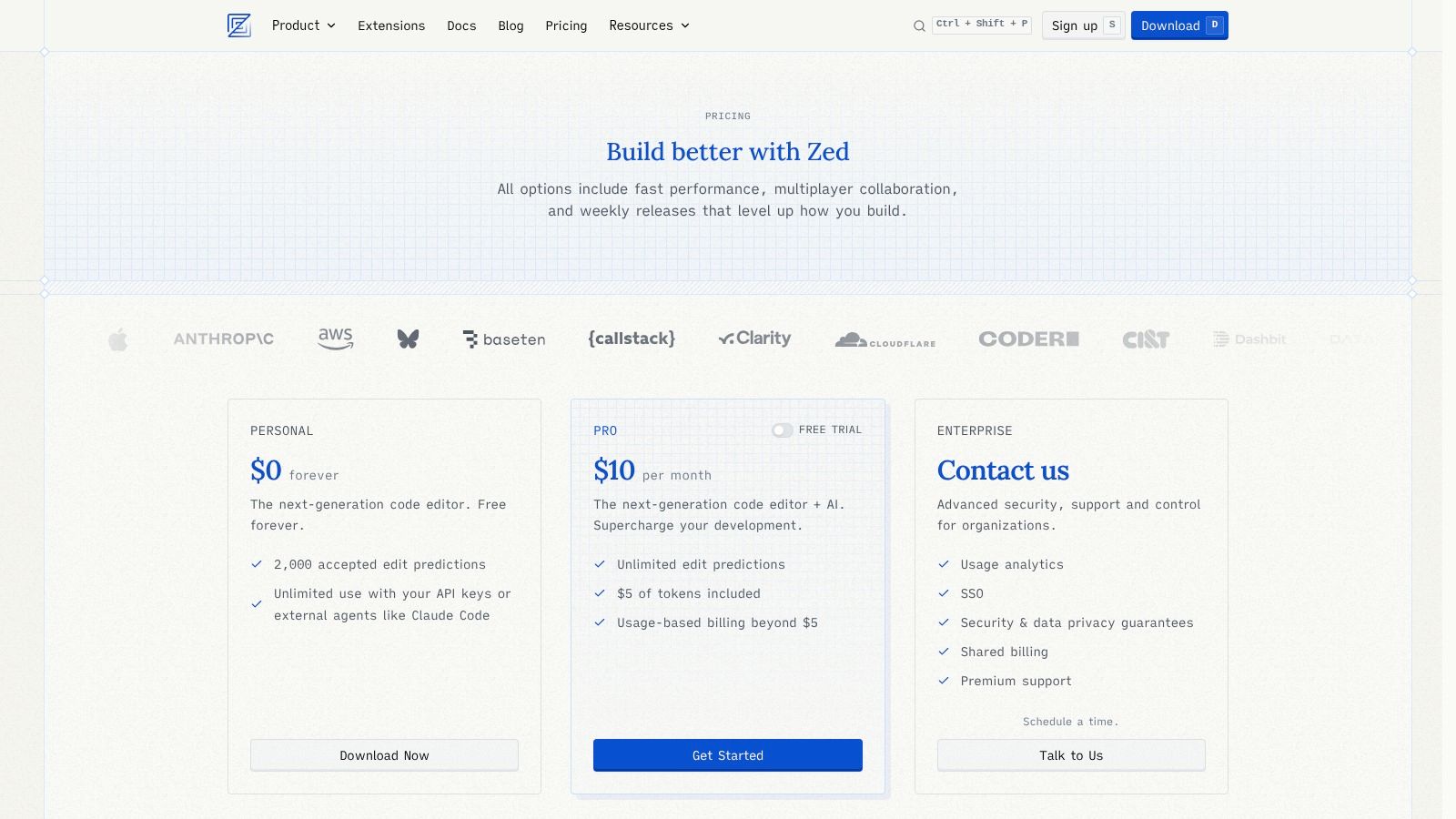
What makes Zed stand out is its “bring your own key” model for AI, giving developers complete control over their tooling. While it offers Zed-hosted AI on its Pro plan, you can just as easily plug in your own keys for OpenAI, Anthropic, Ollama, or even a Copilot subscription. This flexibility, combined with its innovative diff-style edit predictions and seamless real-time collaboration, makes it a powerful and customizable environment for modern development teams. This approach offers a different way to think about AI integration than what you might be used to if you’ve only learned how to use Cursor effectively.
Key Features & Pricing
- Multiplayer Collaboration: Built from the ground up for real-time, low-latency pair programming.
- BYO Model Support: Connect your own keys for major providers like OpenAI, Anthropic, and local models via Ollama.
- Edit Predictions: AI suggests multi-file edits in a clear, diff-style format for easy review and application.
- High-Performance UI: Engineered in Rust for exceptional speed and responsiveness, even with large projects.
Zed has a generous free Personal plan that includes 2,000 accepted edit predictions per month. The Pro plan at $8/month unlocks Zed-hosted AI (billed per token), unlimited edit predictions, and priority support.
Best For: Developers and teams who prioritize raw editor performance, real-time collaboration, and the freedom to use their preferred AI models and providers.
12. Aider
Aider is a unique, open-source AI pair programmer that operates directly within your terminal. It functions by mapping your entire repository, enabling it to understand context across large codebases. This terminal-first approach allows developers to chat with an AI about their code, request changes, and have Aider apply them as automatic Git commits, making it one of the best cursor alternatives for developers who live in the command line.

What makes Aider stand out is its transparent, commit-based workflow and model flexibility. It works with APIs from OpenAI and Anthropic or can be configured to use local models for full privacy. Each change is a reviewable Git commit, integrating perfectly with existing testing and linting pipelines. This approach is ideal for incremental, controlled, and auditable AI-assisted development.
Key Features & Pricing
- Repo Mapping: Provides deep context awareness by creating a map of your entire codebase for the AI.
- Multi-Model Support: Connects to Claude, OpenAI, DeepSeek, and local models, giving you full control over cost and capability.
- Automatic Git Commits: Applies changes directly as commits, ensuring every AI action is version-controlled and easy to revert.
- Open-Source & Free: Licensed under Apache-2.0, Aider is completely free to use, though you must provide your own API keys.
Aider is free and open-source. The only cost is for the API calls to your chosen AI model provider. Its command-line interface has a learning curve compared to GUI-based IDEs but offers unparalleled control for experienced developers.
Best For: Developers who are comfortable in the terminal and want a free, powerful AI companion for making incremental, version-controlled changes to large and complex codebases.
Top 12 Cursor Alternatives — Feature Comparison
| Product | Core features | UX / Quality (★) | Price / Value (💰) | Target (👥) | Key differentiator (✨/🏆) |
|---|---|---|---|---|---|
| Windsurf (Codeium’s agentic IDE) | Agentic workflows, Tab inline completions, chat, multi-file edits, model mix | ★★★★☆ | 💰 Moderate — generous Pro, credit add‑ons for heavy users | 👥 Teams & power users needing agentic IDE | ✨ Cascade workflows, hybrid/self-host options · 🏆 model mix + seat controls |
| GitHub Copilot | Inline completions, chat, agent mode, code review, multi‑IDE support | ★★★★★ | 💰 Per-seat with Free tier; premium usage metered | 👥 Broad orgs & GitHub ecosystems | ✨ Deep GitHub integration · 🏆 widest IDE/enterprise adoption |
| Amazon Q Developer (AWS) | Code suggestions, chat, security scans, AWS resource guidance, SSO | ★★★★☆ | 💰 Free tier; Pro ~$19/user | 👥 AWS-centric teams & cloud engineers | ✨ AWS integration & security scans · 🏆 perpetual Free tier |
| Google Gemini Code Assist | Completions, chat, code transforms/diffs, high request limits | ★★★★☆ | 💰 Very generous free limits; Enterprise via Google Cloud | 👥 Google Cloud devs & individuals with high usage | ✨ Large free quotas · 🏆 tight Google Cloud ecosystem |
| Codeium | Unlimited autocomplete (individuals), in‑IDE chat, team plans, SSO | ★★★★☆ | 💰 $0 for individuals; paid org plans | 👥 Individual devs & teams piloting AI coding | ✨ Free-for-solo, powers Windsurf · 🏆 best free value for individuals |
| Sourcegraph Amp | Agentic workflows, pay-as-you-go credits, SSO, zero LLM retention | ★★★★ | 💰 Credit model (prepaid at cost for non‑enterprise) | 👥 Large teams focused on code search & governance | ✨ Code-search integration, zero retention · 🏆 cost‑transparent credits |
| Tabnine | On‑prem/VPC, multi‑LLM, model governance, compliance, analytics | ★★★★ | 💰 Enterprise pricing (premium) | 👥 Regulated enterprises needing compliance | ✨ On‑prem & model governance · 🏆 strong compliance posture |
| Supermaven | Fast completions, large‑context (1M token), simple low‑cost plans | ★★★★ | 💰 Low‑cost Pro/Team, 30‑day trial | 👥 Devs needing speed & very large context | ✨ 1M‑token context, performance‑first · 🏆 speed & large‑context completions |
| JetBrains AI Assistant | Native JetBrains integration, multi‑file edits, AI credits, SSO | ★★★★ | 💰 Tiered (Free→Enterprise) with AI credits | 👥 JetBrains IDE users & teams | ✨ Deep native IDE integration · 🏆 fine‑grained credit control |
| Continue.dev | Open‑source, BYO model keys, custom agents/blocks, on‑prem option | ★★★★ | 💰 Free Solo; BYO API/model costs or credits | 👥 Teams avoiding vendor lock‑in, self‑hosters | ✨ BYO models & custom agents · 🏆 flexible self‑host/BYOK security |
| Zed | Low‑latency collaborative editor, edit predictions, multiplayer, BYO models | ★★★★ | 💰 Free Personal (limited); Pro token billing | 👥 Collaborative desktop teams & low‑latency users | ✨ Multiplayer + edit predictions · 🏆 real‑time collaborative UX |
| Aider | CLI‑first pair programmer, repo mapping, auto Git commits, multi‑model | ★★★★ | 💰 Free open‑source; BYO API keys | 👥 CLI users, repo‑centric engineers | ✨ Commit‑backed edits & repo mapping · 🏆 transparent OSS workflow |
Choosing Your Next AI Co-Pilot: Key Takeaways
The journey from a promising, all-in-one editor like Cursor to a more tailored, modular setup is a sign of a maturing AI-native development landscape. As we’ve explored, the world beyond a single integrated solution is vast and varied, filled with powerful tools designed for specific ecosystems, workflows, and organizational needs. The core insight is this: there is no single “best” Cursor alternative, only the best one for you and your team’s unique context.
Your decision hinges on a few critical factors. If you’re an individual developer or part of a nimble startup, the flexibility and generous free tiers of tools like Codeium or the BYOK (Bring Your Own Key) model of Continue.dev offer immense power without a hefty price tag. Conversely, for large enterprises where security, compliance, and governance are non-negotiable, solutions like Tabnine Enterprise or Amazon Q Developer provide the robust controls and private deployment options necessary to operate safely at scale.
Finding Your Fit: A Quick Decision Framework
To help narrow down your options, consider where your team’s priorities lie:
- For the Ecosystem Loyalist: If your workflow is deeply embedded in a specific platform, the native solutions are often the most seamless. GitHub Copilot is a natural fit for GitHub-centric teams, while the JetBrains AI Assistant offers unparalleled integration for those living in the IntelliJ ecosystem.
- For the Performance-Obsessed: When raw speed and minimal latency are paramount, look to specialized models like Supermaven or the high-performance local editor Zed. These tools prioritize responsiveness, ensuring the AI keeps up with your train of thought.
- For the AI Power User: If you want deep customization and the ability to chain commands or build complex workflows, agentic tools are your playground. Aider (for terminal-based pair programming) and Continue.dev (for building custom workflows) provide the building blocks for a truly personalized AI assistant.
- For the Enterprise Architect: Security, context awareness across your entire codebase, and organizational control are key. Sourcegraph Amp excels at code-aware generation, while Amazon Q and Google Gemini Code Assist are built for enterprise-grade integration and security.
Actionable Next Steps: Test, Measure, and Optimize
Reading about features is one thing; experiencing them is another. Your next step should be hands-on experimentation. Nearly every tool on this list offers a free tier or a trial period. Create a small pilot group within your team and encourage them to try two or three top contenders for a week. Document their experiences, focusing on workflow friction, quality of suggestions, and overall “feel.”
However, subjective feedback alone isn’t enough. To truly understand the ROI of these AI co-pilots, you need objective data. This is where measuring the impact becomes critical. By tracking key metrics like suggestion acceptance rates, code churn on AI-generated blocks, and the types of prompts that yield the best results, you can move from guessing to knowing. As you evaluate the best cursor alternatives, it’s also worth keeping an eye on innovators in the space who are building unique AI development platforms. For example, some teams are exploring how to centralize and manage AI workflows, and companies like Parakeet AI are part of that evolving landscape.
Ultimately, choosing your next AI co-pilot is about finding a partner that enhances, rather than dictates, your development process. It’s about building a stack that feels like an extension of your own mind, one that frees you up to focus on solving the hard problems. The perfect tool is out there; your job is to test, measure, and find it.
Ready to move from anecdotal feedback to data-driven insights on your AI adoption? Zest connects directly to your development workflow, analyzing how your team uses tools like Copilot, Codeium, and more. See which prompts are most effective, identify power users, and get the objective metrics you need to prove the ROI of your AI investment. Start making smarter decisions about your AI stack today with Zest.
Find Your Next AI Co-Pilot
Move beyond a single editor to a tailored AI stack that enhances your specific development workflow.
📊 Core Metrics
- Suggestion Acceptance Rate — How often AI-generated code is kept vs. discarded.
- Workflow Friction Score — Qualitative measure of how seamlessly the tool integrates.
- Code Churn on AI Blocks — Percentage of AI-assisted code rewritten shortly after commit.
🕹️ My Cheatcodes
- 🌱 Ecosystem First — Prioritize native tools (GitHub Copilot, JetBrains AI) for seamless integration.
- 🦎 Pilot, Then Scale — Test 2-3 top contenders with a small group before a full rollout.
- ⚡ BYOK for Control — Use "Bring Your Own Key" tools (Continue.dev, Zed) for flexibility and cost management.
📈 Reflection Points
- 💡 Does this tool prioritize speed, deep context, or enterprise governance? Which matters most to us?
- 🧩 Is a full IDE replacement necessary, or can a powerful extension achieve our goals?
- 📘 How will we document and share best practices for using this new AI tool across the team?
Gallery
Lemon shots



