
Automated Code Reviews to Boost Your Workflow
At its core, an automated code review is just what it sounds like: using smart software tools to scan your source code for common problems. These tools check for bugs, security holes, and style issues, giving you instant feedback without needing another person to look over your shoulder. Think of it as a first-pass editor for your code, catching the easy stuff so your team can focus on the tricky, high-level design choices.
Why Manual Code Reviews Are Holding You Back

We’ve all been there. Traditional code reviews are a cornerstone of quality, but let’s be real—they can bring the development cycle to a screeching halt. It’s like proofreading a massive novel by hand. You’ll catch a lot, but eyes get tired, mistakes get missed, and the whole thing takes forever. This manual process creates friction that fast-moving teams just can’t afford.
When you’re relying entirely on human reviewers, a few classic problems pop up that hurt both productivity and team morale. Developers end up waiting around for feedback, pull requests pile up, and the whole team’s momentum stalls. This waiting game isn’t just a minor inconvenience; it’s a direct blow to how fast you can get things done.
The True Cost of Human Error and Fatigue
No matter how sharp they are, human reviewers are still human. They make mistakes and have off days. What one developer flags as a critical issue, another might not even notice. This kind of subjectivity leads to inconsistent feedback and endless debates over minor style choices, distracting everyone from the bigger architectural picture.
And then there’s reviewer fatigue. It’s a real thing. After staring at hundreds of lines of code, anyone’s attention starts to wander, and the quality of the review drops. This is exactly when subtle, dangerous bugs slip through the cracks, only to cause major headaches once they’re live in production.
On larger teams, this problem explodes. Picture a team of 250 developers, each merging one pull request a day. That’s about 65,000 PRs a year. If each manual review takes a conservative 20 minutes, the team is sinking over 21,000 hours annually into that single task. To make matters worse, studies show a reviewer’s ability to spot issues plummets after about 100 lines of code. It can take 12 to 14 different people to feel confident about catching security vulnerabilities. As explained by the DevTools Academy, this workload makes it clear that manual review is an unsustainable bottleneck.
The Ripple Effect of Slow Feedback Loops
Slow, inconsistent reviews don’t just delay schedules; they create a seriously frustrating experience for developers. When feedback takes ages, engineers have to switch gears and work on something else. Coming back to the original code hours—or even days—later requires a huge mental effort to get back in the zone, wasting brainpower that could’ve been used for creative problem-solving.
By automating the routine checks, teams can transform code reviews from a necessary chore into a valuable, strategic process. The goal isn’t to replace developers but to empower them by removing tedious work.
In the end, sticking only to manual reviews creates a domino effect of problems:
- Slower Time-to-Market: The review process becomes a chokepoint, directly delaying product releases.
- Inconsistent Quality: Subjective feedback means coding standards are applied unevenly across the board.
- Developer Burnout: The constant waiting, context switching, and rework lead to frustration and lower job satisfaction.
When you lay out all these pain points, it’s easy to see why relying solely on manual processes just doesn’t cut it anymore for teams that need to ship great software, fast.
Here’s the rewritten section, designed to sound like an experienced human expert sharing their insights.
What Are the Real-World Wins from Automating Code Reviews?
Look, automating code reviews isn’t just about catching typos. It’s about fundamentally changing how your team builds software for the better. When you move past relying solely on manual checks, you introduce a consistency and speed that a human-only process just can’t keep up with. You start seeing a real return on your investment, from the quality of the code itself all the way to team morale.
This isn’t about replacing your senior devs with bots. It’s about empowering them. By letting a tool handle the nitpicky, repetitive tasks, you free up your engineers to focus on what really matters: the tough architectural problems and creative solutions that drive your product forward. Let’s break down the key areas where you’ll see the biggest impact.
Ship Better, More Secure Code
The first thing you’ll notice with automated code reviews is a huge jump in code quality. These tools are like a tireless, perfectly consistent reviewer on your team. They check every single pull request against your established coding standards. No more long, drawn-out debates over spacing, variable names, or other style guide minutiae that can bog down a manual review.
Even more critically, automation makes your code fundamentally safer. Many tools are built to scan for common vulnerabilities—think SQL injection or cross-site scripting—before a single line of risky code gets merged. Catching these security flaws early is a game-changer. It’s a lot cheaper and easier to fix a problem before it ever hits production.
By making this part of your everyday process, you build a safety net. This means fewer bugs, fewer security scares, and a more stable, trustworthy application for your users.
Seriously Speed Up Your Development Cycle
We’ve all been there. You push up your code and then… you wait. Maybe for a few hours, maybe for a couple of days, until a teammate can finally get to your pull request. That dead time is a momentum killer, forcing you to switch gears and lose focus. Automated systems completely obliterate that bottleneck by giving instantaneous feedback.
The moment a PR is opened, the automated review kicks off. Within minutes, the developer gets a clear report. They can make the fixes right away while the logic is still fresh in their head. This tight feedback loop dramatically improves the metrics that matter:
- Shorter Pull Request Cycle Times: The window from PR creation to merge gets way smaller.
- More Frequent Deployments: When reviews are faster, you can ship new features to your customers more often.
- No More Blocked Developers: Your team spends its time building, not waiting.
An automated review tool doesn’t take coffee breaks or get pulled into last-minute meetings. It’s always ready, making sure your development pipeline flows smoothly without any artificial delays.
This boost in speed means your team can react faster to customer feedback and deliver value way ahead of the competition.
Improve Life for Your Developers
A smart automated review process can make a developer’s day-to-day work so much better. For one, it makes reviews feel more objective and less personal. It’s one thing to get a list of impartial suggestions from a tool; it’s another to get a wall of critical comments from a peer. This simple shift helps take the ego out of code reviews and keeps the team focused on collaboration.
These tools are also incredible mentors for junior developers. They offer practical examples of best practices and team standards right in the PR, helping new hires ramp up quickly in a low-pressure environment. It’s a great way to build confidence and help them learn the ropes.
At the end of the day, taking away the tedious chores and reducing friction in the workflow leads to happier, less burnt-out developers. That’s a massive win in today’s tech world. The team’s energy shifts from policing each other’s code to working together to build something great.
How AI Takes Automated Code Reviews to the Next Level

Standard automated review tools are a solid start, but they often act like a simple spell-checker. They’re fantastic at catching basic typos—syntax errors and style violations—based on a strict rulebook. The problem is, they can’t tell you if the story your code is telling makes any sense.
This is where AI changes the game entirely.
AI injects a layer of intelligence into automated code reviews, giving them the ability to understand context, developer intent, and complex logic. Think of it as the difference between a grammar checker and a seasoned editor who actually understands your plot. AI tools don’t just see lines of code; they grasp the bigger picture.
This deeper level of understanding allows AI to become a genuine partner in the development process. It takes on the meticulous, time-consuming analysis, freeing up your team to focus on bigger challenges like architecture and creative problem-solving. It’s less about just finding mistakes and more about offering smart suggestions that improve the code’s long-term health.
Moving Beyond Simple Rule-Based Checks
Traditional static analysis tools are useful, but they have their limits. They work off a fixed set of patterns and can create a lot of noise if they aren’t configured perfectly. An AI-powered system, on the other hand, learns from massive datasets of code, which allows it to spot problems that don’t fit into a neat little box.
- Spotting Logical Flaws: AI can catch subtle logic errors that a linter would completely miss, like a function that fails to handle edge cases or an algorithm with unintended side effects.
- Suggesting Performance Boosts: By analyzing how the code will actually run, AI can suggest more efficient algorithms or pinpoint bottlenecks that could slow your application down.
- Predicting Security Risks: Instead of only matching known vulnerability patterns, AI can predict potential security holes based on the context of your code. It’s proactive, not just reactive.
AI-driven reviews don’t just ask, “Is this code written correctly?” They ask, “Does this code do what the developer intended, and is there a better way to do it?” This leap from syntax to semantics is what makes the technology so powerful.
The impact is already clear. As of 2025, AI reviews are a major force in software development. Research from Qodo shows that 59% of developers say AI has improved their code quality. For teams that fully embrace AI in their review process, that number jumps to a staggering 81%. Even when teams aren’t focused on productivity, they still report double the quality improvement compared to their peers who don’t use AI. You can dig into the details in the full state of AI code quality report.
The AI-Powered Reviewer as a Team Member
The best way to view an AI reviewer isn’t as a gatekeeper, but as a collaborative teammate. It delivers objective, data-driven feedback in an instant, cutting through the personal biases and fatigue that can creep into human reviews. This alone helps build a more positive and productive engineering culture.
It’s also an incredible mentoring tool. A junior developer can get immediate, constructive feedback on a pull request instead of waiting for a senior engineer to free up. The AI explains why a change is recommended, linking it to best practices and potential risks, which speeds up the learning curve and builds great habits from day one. To learn more, check out our guide on how to improve your workflow with AI code review tools.
So, what are the real differences between the old way and the new way? This table breaks it down.
Static Analysis vs AI-Powered Code Review
| Capability | Traditional Static Analysis (Linters) | AI-Powered Automated Review |
|---|---|---|
| Error Detection | Focuses on syntax, style, and known patterns. | Detects complex logical flaws, bugs, and edge cases. |
| Context Awareness | Limited to the immediate file or function. | Understands the entire codebase and project architecture. |
| Suggestions | Provides generic fixes based on predefined rules. | Offers tailored, context-aware suggestions for improvement. |
| Security | Identifies known vulnerabilities (SAST). | Predicts novel security risks and suggests preventative measures. |
Ultimately, bringing AI into the mix transforms automated code reviews from a simple checklist into an intelligent system that actively helps you build better, safer, and more efficient software.
Weaving Automated Reviews into Your CI/CD Pipeline
Alright, let’s get practical. How do you actually get an automated code review tool up and running? The goal isn’t just to buy a new piece of software, but to make it a seamless, almost invisible part of your team’s daily routine. You want it to feel like a helpful colleague, not another chore.
Think of it as embedding a quality expert directly into your development workflow. This isn’t about ripping everything out and starting over. Instead, it’s about carefully connecting this expert into the places your developers already live and breathe—their version control system and the CI/CD pipeline. The whole point is to make it smooth, helpful, and completely natural.
Choosing the Right Tool for Your Stack
First things first, you need to pick the right tool for the job. The market is flooded with options, from basic open-source linters that check for style to seriously smart AI platforms that analyze complex logic. Your decision should come down to your team’s biggest headaches and the tech you’re already using.
When you’re looking at different tools, keep a few key things in mind:
- Language and Framework Support: Does it actually understand your code? Make sure it has solid support for the main languages and frameworks your team relies on.
- Integration Simplicity: How much of a headache will it be to set up? Look for tools with native integrations for platforms like GitHub, GitLab, or Bitbucket, or at least a well-documented API.
- Customization and Configurability: Can you make it your own? A tool that flags a million minor things your team doesn’t care about will get ignored. You need to be able to tweak the rules to fit your coding standards.
- AI vs. Static Analysis: Are you looking to enforce strict style rules (static analysis) or do you need deeper, more thoughtful feedback on things like logic and performance (AI-powered)?
Configuring Your First Set of Rules
Once you’ve picked a tool, it’s tempting to switch on every single rule it offers. Don’t do it. This is a classic mistake that instantly overwhelms developers with a tidal wave of notifications, training them to ignore the tool completely. A slow, steady rollout works much better.
Start small, but aim for a big impact. Your first set of rules should catch the kind of critical, non-negotiable issues that everyone can agree on.
Begin with a core set of rules that target security vulnerabilities, major performance bottlenecks, and outright bugs. This ensures the first wave of feedback is undeniably valuable and builds trust in the system.
Once your team sees the value, you can gradually start adding rules for style guides and other best practices. This way, the automated reviewer is introduced as a helpful partner, not just a loud, nitpicky critic.
Setting Up Triggers on Pull Requests
This is where the real magic happens. The best automated reviews are the ones that just happen as part of the normal pull request (PR) process. The most effective way to do this is to trigger the review the moment a PR is created or updated. This guarantees that every line of new code gets checked before a human ever lays eyes on it.
Setting this up is usually pretty simple inside your version control system. You’ll use a webhook or a marketplace app to link your new tool. When a developer opens a PR, the tool gets a signal and kicks off its analysis. The findings are then posted right back into the PR, often as comments or status checks. To see how this fits into the bigger picture of modern development, check out our guide on what is continuous integration.
This tight feedback loop is a game-changer. Developers can fix issues while the code is still fresh in their minds, which takes way less time and mental energy. It also acts as a filter, cleaning up the simple mistakes so that senior developers can focus their precious time on the hard stuff, like architecture and logic. The result? A review cycle that’s faster and more effective for everyone involved.
Best Practices for a Successful Rollout
Dropping a new tool into your workflow and hoping for the best is a recipe for failure. To really get the most out of automated code reviews, you have to weave the tool into your team’s culture. Think of it less like a robotic gatekeeper and more like a helpful, always-on-call junior developer.
A thoughtful rollout is all about building trust, tweaking the tool to match your team’s specific standards, and using its feedback as a way to level up everyone’s skills. Without a clear plan, even the most powerful tool just becomes another source of notification spam, leading to frustrated devs and ignored alerts.
Strike the Right Balance Between Automation and Human Insight
The whole point of automation is to free up your human reviewers, not replace them. Automated tools are brilliant at catching the small stuff—style guide slip-ups, common security risks, and overly complex methods. They act as the first line of defense, cleaning up a pull request so your senior developers can focus their brainpower on what really matters.
This lets your human experts zero in on the big picture: Is the architecture sound? Does the code actually solve the business problem? Is the solution elegant and maintainable?
This partnership is key. Despite how far AI has come, a human eye is still essential for true quality control. Some studies even show AI-assisted code can create more code duplication—something a human reviewer is much better at spotting. Plus, trust is still a big factor; with 46% of developers admitting they distrust AI-generated code, it’s clear that automated code reviews are here to help humans, not take over their jobs. You can explore the full findings on developer trust in AI-generated code to see the data for yourself.
Customize Rules to Reflect Your Team’s Standards
Nothing will get an automated tool ignored faster than a generic, out-of-the-box ruleset. Every team has its own coding quirks, priorities, and unwritten rules. For a rollout to stick, you have to customize the tool to enforce what your team actually cares about. If it’s constantly nagging people about minor style issues your team agreed to ignore, it loses all credibility.
The best approach is to start small and focus on high-impact rules first. Configure your tool to catch the dealbreakers:
- Critical Security Flaws: Checks for things like SQL injection should be non-negotiable from day one.
- Performance Bottlenecks: Flag anything that could lead to inefficient code or memory leaks.
- Logic Bugs: Set up rules to spot common mistakes like null pointer exceptions.
Once your team sees the tool catching real, meaningful problems, they’ll start to trust it. From there, you can gradually roll out more rules for style and team-specific best practices. This phased approach makes sure every piece of feedback the tool gives is actually valuable.
This visual shows exactly where automation fits into the process, from the initial push to the final merge.
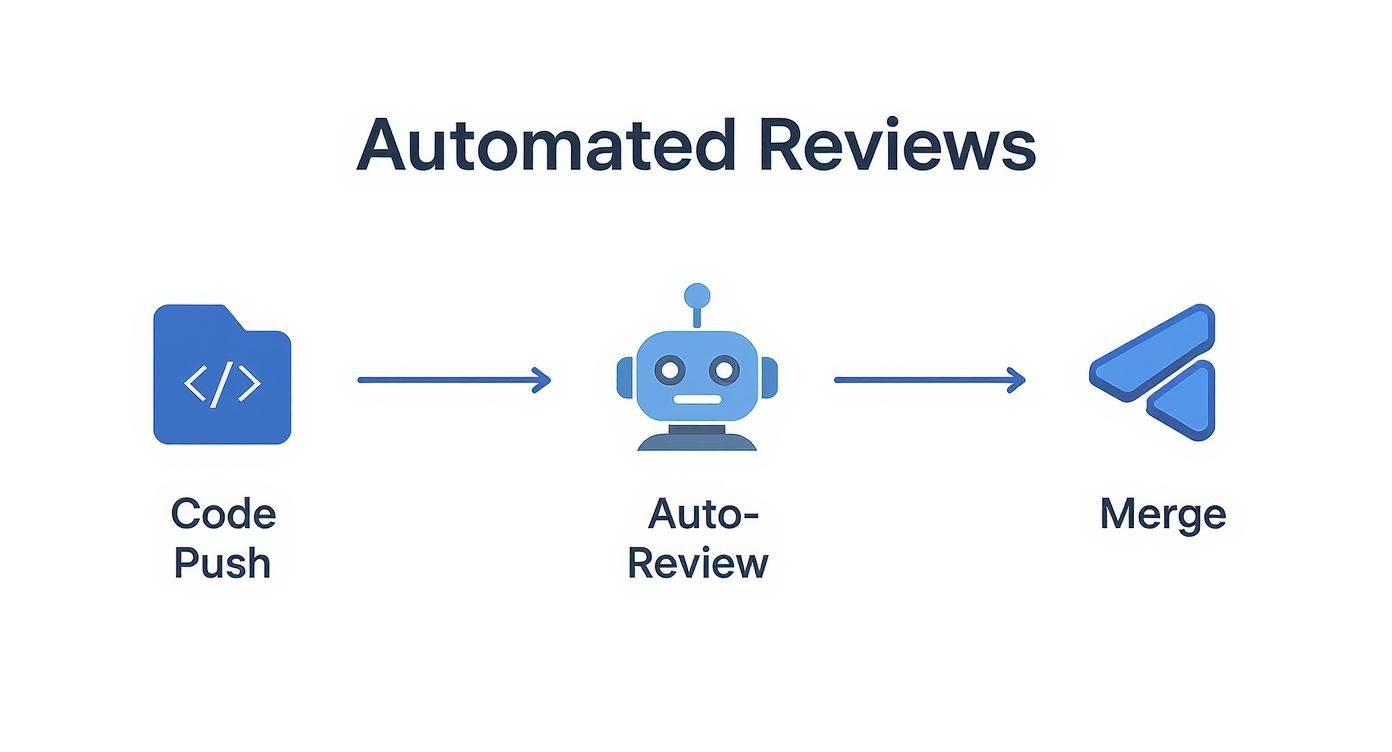
As you can see, the automated review acts as an instant quality check, making the entire journey to merging code smoother and faster.
Use Automation as a Mentoring Tool
Here’s one of the biggest (and most overlooked) benefits of automated code reviews: they’re fantastic for teaching. For a junior developer, getting instant, impartial feedback from a tool is an amazing way to learn. It creates a safe space to make mistakes and see corrections without the awkwardness of a direct critique from a senior dev.
Treat the automated reviewer as an impartial mentor. Its feedback isn’t criticism—it’s objective advice to help everyone grow and write code that aligns with the team’s standards.
To make this work, set up your tool so it doesn’t just flag problems but also explains them. When it finds an issue, it should tell the developer why it’s an issue and, if possible, link to internal docs or examples of the right way to do it.
This turns a simple error flag into a mini-coaching session, right inside the workflow. When you build this kind of culture, you create a positive loop that continuously raises the skill level of the entire team. To dig deeper, check out our guide on implementing effective code review best practices.
Of course. Here is the rewritten section with a more human-like, expert tone.
Common Questions About Automated Code Reviews
If you’re thinking about bringing automated code reviews into your workflow, you probably have a few questions. That’s a good thing. It’s a big shift, and it’s smart to get clear on what it means for your team before jumping in. Let’s tackle some of the most common concerns I hear from engineering teams.
Will Automated Tools Replace Human Code Reviewers?
Not a chance. The goal here is to augment your human reviewers, not replace them. Think of automated tools as a tireless first-pass filter. They’re fantastic at catching the objective, black-and-white stuff—things like style violations, known security flaws, and overly complex code.
This initial sweep frees up your senior developers to focus on what they do best: questioning architectural choices, validating business logic, and judging the overall elegance of the solution. The best teams create a partnership. Automation handles the grunt work, and humans apply their critical thinking where it truly matters. It’s about making your people more effective, not redundant.
How Do We Avoid Being Overwhelmed by Automated Comments?
This is a huge and very real concern. If a tool just creates a wall of noise, people will start ignoring it pretty quickly. The key is to avoid turning everything on at once.
Start small. Begin with a core set of high-impact rules that focus only on critical bugs and major security holes. When your team sees the tool flagging genuinely important issues, they’ll start to trust it.
Once that trust is established, you can gradually introduce more checks for style and best practices. Modern automated code reviews tools are highly customizable. You can tweak rules, adjust severity levels, and even mute specific warnings in certain files. By tailoring the tool to your team’s standards, you make sure every comment is valuable, not just another notification to close.
What Type of Automated Review Tool Is Right for Our Team?
There’s no single “best” tool—it really depends on your tech stack, your budget, and what you’re trying to fix. But most tools fall into a few general categories, and understanding them will help you narrow down the options.
- Linters & Static Analyzers: Think ESLint or SonarQube. These are your foundation for enforcing consistent coding standards and catching basic syntax errors. They keep the codebase clean and readable.
- Security Scanners (SAST): Tools like Snyk or Checkmarx are specialists. They dig deep into your code to find security vulnerabilities. If security is a top priority, a dedicated SAST tool is non-negotiable.
- AI-Powered Platforms: This is the new frontier. Tools like GitHub Copilot Workspace or Zest use AI to give context-aware feedback on logic, performance, and even architectural patterns. They move beyond simple rules to understand what the developer was trying to do.
To pick the right one, figure out your biggest headache. Is it inconsistent style? Security risks? A need for deeper quality checks? Start there, and then find a tool that slots nicely into your existing CI/CD pipeline and developer workflow.
How Can We Prove the ROI of Automated Code Reviews?
Measuring the return on your investment comes down to tracking a few key metrics before and after you roll out a tool. You’ll want to look at both the hard data and the softer, qualitative improvements.
To build your case, focus on these numbers:
- Bug Detection Rate: How many bugs are you catching before code hits production versus after? A good tool should cause the number of production bugs to plummet.
- Pull Request Cycle Time: How long does it take for a pull request to get merged after it’s opened? Automation should shrink this time by giving instant feedback.
- Deployment Frequency: When reviews are faster and more reliable, teams can ship more often. An increase in deployments is a clear win for velocity.
Don’t forget the human element. Send out a quick survey to your developers. Ask them how they feel about the review process. When you can show that this investment leads to faster, more stable releases and a happier, more productive engineering team, you’ve got a rock-solid argument.
Ready to transform your development workflow with intelligent insights? Zest helps you measure and improve your AI-assisted coding, turning every session into a learning opportunity. Discover how to ship faster and smarter.
Master Automated Code Reviews
Turn your review process from a bottleneck into a powerful engine for quality and speed.
📊 Core Metrics
- Bugs Caught Pre-Production — Number of critical issues flagged by automation before merge.
- PR Cycle Time Reduction — Decrease in the average time from pull request creation to merge.
- Deployment Frequency — Increase in the rate of successful deployments per week or month.
🕹️ My Cheatcodes
- 🌱 Start with Critical Rules — Implement security and major bug checks first to build immediate trust and show value.
- 🦎 Customize to Your Culture — Tailor rules to match your team's specific coding standards to reduce noise and increase adoption.
- ⚡ Partner, Don't Replace — Use automation to handle repetitive tasks, freeing human reviewers for high-level architectural and logic validation.
📈 Reflection Points
- 💡 Is our automated feedback helping or overwhelming our developers?
- 🧩 Have we proven the tool's value with clear metrics on quality and speed?
- 📘 Does our tool choice align with our team's biggest pain points (style, security, or logic)?
Gallery
Lemon shots



