
Ultimate Review: ai software development copilot replit cline gemini

When you’re trying to pick between AI coding tools like Copilot, Replit, Cline, and Gemini, the real difference comes down to their core design and who they’re built for.
GitHub Copilot is the all-rounder, digging deep into your IDE. Replit offers a slick, all-in-one cloud environment that’s perfect for getting projects off the ground fast. Cline puts privacy first by running everything locally, while Google Gemini is the powerhouse for tackling complex problems that need serious reasoning. Your best bet depends entirely on what you value most: tight integration, speed and collaboration, airtight security, or raw analytical power.
The New Era Of AI Software Development

AI isn’t just another tool in the developer’s belt anymore. It’s fundamentally changing how we build software, from the ground up. The explosion of AI coding assistants is completely overhauling workflows, shrinking timelines, and freeing up developers to focus on bigger, more interesting challenges. We’ve moved way beyond simple autocomplete; this is about having an intelligent partner right in your editor.
The numbers don’t lie. The AI code assistant market has blown up into a massive industry, currently valued somewhere between USD 3.9 to 4.7 billion. And it’s not slowing down. Projections show it rocketing to USD 14.62 billion by 2033, growing at a blistering 15.31% CAGR. This growth is being driven by tools like GitHub Copilot and Google’s Gemini models becoming standard issue for developers working in editors like VS Code.
Navigating the AI Copilot Landscape
For engineering leaders and individual devs, the biggest challenge is cutting through the noise to find the right AI assistant. It’s not about finding the tool with the most features, but the one that actually fits how you and your team work.
A few key things really set these tools apart:
- Workflow Integration: How well does it plug into your existing IDE and daily habits? Is it seamless or clunky?
- Security & Privacy: Is your code being sent to the cloud, or does it stay on your machine? This is a huge deal for many organizations.
- Team Dynamics: Is it built for a lone coder, or does it have features that make team collaboration easier?
- Use Case Specificity: Is the tool tuned for web development, data science, or building large-scale enterprise apps?
This guide breaks down the top contenders, comparing them side-by-side to help you see where each one shines. As we all get our footing in this new landscape, it’s a good time to delve deeper into the future of AI code writers and see where this is all headed.
Here’s a quick look at how the big four stack up:
| Feature | GitHub Copilot | Replit AI | Cline | Google Gemini |
|---|---|---|---|---|
| Core Focus | General-purpose, deep IDE integration | Cloud-native, collaborative development | Privacy-first, local code processing | Advanced, multi-modal reasoning |
| Primary Environment | VS Code, JetBrains, Visual Studio | Browser-based Replit IDE | VS Code (local instance) | Google Cloud, various IDEs |
| Data Handling | Cloud-based (with enterprise controls) | Cloud-based | Entirely local processing | Cloud-based (with GCP security) |
At the end of the day, understanding the nuances of https://meetzest.com/blog/ai-software-development is what will help you make the right call. Our analysis will give you the clarity you need to decide whether Copilot, Replit, Cline, or Gemini is the best co-pilot for your coding journey.
Meet The Contenders In AI Coding

Before we jump into a side-by-side comparison, it’s important to get a feel for the philosophy behind each major AI coding assistant. These tools aren’t just interchangeable code-spitters; they’re built on different ecosystems, for different kinds of developers, with different missions. Nailing down these core differences is the first step to finding the right ai software development copilot for your team.
We’re going to look at four key players: GitHub Copilot, Replit AI, Cline, and Google Gemini. Each one has carved out its own space, whether it’s through tight enterprise integration, cloud-native speed, or ironclad privacy.
GitHub Copilot: The Ubiquitous Integrator
There’s a good chance you’ve already heard of GitHub Copilot. Its popularity comes from being deeply woven into the Microsoft and GitHub ecosystem, making it feel like a natural extension for millions of developers. Its real magic is how seamlessly it plugs into the IDEs we already live in, like VS Code, Visual Studio, and the JetBrains suite.
Powered by OpenAI’s models, Copilot truly acts like a pair programmer. It looks at the context of your open files and even your comments to offer up surprisingly relevant suggestions, from single lines to complete functions. For any company already using GitHub for version control, Copilot is often the path of least resistance and a quick win for productivity.
Copilot’s core value is its pervasiveness. It meets developers exactly where they are, embedding powerful AI assistance directly into the editors they already use daily, minimizing friction and accelerating adoption.
Replit AI: The Cloud-Native Collaborator
Replit AI flips the script entirely. Instead of plugging into your local IDE, it builds the AI directly into its own browser-based development environment. The goal here is a zero-setup, collaborative coding space where you can go from an idea to a deployed app without ever leaving your web browser.
This all-in-one approach is a game-changer for quick prototypes, hackathons, and teaching environments. Replit’s AI features are built for this cloud-first world, helping explain and debug code right where you write it. Its biggest advantage is pure, unadulterated speed—no configuring local environments means teams can start building together instantly.
Cline: The Privacy-First Champion
In a world of cloud-connected tools, Cline stands out by putting privacy and security front and center. It’s an open-source, autonomous coding assistant for VS Code that runs 100% on your local machine. This guarantees your proprietary code never, ever leaves your control.
Cline is designed for developers and companies where data security is non-negotiable. It can scan your entire project, map out multi-step plans to add features, and then execute those changes across multiple files. You get to decide which language model it uses, whether that’s a cloud API or a self-hosted model running on your own servers. This makes Cline the clear winner for anyone working in regulated industries or on a highly sensitive codebase.
Google Gemini: The Multi-Modal Powerhouse
Google Gemini isn’t just one tool—it’s a whole family of powerful, multi-modal models that are being integrated across Google Cloud and its developer products. While it does the code completion and chat you’d expect, Gemini’s real strength is in its advanced reasoning capabilities and its ability to understand more than just text.
It’s particularly good at tackling complex problems, analyzing code, and even interpreting visual inputs like diagrams or screenshots to generate code. For developers working in the Google Cloud ecosystem or facing tricky, data-heavy challenges, Gemini brings a level of analytical power that others can’t match. It’s a glimpse into the future of ai software development, where the assistant helps you reason through tough architectural choices, not just write boilerplate.
AI Coding Assistants At A Glance
To make sense of these options, it helps to see their core strengths laid out side-by-side. Think of this table as a quick cheat sheet for matching the right tool to the right job.
| Tool | Primary Strength | Ideal Developer Profile | Core Environment |
|---|---|---|---|
| GitHub Copilot | Seamless IDE Integration | Enterprise teams, individual devs using mainstream IDEs | Local IDE (VS Code, JetBrains) |
| Replit AI | Rapid Prototyping & Collaboration | Students, startups, hackathon participants | Browser-based IDE |
| Cline | Privacy & Local Control | Security-conscious orgs, regulated industries | Local IDE (VS Code) |
| Google Gemini | Advanced Reasoning & Multi-Modality | Google Cloud users, data scientists, R&D teams | Google Cloud Platform, various IDEs |
Ultimately, the best choice depends less on the tool itself and more on your team’s specific context—your existing tech stack, security requirements, and the kind of problems you’re trying to solve.
Comparing Performance and Core Features
Once you get past the high-level sales pitches, the real value of an ai software development copilot shows up in the day-to-day grind. How well does it complete your code? Does it actually fit into your workflow? How does it handle the specific languages you use? These are the things that determine if a tool is a true partner or just another distraction. Let’s break down how GitHub Copilot, Replit AI, Cline, and Gemini stack up on the features that really matter.
The explosion in the adoption of these tools isn’t a fluke. Developers are bringing AI coding assistants into their workflows like never before. A massive 84% are either using them or plan to, which is a huge leap from 76% just last year. In fact, a full 41% of all code written globally is now either AI-generated or AI-assisted.
Tools like GitHub Copilot, which holds a dominant 40% of the market, and innovators like Replit, Cline, and Google Gemini are at the heart of this shift. On average, they’re helping developers write 12-15% more code and are reporting productivity boosts of around 21%.
Code Completion Quality and Context Awareness
At its core, an AI coding assistant has one job: generate accurate, context-aware code. This is where the underlying models and the data they were trained on make all the difference.
GitHub Copilot is what most developers measure everything else against. It was trained on an incredible volume of public code from GitHub, so its suggestions for popular languages and frameworks are often spot-on. It’s great at understanding the context of the file you’re currently in and can whip up entire functions from just a comment or a function name. The catch? Its vision can be a bit narrow, sometimes missing the bigger picture of the entire project.
Google Gemini tends to excel when a task requires a bit more brainpower. Since it’s built for multi-modal understanding, it can often get a better grip on complex logic or architectural patterns. If you’re building out tricky algorithms or complex data structures, Gemini’s suggestions often feel more robust and less likely to contain simple mistakes. It’s especially powerful if you’re working in the Google Cloud ecosystem, where it has a native understanding of the platform services.
Replit AI, on the other hand, is perfectly tuned for its own self-contained, cloud-based IDE. Its “context” is the entire Replit workspace, which means it can provide incredibly relevant suggestions for full-stack web apps built within that world. It’s fantastic at spitting out boilerplate for frameworks like React or Node.js, which really speeds up the start of a project.
Cline comes at this from a totally different angle by processing your entire codebase right on your local machine. This gives it a deep, project-wide understanding that most cloud-based tools just can’t match. It can make changes across multiple files to push a single feature, showing a real grasp of your project’s architecture. The quality of its suggestions, though, depends entirely on the language model you hook it up to—whether that’s a beast like GPT-4 or a self-hosted model.
Key Differentiator: While Copilot nails file-level context and Gemini handles logical complexity, Cline’s local-first architecture gives it a unique advantage in understanding and refactoring an entire repository at once.
IDE and Workflow Integration
A great AI assistant should feel like it’s part of your editor, not some clunky add-on that breaks your focus. Smooth, seamless integration is everything.
When it comes to mainstream IDEs, GitHub Copilot is the clear winner. Its native integrations for VS Code, JetBrains, and Visual Studio are so polished and deeply woven in that you forget it’s not a built-in feature.
Cline is also built for VS Code, but with a firm focus on local execution. The integration is designed to put you in the driver’s seat. It lets you review its multi-step plans before it touches your code, which feels much more deliberate and secure compared to Copilot’s instant, fire-and-forget suggestions.
Replit AI, true to its nature, is perfectly integrated into its own browser-based IDE. You don’t have to set anything up; it just works. This is its biggest strength but also its biggest limitation—the experience is flawless, but only if you live inside the Replit ecosystem.
Google Gemini is making its way into more platforms, and you can find plugins for most popular IDEs. But its most powerful integrations are, unsurprisingly, within Google’s own tools like Google Cloud Shell and Colab notebooks. In those environments, it can do a lot more than just complete code.
If you want to go even deeper on how these tools compare, check out our full guide to the best AI coding assistants on the market today.
Language and Framework Support
Most tools claim they support dozens of languages, but how well they actually support them can vary wildly.
- GitHub Copilot: Has the widest and most mature support for a massive list of languages, from Python and JavaScript to Go and Rust. It’s at its best with languages that have a huge footprint on GitHub.
- Google Gemini: Shows strong skills across the big languages and is particularly good with Python and anything related to data science or machine learning. Its underlying model also helps it adapt to less common languages more quickly.
- Replit AI: Is laser-focused on web development. It offers fantastic support for JavaScript, TypeScript, Python, and the frameworks that go with them (think React, Node.js, and Django).
- Cline: Its language support is technically infinite since it just piggybacks on whatever language model you connect it to. It works great with any language that models like GPT-4 or local options like Llama 3 can handle.
Unique Differentiating Capabilities
Putting aside the standard features, each of these tools has its own secret sauce.
| Tool | Unique Capability | Best For… |
|---|---|---|
| GitHub Copilot | Ubiquitous Integration | Developers who want a reliable assistant that “just works” inside their favorite IDE without disrupting their flow. |
| Replit AI | Real-Time Collaboration | Teams and solo developers who need to rapidly prototype and launch web apps in a shared, zero-setup cloud environment. |
| Cline | Local-First Processing | Companies with strict data privacy rules or developers working on proprietary code that absolutely cannot leave their machine. |
| Google Gemini | Multi-Modal Reasoning | Solving complex problems that need more than just code understanding, like analyzing system architecture diagrams or technical docs. |
At the end of the day, picking the right assistant comes down to what you care about most—the seamless flow of Copilot, the collaborative speed of Replit, the security of Cline, or the deep thinking of Gemini.
Choosing The Right Tool For Your Use Case
Picking the right AI software development copilot isn’t about finding the “best” one on a spec sheet. It’s about figuring out which tool fits your team, your projects, and your existing workflow. The most powerful assistant is useless if it just gets in the way. The trick is to look past the marketing hype and focus on which one solves your biggest headaches.
Your decision usually boils down to a few key priorities. This flowchart helps break down the choice based on what you value most: seamless integration, raw performance, or tight collaboration.
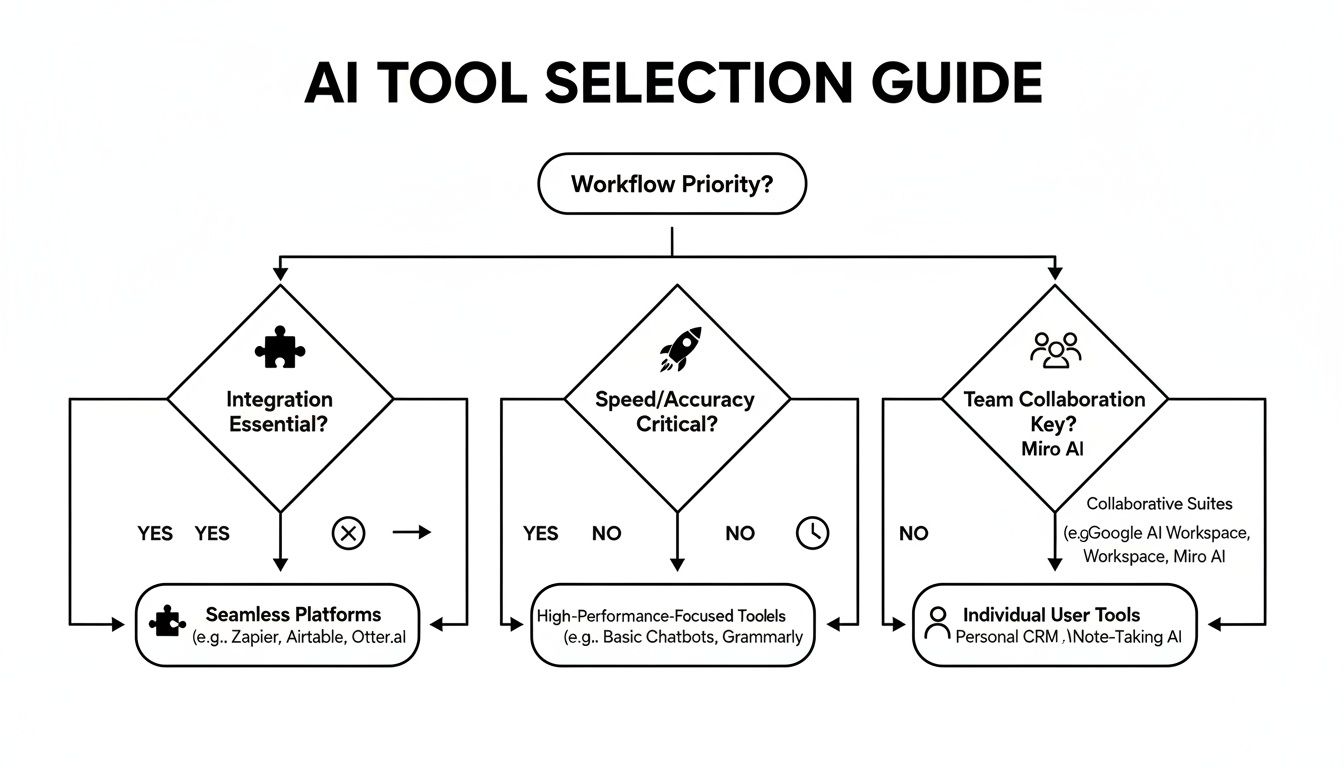
As you can see, what you need to get done every day—whether that’s deep integration, lightning-fast performance, or real-time teamwork—points you to a different answer. This is a practical way to cut through the noise and figure out which assistant will actually make a difference for you.
For The Enterprise Powerhouse: GitHub Copilot
If your organization is already all-in on the GitHub ecosystem, GitHub Copilot is the no-brainer. It’s built to feel native inside IDEs like VS Code and the JetBrains family, which means your developers can adopt it without changing a thing. The AI simply shows up where they already work.
Copilot really shines in established teams where consistency is everything. Its suggestions have been battle-tested by millions of developers across countless public codebases, making it a reliable workhorse for everyday development in languages like Python, JavaScript, and Java.
For The Rapid Collaborator: Replit
Replit is the king of speed and collaboration, especially when you need a zero-setup environment. It’s perfect for hackathons, coding bootcamps, and early-stage startups that are building cloud-native apps. The browser-based IDE gets rid of all the “it works on my machine” headaches, letting your team jump straight into coding together.
The built-in Replit AI is tuned perfectly for this fast-paced world. It helps scaffold projects, debug tricky code, and explain concepts on the fly. If your main goal is to get from an idea to a deployed prototype with a distributed team as fast as humanly possible, Replit was made for you.
For The Security-Minded: Cline
When data privacy and code security are completely non-negotiable, Cline is the obvious choice. Its local-first design is its biggest selling point, guaranteeing your proprietary code never leaves your machine. This is a must-have for companies in regulated fields like finance and healthcare, or for any team protecting valuable intellectual property.
Cline gives developers access to powerful AI assistance without forcing a security compromise. You can run your language model of choice locally or on a private server, giving you total control over your data. It’s the ideal AI software development tool for any organization with a zero-trust security policy.
For The Complex Problem-Solver: Gemini
When you’re wrestling with complex, multi-faceted problems that require genuine reasoning, it’s time to bring in Google Gemini. This is way more than a code completion tool; it’s a powerful analytical partner. It’s especially potent for teams embedded in the Google Cloud Platform, where it can offer incredibly context-aware suggestions for GCP services.
Gemini truly stands out in fields like data science, machine learning, and complex system architecture. Its ability to understand not just code but also diagrams and technical docs gives it a huge leg up. When the job is more about “thinking” than “typing,” Gemini’s advanced models provide a much deeper level of help. As you weigh your options, you might also consider AI-powered no-code backend development for certain projects, as it offers a completely different approach than traditional coding assistants.
At the end of the day, the right tool is the one that feels like a natural extension of how you already work. Pick GitHub Copilot for integration, Replit for speed, Cline for security, and Gemini for complexity.
Navigating Security, Privacy, And Deployment

Performance is one thing, but for any business serious about adopting an AI software development copilot, the real dealbreaker is how the tool handles your code. Security, privacy, and deployment aren’t just checkbox features. They’re the foundation that determines whether a tool can even be considered within your company’s risk framework. For many, sending proprietary code to a third-party cloud is a complete non-starter.
The market for these assistants is white-hot. The coding AI sector is valued at over $2 billion, and GitHub Copilot is the undisputed giant, pulling in an estimated $800M ARR with over 70% market share. Startups like Replit are also growing at an incredible pace, which just goes to show how much demand there is. This explosive growth makes it more important than ever to understand the security trade-offs you’re making with each platform. You can dig deeper into the numbers in this coding AI market share report from CB Insights.
Cloud Vs. Local Deployment Models
The biggest difference between these tools boils down to a single question: where does your code get processed? The answer has massive security and compliance implications.
- Cloud-Based (Copilot, Replit, Gemini): These tools send your code snippets or project context to their servers to generate suggestions. It’s convenient, for sure, but it means you have to place complete trust in the vendor’s security infrastructure.
- Local-First (Cline): Cline is different. It runs entirely on your local machine, meaning your code never leaves your device unless you choose to connect to an external API. This gives you total control and confidentiality.
GitHub Copilot for Business does offer enterprise-grade controls, like preventing its models from training on your code, but at the end of the day, your data is still processed in the cloud. Google Gemini benefits from the robust security of Google Cloud Platform, but it’s fundamentally a cloud-centric service. And Replit, as a cloud IDE, processes everything on its servers by design.
For companies in regulated industries like finance or healthcare, or anyone handling sensitive intellectual property, a local-first architecture like Cline’s is often the only viable option. It simply eliminates the risk of third-party data exposure from the get-go.
Dissecting Privacy Policies And Data Handling
You absolutely have to know what happens to your code after it leaves your editor. GitHub Copilot’s policies are a great example of the nuances here—they differ significantly between the individual and business plans, with the business plan offering much stronger data protection guarantees. With Replit, your entire project lives on their platform, so their data handling policies are something you need to review carefully for any proprietary work.
Google Gemini, being part of GCP, follows Google’s enterprise data processing terms, which ensures your data isn’t used to train general models without your consent. Cline, on the other hand, sidesteps all of these concerns. By keeping everything local, its privacy policy is as simple as it gets: your code is your code. Period. This is a crucial element when building out a process for more secure code reviews that incorporates AI assistance.
Evaluating Total Cost And Deployment Complexity
Finally, let’s talk about the total cost of ownership and the effort it takes to get up and running. Cloud-based tools are pretty straightforward, usually following a per-user, per-month subscription model that’s predictable and easy to manage.
- GitHub Copilot & Replit AI: Both offer simple subscription tiers.
- Google Gemini: Pricing is often tied to overall GCP usage, which can be a bit more complex.
- Cline: The software itself is open-source and free. The real cost comes from the language model you use. You can either pay for an API like GPT-4 or invest in the hardware and expertise to run a powerful open-source model locally.
While setting up a local model with Cline might have a higher upfront cost and learning curve, it delivers unparalleled security and can lead to significant long-term savings by cutting out recurring API fees. For organizations ready to invest in a secure, self-hosted AI software development infrastructure, it’s a very compelling option.
Frequently Asked Questions About AI Coding Assistants
If you’re an engineer or a team lead trying to figure out which AI coding tool to use, you’ve probably got a few questions. Let’s get straight to the answers for the most common ones.
Can AI Tools Write Perfect, Bug-Free Code?
The short answer is no. AI assistants like GitHub Copilot, Replit AI, and those using Google Gemini are fantastic for knocking out boilerplate code, sketching out algorithms, and offering quick solutions. But they’re not perfect.
These tools learn from massive amounts of public code, and that code sometimes contains outdated methods or subtle bugs. The AI can unknowingly repeat those mistakes in its suggestions.
Think of an AI copilot as a very knowledgeable but junior pair programmer. It speeds things up and gives you a great first draft, but you’re still the senior developer in charge. You have to review, test, and own the quality of the final code. Treat its output as a starting point, never the finished product.
How Do AI Copilots Handle My Company’s Code?
This is a huge deal, and the answer varies. Cloud-based tools—including GitHub Copilot, Replit, and Gemini—send snippets of your code to their servers to generate a response. Enterprise plans come with strong privacy promises (like not using your code for training), but the fact remains: your code leaves your machine.
For teams where security is non-negotiable, a local-first assistant like Cline is the way to go. It runs entirely on your computer, so your proprietary code never goes anywhere. That makes it the clear choice for organizations with strict data policies.
What’s the Learning Curve Like?
It’s surprisingly gentle. Most of these tools, especially Copilot, blend right into your IDE (like VS Code) and feel like a supercharged autocomplete. You’ll be using it in minutes.
The real skill you’ll develop is prompt engineering—learning how to write clear comments and instructions that guide the AI to give you exactly what you need. Most developers get the hang of it after just a few hours of active use. The trick is to play with it: experiment with prompts and learn when to accept, edit, or reject what it offers.
Optimize Your AI Coding Stack
Getting an AI assistant is just step one. Turning it into a real driver of productivity and quality for your team is the goal.
📊 Key Metrics to Track
- Suggestion Acceptance Rate: What percentage of AI suggestions are developers actually using?
- Time Saved on Boilerplate: How many hours a week are you saving on repetitive, low-level coding?
- Fewer PR Revisions: Are you seeing a drop in the back-and-forth on pull requests because the initial code quality is higher?
🕹️ My Cheat Codes for Better Results
- 🌱 Context is King: Always feed the AI some context. Show it related code snippets or examples to get far more accurate suggestions.
- 🦎 Local-First for Sensitive Code: If you’re working on anything proprietary, use a tool like Cline. It removes the data privacy headache completely.
- ⚡ Prompt with Intent: Don’t just say “write a function.” Be specific. “Write a React hook to fetch user data from this API and manage the loading and error states.”
📈 Questions to Ask Yourself
- 💡 Am I actually reviewing the AI’s code, or just blindly accepting it?
- 🧩 Does the tool I picked match my company’s security policies?
- 📘 Which assistant truly fits my day-to-day work: one for enterprise features, another for quick prototypes, or one for secure local development?
Master Your AI Copilot Choice
Select the right AI development partner by aligning its core strengths with your team's workflow, security needs, and project complexity.
📊 Core Metrics
- Suggestion Acceptance Rate — Percentage of AI-generated code used without significant edits.
- Time to First Prototype — How quickly you can go from idea to a working model using the tool.
- Security Compliance Score — A rating of how well the tool's data handling aligns with your company's privacy policies.
🕹️ My Cheatcodes
- 🌱 Integration First — For enterprise teams, choose the tool that melts into your existing IDE (Copilot).
- 🦎 Privacy Always — For sensitive IP, a local-first tool isn't a feature, it's a requirement (Cline).
- ⚡ Speed for Prototypes — For hackathons or new ideas, prioritize a zero-setup cloud environment (Replit).
✅ Before Committing to a Tool
- 🔍 Validate language/framework support for your primary tech stack.
- 📊 Review the data privacy policy to ensure compliance.
- 🧭 Run a pilot with a small team to measure real-world productivity gains.
- 📈 Compare the total cost of ownership, including subscriptions or self-hosting needs.
Gallery
Lemon shots



