
A Developer's Guide to AI Software Development
AI software development isn’t just about adding a smart feature here or there. It’s a whole new way of building things. Instead of writing code that follows a strict set of rules, we’re now guiding intelligent systems that work with probabilities. This means we’re designing, testing, and managing software where an AI model is the star of the show, not just a supporting actor.
A Fundamental Shift in Building Software
Welcome to a completely new chapter in software engineering. What used to be a niche field reserved for academics is now a practical, hands-on discipline for building the next wave of intelligent applications. This is so much more than just plugging a chatbot into your website; it’s a total shift in how we approach creating software from the ground up.
This isn’t just a technical change; it’s creating massive economic waves. The global AI software market is already huge, valued at US$122 billion in 2024, and it’s expected to rocket to US$467 billion by 2030. Generative AI is the main engine behind this, growing at a blistering 34.5% CAGR. If you want to dig into the numbers, you can check out the full report on the global AI market size.
AI-Enabled vs. AI-First Thinking
To really get what’s happening, you need to understand the difference between “AI-enabled” and “AI-first” applications. Think back to when mobile phones first took off. At first, companies just squished their desktop websites onto a tiny screen. The real magic happened when developers started building “mobile-first,” designing experiences that were native to the device—using GPS, the camera, and push notifications.
It’s the exact same idea with AI.
To make this distinction crystal clear, let’s break down the key differences between these two approaches.
Understanding AI-Enabled vs AI-First Applications
| Characteristic | AI-Enabled Application | AI-First Application |
|---|---|---|
| Core Concept | Adds an AI feature to a traditional app. The AI is an add-on. | Builds the entire application around an AI model. The AI is the core engine. |
| Development Focus | API integration, minor UI changes. | Prompt engineering, model orchestration, and managing probabilistic outputs. |
| User Experience | A smart enhancement to an existing workflow (e.g., grammar check). | A completely new, dynamic workflow that feels like collaborating with an expert. |
| Example | A text editor with a “summarize” button. | A customer support tool that autonomously analyzes and drafts replies to tickets. |
In short, AI-enabled is about making existing software a bit smarter. AI-first is about creating entirely new kinds of software that simply weren’t possible before.
Building AI-first isn’t about making existing software smarter; it’s about imagining entirely new kinds of software that were previously impossible. The focus moves from programming explicit instructions to orchestrating intelligent agents.
The Modern AI Development Lifecycle
An AI-first mindset demands a completely different development process. It’s less about writing perfect, bug-free code right away and more about constant experimentation and fine-tuning. This introduces a few new, critical steps that you won’t find in a traditional software lifecycle.
Here are the key phases you’ll be working with:
- Model Selection: Picking the right pre-trained model for the job based on its skills, cost, and speed.
- Prompt Engineering: The craft of designing, testing, and versioning the instructions you give the model to get reliable results.
- Model Evaluation: Moving beyond simple pass/fail tests to actually measure the quality and usefulness of what the model produces.
- Observability: Keeping a close eye on the model’s performance, cost, and behavior once it’s live to catch any issues.
This guide will walk you through each of these areas, giving you a clear roadmap for building powerful, truly intelligent applications.
Your Modern AI Developer Toolkit
Stepping into AI software development means getting familiar with a whole new class of tools. Think of these less as replacements for what you already do and more as force multipliers. This isn’t about automating developers out of a job; it’s about giving them superpowers. The modern AI stack isn’t just about compilers and debuggers—it’s about tools that help you talk to, manage, and build with intelligent models.
At the center of it all are AI coding assistants. These tools plug right into your IDE, like VS Code, and act as a real-time pair programmer. They can do things that feel like magic: suggest entire functions, translate code between languages, write boilerplate unit tests, and even explain a gnarly chunk of code you’ve never seen before.
AI Coding Assistants: The New Command Line
For many developers, tools like GitHub Copilot and Cursor are already becoming as essential as the terminal. They form the first layer of the modern toolkit, focusing on speeding up the day-to-day loop of coding, debugging, and refactoring. They go way beyond simple autocomplete by understanding the context of your entire file—and sometimes your whole project—to generate code that actually works.
The economic impact here is staggering. AI is completely reshaping developer productivity. Globally, there are about 30 million developers who could unlock an estimated $3 trillion in annual economic value with these tools. A basic AI coding assistant can boost a developer’s output by around 20%, which translates to an immediate $600 billion lift. This kind of potential has kicked off a gold rush, with tools like Cursor seeing massive growth as they become indispensable. For a deeper dive, check out a16z’s take on the Trillion-Dollar AI stack.
Here’s a look at the Cursor interface, which was built from the ground up for developing with AI.
You can see how the developer is literally having a conversation with their codebase, asking the AI to make changes, spot bugs, or explain logic, all without leaving the editor.
Beyond the IDE: Frameworks and Databases
While coding assistants help you write code faster, a whole other set of tools helps you build truly robust AI applications. This is the next layer of your toolkit, designed to solve the unique problems that come with using large language models (LLMs).
-
Orchestration Frameworks: Think of tools like LangChain and LlamaIndex as the plumbing for your AI application. They give you a structured way to chain multiple LLM calls together, hook models up to external data sources (like APIs or your own documents), and keep track of a conversation’s state. They turn a simple model into a truly capable agent.
-
Model Hubs and Platforms: Hugging Face has become the undisputed hub for the AI community. It’s a massive library where you can find, test, and deploy thousands of pre-trained models. Instead of spending months and millions training a model from scratch, you can grab one that’s already specialized for your task.
-
Vector Databases: Ever wonder how an AI can “remember” or reference specific information, like your company’s internal wiki? That’s where a vector database comes in. Tools like Pinecone and Chroma store data as numerical representations called embeddings. This enables lightning-fast semantic search, where the AI can find the most contextually relevant information to answer a question. It’s the technology that powers Retrieval-Augmented Generation (RAG). To get a better sense of the options available, you might be interested in our guide on the best AI coding tools available today.
A modern AI developer’s core skill is shifting from just writing code to becoming a master composer of specialized tools. Your value lies in knowing which framework, model, and database to wire together to solve a real business problem.
When you put it all together, you have a complete, cohesive stack. You might use an AI assistant like Cursor to write the Python code that calls a LangChain agent. That agent, in turn, pulls relevant documents from a Pinecone database and uses a model from Hugging Face to generate a final, context-aware answer for the user. Figuring out how these pieces fit together is the key to mastering modern AI software development.
Core Workflows and Architectural Patterns
Building an AI application isn’t some black box magic; it’s a disciplined engineering process. The journey from a rough idea to a live, monitored AI product follows a workflow that looks quite different from traditional software development. It’s less about writing explicit, step-by-step logic and more about creating an iterative loop of designing, testing, and refining how a model behaves and interacts with the real world.
The lifecycle usually kicks off by pinpointing a problem AI is well-suited to solve. From there, you select a pre-trained model, weighing its capabilities against its speed and cost. This is where the real engineering begins—shifting from a “coder” mindset to that of a “guide,” shaping the model’s outputs.
This diagram breaks down the high-level stages you’ll find in a modern AI development toolkit, moving from the initial code all the way to orchestrating complex model interactions and managing the final application.
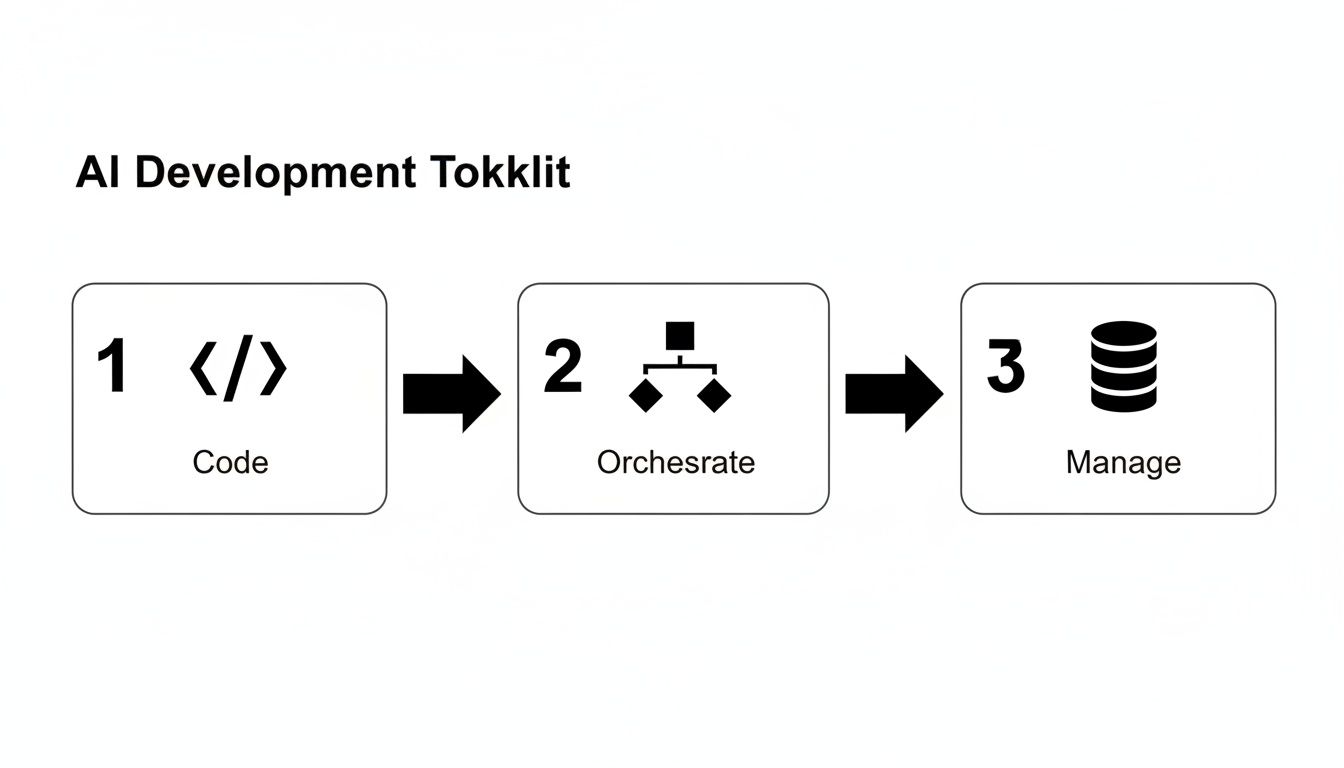
As you can see, this isn’t a straight line. It’s a connected system where the code you write, the way you orchestrate data flow, and how you manage the application all feed back into one another.
A Practical Workflow Example
Let’s make this concrete. Imagine we’re building a customer support chatbot that needs to answer questions using only our company’s internal knowledge base.
Here’s how that breaks down:
-
Ideation and Model Selection: The mission is clear: a chatbot that gives accurate answers based only on our official documentation. We might pick a powerful model like GPT-4o for complex reasoning but plan to route simpler queries to a smaller, faster model to keep costs down.
-
Data Preparation: We gather all our support articles and FAQs, clean them up, and chop them into small, searchable chunks. Each piece is then turned into a numerical representation—an embedding—and loaded into a specialized vector database like Pinecone.
-
Prompt Engineering and Orchestration: This is where the core logic lives. We craft a master prompt that gives the model its personality (“You are a friendly and helpful support assistant”) and its rules (“Only use the provided documents to answer the user’s question”). Our guide on how to code with ChatGPT has some great hands-on techniques for this critical step.
-
Iterative Testing and Evaluation: We build a test suite of common (and tricky) user questions. We then run these tests to check the chatbot’s answers for accuracy, tone, and helpfulness. This isn’t a simple pass/fail; it’s a qualitative review that helps us tweak our prompts and data retrieval logic until it’s just right.
-
Deployment and Monitoring: Once the bot performs well in testing, we push it live. But the work doesn’t stop there. We have to monitor real-world user interactions, flag questions it gets wrong, and watch for any “hallucinations” where it invents facts. This feedback is gold, feeding directly into the next round of improvements.
The RAG Architectural Pattern
The chatbot we just described uses a powerful and increasingly common architectural pattern: Retrieval-Augmented Generation (RAG). RAG is a big deal because it directly tackles one of the biggest weaknesses of large language models—their lack of real-time, domain-specific knowledge.
A standard LLM knows a lot about general world history, but it knows nothing about your company’s product launch next Tuesday or your internal return policy. RAG fixes this by “grounding” the model with your specific, private data before it generates a response.
This pattern is fundamental for building AI applications that are reliable and factual. It dramatically cuts down on hallucinations and gives you an easy way to update the AI’s knowledge base. All you have to do is update the source documents in your vector database—no costly and time-consuming model retraining needed. Digging into advanced AI orchestration techniques can help streamline RAG workflows and other complex patterns.
Getting a handle on these workflows and patterns pulls back the curtain on AI development. It shifts the perspective from an unpredictable art form to a structured engineering discipline focused on building systems that are not only intelligent but also dependable, verifiable, and grounded in truth.
Getting Engineering Right: The New Best Practices
Jumping into AI software development isn’t just about picking the right tools; it’s a whole new way of thinking about engineering. If you try to apply old software rules to AI, you’re going to have a bad time. AI systems are probabilistic and a little bit fuzzy, which means we need a new playbook to build anything robust and reliable.
Think of these practices as the guardrails that turn cool AI experiments into stable, secure products people can actually depend on. They’re what separate a clever hack from a real, engineered system. And the stakes couldn’t be higher.
The industry is pouring unbelievable resources into this space. U.S. private AI investment is projected to hit $109.1 billion in 2024, and the pace is accelerating. According to Stanford’s 2025 AI Index, American institutions released 40 notable models this year, blowing past China’s 15. The real story, though, is that private companies are now producing 90% of all new models—a massive leap from just 60% a few years ago. This explosion of industry-led development makes solid engineering practices more critical than ever. You can dig into more of these software development statistics and trends to see the full picture.
Prompt Engineering Isn’t Magic, It’s a Discipline
Let’s get one thing straight: prompt engineering is the single most important new skill your team needs. It’s not some “dark art” of whispering magic words to an AI. It’s a systematic, repeatable engineering process. You wouldn’t let your team ship code without version control, right? So why would you let them manage prompts in a messy text file?
Here’s what real prompt engineering looks like:
- Systematic Design: You build prompts with intention. This means clear instructions, specific constraints, a few good examples to guide the model (few-shot learning), and a strict definition of the output format you need (like clean JSON).
- Versioning: Treat your prompts just like source code. They belong in Git. Track every change, and tie specific prompt versions to your application releases. This is how you prevent a brilliant new prompt from accidentally breaking something downstream.
- Testing: Create automated tests for your prompts. Think of them as unit tests. You feed the prompt a list of inputs and check that the AI’s output consistently gives you the structure and quality you expect.
How to Tell if Your AI is Actually Working
So, you’ve built an AI feature. Is it any good? With traditional software, a button either works or it doesn’t. With AI, quality is a spectrum. A simple accuracy score can be dangerously misleading.
A model that’s 95% “accurate” but fails on the 5% of cases your most valuable customers care about is a business failure. Your evaluation strategy must reflect business outcomes, not just statistical perfection.
You need to get smarter about evaluation. Start by building a “golden dataset”—a hand-picked collection of inputs and ideal outputs that represent what your users really do. Run your models against this set and measure what actually matters: Is the answer helpful? Is the tone right? Is it factually correct? You can even use another LLM to help score the outputs, which makes the whole process much faster.
A Modern Testing Strategy for AI Systems
Testing an AI app is a whole different beast. The model at its core isn’t deterministic, so your testing has to embrace that uncertainty. It’s a multi-layered game.
Here’s a simple hierarchy for thinking about AI testing:
- Prompt Unit Tests: We just talked about these. They’re your first line of defense, making sure your prompt produces structurally sound output for a known set of inputs.
- Model Integration Tests: This is where you test the entire workflow. For a RAG system, for example, you’d test that the retrieval step finds the right documents and that the final answer is based on them.
- Behavioral and Adversarial Tests: Now it’s time to try and break it. Throw edge cases at the model. Give it ambiguous questions. Try to trick it with prompt injection attacks. You need to know how it behaves under pressure and ensure your safety guardrails hold up.
You Can’t Fly Blind: The Need for Observability
Your job isn’t done when the AI feature goes live. In fact, it’s just beginning. Models can “drift” as user behavior changes or the data they rely on gets stale. Observability is how you watch your system in production to catch problems before your users do.
Here’s what you absolutely must keep an eye on:
- Model Performance: Are the quality scores for real-world traffic starting to dip?
- Latency: How long is it taking to get a response? A slow AI is a useless AI.
- Cost: Keep a close watch on token usage. It’s shockingly easy for API bills to spiral out of control.
- Error Rates: How often is the model failing completely or forcing your app to use a fallback?
By adopting these practices, your team can move from just playing with AI to professionally building with it. This is the discipline that turns fragile prototypes into the kind of production-grade AI software development that can actually scale.
Driving Team Adoption and Measuring Success
Bringing AI tools into your engineering team is about more than just handing out new licenses. It’s a cultural shift. You’re asking developers to move away from purely traditional coding and embrace a more experimental, AI-assisted way of working.
For this to stick, you need more than just cool tech. Success comes down to solid leadership, a real strategy for teaching new skills, and—most importantly—a way to prove the investment is actually paying off. Without these pieces, even the best AI tools will end up as expensive shelfware.
Your real goal is to create an environment where developers feel safe to experiment and even fail. This means providing good training, setting up shared best practices, and creating a space for collaboration, like a dedicated Slack channel or an internal “center of excellence.” When engineers can share what works, individual a-ha moments quickly become team-wide skills.
Getting Your Engineering Team AI-Ready
Your current engineers are your biggest advantage, but they’ll need some new skills to really make AI work for them. The key is to focus on practical, hands-on training that fits into their daily workflow, not abstract machine learning theory.
Here are the core skills to build on:
- Mastering Prompt Engineering: This is a fundamental shift. Teach your engineers to treat prompts like code—something you version, test, and refine. It’s the difference between asking a simple question and giving a precise, structured command that gets a reliable output every time.
- Learning the New Toolchain: Go beyond the basics of a simple AI assistant. Get your team hands-on with orchestration tools like LangChain and show them how to use vector databases to build powerful features like Retrieval-Augmented Generation (RAG).
- Thinking in AI Systems: Your senior engineers need to start thinking about new architectural patterns. This includes designing systems that can handle non-deterministic outputs, building in smart fallbacks for when a model doesn’t cooperate, and understanding the real-world trade-offs between different models.
Measuring What Actually Matters
To make the case for AI, you have to measure its impact. But forget about old-school metrics like lines of code—they’re completely useless here. You need to track things that show real improvements in efficiency, code quality, and the day-to-day lives of your developers.
The ultimate goal of measuring AI adoption isn’t just about proving ROI; it’s about creating a feedback loop. When developers can see how a new technique reduces deployment time or eliminates tedious tasks, they become champions for the change themselves.
Start by tracking KPIs that are directly tied to your development lifecycle. These numbers will tell the true story of your AI adoption. For a deeper look into this topic, our guide on developer productivity metrics offers some great frameworks.
Key Metrics for AI Development Success
To show that AI is working, focus on a mix of metrics that cover speed, quality, and cost.
- Shorter Development Cycles: Track the time it takes for a ticket to go from “in-progress” to “deployed.” AI should be shrinking this loop by speeding up coding, debugging, and testing.
- Happier Developers: This isn’t just a “nice to have.” Use simple, regular surveys to see how your team feels. A quick question like, “How much did AI help you get unblocked this week?” can give you powerful insights into where the tools are having the biggest impact.
- Smarter Spending: Keep a close eye on your API costs from LLM providers and any GPU infrastructure expenses. The goal is to connect these costs to productivity gains, making sure you’re using the right model for the job and getting a clear return on your investment.
Common Pitfalls and How to Avoid Them

Jumping into AI software development means facing a totally different set of problems than you’re used to. These aren’t just your standard software bugs; they’re quirks that come from the very nature of AI. Overlooking them can lead to flaky products, gaping security holes, and budgets that spiral out of control.
Think of building an AI application like navigating a new kind of terrain—you need to know where the traps are hidden. Many teams have learned these lessons the hard way, but you can get a head start by understanding and overcoming common AI implementation challenges before they bite you.
Taming Unpredictable Model Behavior
One of the first and most frustrating issues teams run into is dealing with model “hallucinations.” This is when an AI just makes stuff up but presents it with complete confidence. It might invent an API function that doesn’t exist, cite a research paper that was never written, or give you a perfectly plausible but totally wrong piece of information.
The best way to combat this is by grounding your model. Techniques like Retrieval-Augmented Generation (RAG) are your best friend here. By forcing the AI to pull its answers directly from a source you trust—like your company’s internal documentation—you rein it in, dramatically cutting down its ability to go off-script.
The Hidden Costs and Sneaky Security Risks
Another major gotcha is not realizing how quickly AI costs can add up. Every API call to a powerful model costs money based on tokens, and as your app grows, that usage can skyrocket without warning. Your cool new AI feature can turn into a serious financial drain if you’re not watching it closely.
When it comes to security, AI demands a fresh perspective. Prompt injection is a huge risk, where a clever user tricks your model into ignoring its original instructions and doing what they want instead. If you’re not careful, they could expose sensitive data or find ways to misuse your system.
You have to treat all user input as potentially hostile. Put strict validation and cleaning processes in place to filter out any malicious instructions. It’s also smart to use the smallest, cheapest model that gets the job done right. Don’t use a sledgehammer to crack a nut; picking an oversized, expensive model for a simple task is a classic way to burn through your budget for no good reason.
Lastly, don’t get caught off guard by inconsistency. A prompt that works flawlessly one day might give you a slightly different answer the next, especially if the model provider pushes a silent update. This is precisely why versioning your prompts and having a solid testing and evaluation process are absolutely essential for any serious AI development work.
To give you a clearer picture, here’s a quick rundown of these common issues and how to tackle them head-on.
Common AI Development Pitfalls and Solutions
| Pitfall | Description | Mitigation Strategy |
|---|---|---|
| Model Hallucinations | The AI confidently generates false or fabricated information that appears factual. | Implement Retrieval-Augmented Generation (RAG) to ground the model in a trusted knowledge base. |
| Spiraling Costs | Unmonitored API usage leads to unexpectedly high bills as the application scales. | Set up strict monitoring, implement caching, and always choose the most cost-effective model for the task. |
| Prompt Injection | Malicious users craft inputs to bypass instructions and hijack the model’s behavior. | Sanitize all user inputs rigorously and establish clear, firm operational boundaries for the AI. |
| Output Inconsistency | Model outputs change over time, even with the same prompt, due to provider updates. | Version control all prompts and build a robust evaluation suite to test for regressions continuously. |
By keeping these potential problems in mind, you can build more reliable, secure, and cost-effective AI applications from the start.
A Few Common Questions
Jumping into AI development can feel like learning a whole new language, even for seasoned engineers. It’s a different world from the traditional coding we’re used to. Let’s clear up a few of the most common questions that pop up.
How Is This Different From Regular Software Development?
Think of traditional development as being deterministic. You write a specific set of rules, and the code follows them to the letter, every single time. A function to add two numbers will always give you the same answer for the same inputs—no surprises there.
AI development, on the other hand, is probabilistic. You aren’t writing explicit rules; you’re working with models that learned from massive datasets. Their outputs are based on patterns and probabilities, not guarantees. Your job shifts from writing rigid logic to guiding the model with smart prompts, picking the right model for the task, and figuring out how to handle answers that aren’t always 100% predictable. It’s a whole new ballgame that requires a different mindset and testing approach.
Do I Need a Ph.D. in Machine Learning to Get Started?
Absolutely not. That’s the best part. Thanks to incredible pre-trained models and easy-to-use APIs from companies like OpenAI, Anthropic, and Google, any developer can build powerful AI features without needing a deep machine learning background.
The skill set has changed. It’s less about algorithms and more about smart prompting, using orchestration tools like LangChain to connect the dots, and managing the overall system. In fact, solid software engineering fundamentals are more important than ever to build a reliable application around these powerful, non-deterministic models.
How on Earth Do You Test and Debug an AI App?
You can’t just write a standard unit test and call it a day. Testing an AI application is a completely different beast because you have to account for that unpredictability. It’s more about building confidence in the system through a few different layers.
- Prompt Unit Tests: The first step is to treat your prompts like code. Create simple tests to make sure a prompt consistently returns the kind of output you expect, like properly formatted JSON, given a few sample inputs.
- Evaluation Sets: This is a big one. You need to build what’s often called a “golden set”—a curated list of inputs and the ideal outputs you’d want to see. Running the model against this set helps you measure its performance on the tasks that actually matter.
- Production Monitoring: Once your app is live, you need great observability. You have to keep a close eye on performance, watch for strange “hallucinations” or drift, and, of course, monitor your API costs.
What Are the Biggest Costs I Should Expect?
The two big expenses in AI development are usually API usage and infrastructure. The API costs from LLM providers are token-based, which means you pay for the data you send and the data you get back. This can add up shockingly fast as your user base grows.
If you go down the path of fine-tuning or hosting your own models, then the cost of GPUs for training and inference becomes a major line item. Because of this, getting good at cost management is non-negotiable. Things like smart caching, prompt optimization, and choosing the smallest model that can still do the job well are essential for keeping your budget in check.
AI Software Dev Scorecard
Use this scorecard to shift from building traditional software to engineering intelligent, production-grade AI systems.
📊 Core Metrics
- Development Cycle Time — Measure the reduction in time from ticket creation to deployment.
- Model Quality Score — Track accuracy and helpfulness scores from your evaluation datasets.
- API Cost Per Feature — Monitor token usage and infrastructure costs to ensure ROI.
🕹️ My Cheatcodes
- 🌱 Ground Your Models — Use RAG to combat hallucinations by forcing the AI to use trusted data sources.
- 🦎 Version Your Prompts — Treat prompts like code; put them in Git and run tests to prevent regressions.
- ⚡ Right-Size Your Model — Start with the smallest, cheapest model that can solve the problem effectively.
📈 Reflection Points
- 💡 Have I built fallbacks for when the model's output is unpredictable or wrong?
- 🧩 Is my team treating prompt engineering as a disciplined practice, not just a guessing game?
- 📘 Can I clearly tie my AI feature's cost to a measurable business outcome?
Gallery
Lemon shots



