
AI Pair Programming Your Guide to Shipping Code Faster
Picture this: you’re coding, but you have a partner who never needs a coffee break, has basically memorized every public code repository on the internet, and can spit out a solution in milliseconds. That’s the gist of AI pair programming. It’s the classic two-devs-one-keyboard model, but your partner is an AI like GitHub Copilot living right inside your editor.

What Is AI Pair Programming, Really?
AI pair programming isn’t just a fancy syntax checker. It fundamentally shifts coding from a solo grind into a real-time collaboration. Your AI partner actively joins in on the creative process of building software. It’s not about replacing developers; it’s about amplifying what they can do, making the whole workflow feel faster and more dynamic.
Think of the AI as an expert navigator on a long road trip. It’s not just holding the map—it’s helping you drive.
- It calls out the next turn: The AI suggests entire functions or code blocks, often figuring out your next logical step before you’ve even started typing.
- It spots traffic jams ahead: It can flag potential bugs, point out inefficient patterns, and suggest better ways to write a piece of code, saving you from headaches later on.
- It handles the boring paperwork: It automates the grunt work like writing boilerplate code, generating documentation, and creating unit tests. This frees you up to think about the actual problem you’re trying to solve.
The New Normal for Developers
This way of working isn’t some fringe experiment anymore; it’s quickly becoming how modern software gets built. Adoption has been incredibly fast. A recent JetBrains report found that a staggering 85% of developers now use AI coding assistants like Copilot or ChatGPT in their daily work. Solo coding sessions are now dynamic duos with an AI. You can dig into what this means for the future of development in this detailed report on AI assistant statistics.
This isn’t just a new tool. It’s a completely different way to approach building software, one that cuts down on mental fatigue and makes the whole process more engaging.
To get a clearer picture of how this changes the game, let’s compare the old way with the new.
Traditional vs AI Pair Programming At a Glance
Here’s a quick comparison highlighting the key differences and advantages of integrating an AI partner into the development workflow.
| Aspect | Traditional Pair Programming | AI Pair Programming |
|---|---|---|
| Partner | A human developer | An AI model (e.g., GitHub Copilot) |
| Availability | Dependent on a colleague’s schedule | 24/7, on-demand |
| Knowledge Base | Limited to the human partner’s experience | Vast, trained on massive public codebases |
| Speed | Relies on human typing and thinking speed | Instantaneous suggestions and code generation |
| Core Function | Collaborative problem-solving, knowledge sharing | Code generation, bug detection, automation |
| Communication | Verbal discussion and real-time interaction | Natural language prompts and code comments |
| Cost | The salary of a second developer | A monthly subscription fee |
Ultimately, while traditional pairing is fantastic for mentorship and complex problem-solving, AI pairing excels at boosting individual productivity and tackling the routine tasks that slow us down.
At its core, AI pair programming transforms your code editor from a simple canvas into an intelligent workspace. The AI acts as a constant sounding board, offering ideas, catching mistakes, and handling the repetitive work so you can solve the truly complex problems. It’s about enhancing creativity and efficiency in tandem.
By handing off some of the cognitive load to an AI, developers can stay focused longer, try out more creative approaches, and ultimately ship better code, faster. It’s a more powerful and sustainable way to write software, whether you’re a solo dev or part of a huge team.
The Real Payoff of Coding with an AI Partner
Bringing an AI into your coding workflow is more than just a neat trick; it has a real impact on how software gets built, day in and day out. These aren’t just fuzzy benefits either. We’re talking about measurable wins that you and your engineering leads will notice, leading to faster shipping times and more solid code.

Huge Productivity Gains
The first thing you’ll notice with AI pair programming is a serious speed boost. Developers can hand off the grunt work—all those repetitive, time-sucking tasks—to their AI assistant. This frees up crucial mental bandwidth for what really matters: high-level problem-solving and smart architectural choices.
Instead of grinding out unit tests for an hour, you can just ask the AI to generate a full suite in a few minutes. This means you can get better test coverage in a tiny fraction of the time. Stuck with a messy legacy file? Your AI can scan it, break it down, and propose refactoring options to clean up complex functions with a simple prompt.
Think of it as compressing the tedious parts of coding. The AI handles the boilerplate, syntax lookup, and common patterns, allowing the developer to maintain a state of flow and focus exclusively on the core logic and business value.
Better Code Quality
Speeding up doesn’t mean you have to cut corners on quality. In fact, coding with an AI often makes your code better. These models have been trained on mountains of open-source code, so they have a deep-seated knowledge of best practices, common mistakes, and tricky security flaws.
As you type, the AI acts like a real-time code reviewer, flagging potential problems long before they end up in a pull request. It might spot a chance to use a more efficient algorithm, warn you about a possible null pointer exception, or suggest a safer way to handle user input. This quiet, continuous feedback helps enforce your team’s standards without any extra effort.
For engineering leaders, this is gold. It means fewer bugs sneak into production. The AI acts as a first line of defense, catching the small stuff that’s easy for a human reviewer to miss, leading to a much more stable and maintainable codebase.
A Smoother Developer Experience
Beyond speed and quality, an AI partner just makes the day-to-day work of coding less of a headache. We’ve all been there—staring at a problem, completely stuck. An AI can be the perfect sounding board, offering a fresh perspective or explaining a confusing concept to help you break through the block.
This kind of collaboration lightens the mental load and helps fight burnout. Developers spend less time digging through Stack Overflow and more time actually building things. When you automate the boring stuff like writing documentation or generating boilerplate, the whole process feels more creative and satisfying.
A happy developer is a productive developer. By making the job better, AI pair programming helps build a more innovative and resilient engineering culture. That’s how you keep your best people around and drive real success. The result is a team that not only ships faster but also enjoys the craft of building great software.
Common Risks and How to Avoid Them
AI pair programming can absolutely supercharge your team’s speed and output, but jumping in without thinking through the downsides can create a whole new set of problems. Like any powerful tool, you have to know how to handle it. Understanding the common pitfalls—and knowing how to sidestep them—is the key to getting all the good stuff without the headaches.
If you ignore these risks, you could end up with a codebase that’s a nightmare to maintain, riddled with bugs, or even stunts the growth of your junior developers. By getting out ahead of these challenges, you can build an AI-assisted workflow that’s both responsible and sustainable.
The Danger of AI Hallucinations
AI models are built to be helpful, but they don’t actually “understand” code in the way a human does. Sometimes, they’ll spit out code that looks perfectly fine on the surface but contains subtle, hard-to-find bugs. These “hallucinations” can be anything from using a function that doesn’t exist to implementing a deeply flawed security pattern.
A developer in a hurry might just accept the code and move on, unknowingly planting a ticking time bomb in your application. The AI’s confident tone can be incredibly misleading, making it far too easy to trust suggestions that are fundamentally broken.
The most dangerous bug isn’t the one that crashes your app right away. It’s the one that silently corrupts data or opens up a security hole. Unchecked AI-generated code can be a prime source for these kinds of nasty surprises.
The only way to fight this is to treat every piece of AI-generated code as if it came from a brand-new junior dev: trust, but verify.
- Make Code Reviews Non-Negotiable: Never, ever skip a thorough human review of AI-generated code, especially when it touches critical business logic.
- Lean on Your Tests: A solid automated test suite is your best friend. Make sure any code coming from an AI is covered by unit, integration, and end-to-end tests to prove it works as expected.
- Ask “Why?”: Challenge the AI. Ask it to explain its logic. If it can’t give you a clear reason for its solution, that’s a huge red flag.
So. Much. Duplication.
AI assistants are fantastic at recognizing and repeating patterns, but that strength is also a major weakness. If you ask an AI to solve a similar problem in a few different places, it will almost always generate nearly identical blocks of code instead of suggesting you create a reusable function or class. This leads straight to code duplication, a classic architectural sin that makes future maintenance a real pain.
The sheer volume of code now flowing from these tools is staggering. In fact, the rise of AI has been linked to a 4x spike in code duplication, which is both a sign of massive productivity and a serious warning for anyone who has to maintain that code long-term. You can dig into these trends and more with insights from GitClear’s deep dive into 153 million lines of code.
To keep your codebase clean, turn your AI into a refactoring partner:
- Spot Duplicates Early: Use static analysis tools to automatically flag duplicated logic before it gets merged.
- Prompt for Abstraction: When you see repetition, don’t just fix it yourself. Ask your AI assistant, “How can we refactor this duplicated logic into a single, reusable function?”
- Live by the DRY Principle: Make “Don’t Repeat Yourself” a core tenet of your team’s AI-assisted workflow.
Over-Reliance and Stifled Learning
This might be the biggest long-term risk of all, especially for junior developers. When a developer can just accept code without ever having to understand how it works, they miss out on critical learning opportunities. They get really good at writing prompts, but they never learn how to truly problem-solve.
This can create a dangerous skill gap, leaving you with developers who can handle simple, repetitive tasks but are lost when faced with a complex, novel problem that requires deep thinking. The AI becomes a crutch, and they never build the mental models needed to become great engineers.
The best way to prevent this is to treat the AI as a teaching tool, not just a code factory:
- Explain and Elaborate: Encourage your team to constantly ask the AI to explain concepts, clarify weird syntax, or walk them through the logic behind a suggestion.
- Start with the “Why”: Before ever asking the AI for a solution, a developer should first try to outline a plan themselves. What are the steps? What’s the goal?
- Pair AI with Human Mentors: An AI can’t replace the wisdom and context of a senior developer. Use the AI to handle the “how,” but always rely on human mentors to teach the “why.”
How to Get Started with AI Pair Programming
Jumping into AI pair programming isn’t like flipping a switch; it’s more like building a new muscle. The trick is to start small. Find a few quick wins, then slowly weave the AI into more complex parts of your daily work. This is how you turn skepticism into real enthusiasm—by proving the tool’s value right from the get-go.
Whether you’re a developer flying solo or you’re in charge of an entire engineering department, rolling this out thoughtfully makes all the difference. For an individual, it’s about building confidence. For a team, it’s about establishing shared habits that actually stick.
A Phased Rollout for Your Team
Getting a whole team on board with AI tools requires a bit of strategy. If you just throw a new tool at everyone, you’ll get chaos. A phased approach, on the other hand, builds momentum.
-
Start with a Pilot Group: Find 3-5 developers who are genuinely curious about AI. Think of them as your vanguard. They’ll be the ones to experiment, find what works, and become your internal champions.
-
Establish a Prompt Library: As the pilot group starts using the tools, have them document their winning prompts. A shared wiki or repository is perfect for this. It becomes a go-to resource for effective prompts, reusable “cheatcodes,” and solid strategies for common tasks like refactoring or generating tests.
-
Define Review Standards: Make one thing crystal clear: AI suggestions are just that—suggestions. Your team’s critical thinking, rigorous testing, and human oversight are still the most important part of the process. Set firm guidelines for how AI-generated code gets reviewed.
-
Share Early Wins: When the pilot team starts seeing results, get them to share those stories. A quick demo, a lunch-and-learn, or a few testimonials can be incredibly powerful. It’s always better to show the benefits of AI pair programming, not just talk about them.
This infographic breaks down the main risks you’ll want to keep an eye on as your team starts using AI coding assistants.
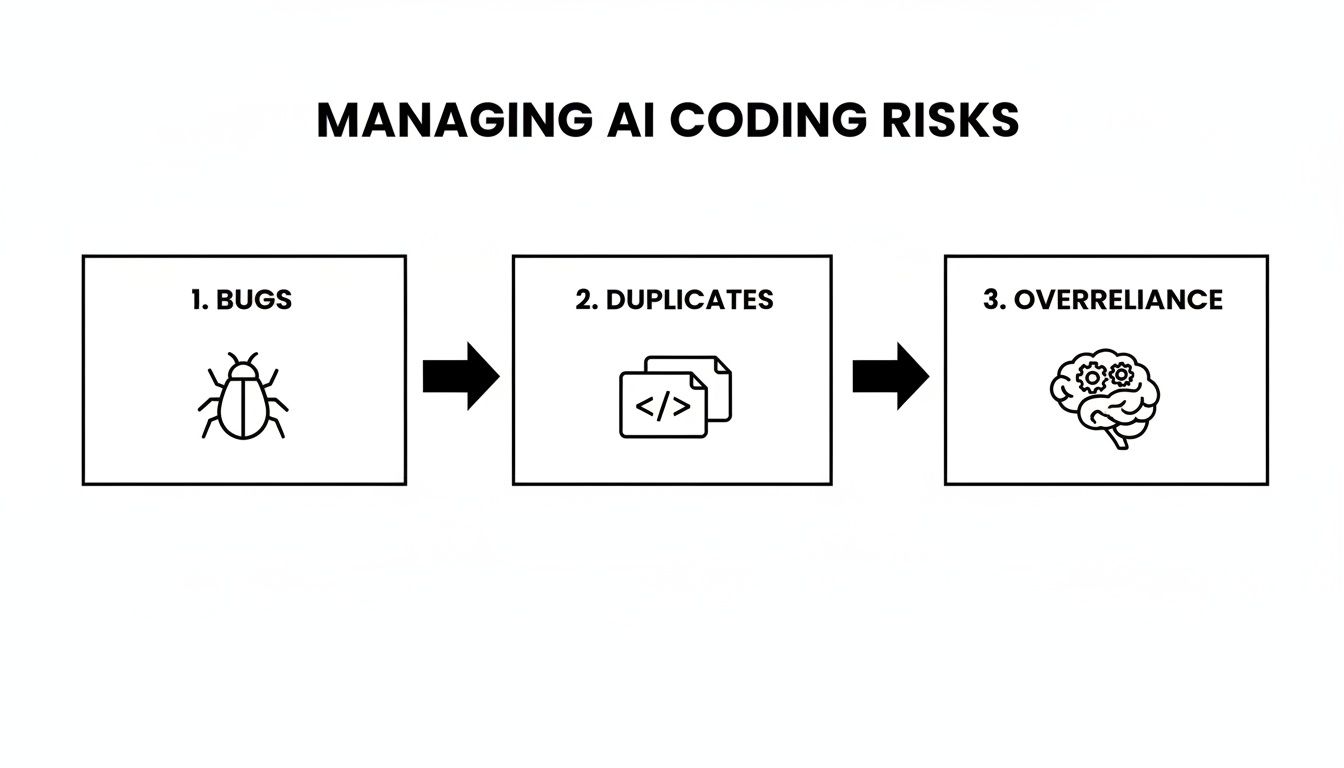
Ultimately, handling potential issues like AI-generated bugs, duplicated code, or over-reliance comes down to being proactive and building smart checks into your team’s workflow.
An Adoption Plan for Individual Developers
If you’re a developer looking to get started on your own, the path is much simpler. The goal is to make the AI feel less like a tool and more like a natural extension of your own coding process.
First, pick a tool that plugs right into your IDE. Something like GitHub Copilot for VS Code is a fantastic starting point because it feels so seamless, almost like a super-powered autocomplete. Tabnine and Amazon CodeWhisperer are also solid options with great communities behind them. If you want to dig deeper into the different tools out there, check out our guide on how to code with ChatGPT, Claude, Gemini, and Copilot.
Once you’ve got it installed, don’t try to solve world hunger with it on day one. Instead, build up your confidence by tackling small, low-risk tasks that deliver a high-value return.
Pro Tip: Your first goal isn’t to solve some massive architectural puzzle. It’s just to finish one small task faster than you could have on your own. That’s the “aha!” moment you’re looking for. It’s what builds momentum.
Try using your new AI partner for things like:
- Generating Documentation: Ask it to write docstrings for a function you’ve already written.
- Writing Simple Unit Tests: Give it a function and ask for a basic test case.
- Boilerplate Code: Use it to quickly scaffold a new component or an API endpoint.
- Translating Code: Ask it to convert a snippet from one language to another, like from Python to JavaScript.
These little victories are what show you the real power of the tool. They also teach you how to “speak its language” with better prompts. Once you’re comfortable, you can start moving on to bigger things like debugging, refactoring, and even implementing entire features. It’s this gradual approach that makes the learning curve feel easy and the benefits feel immediate.
Essential Tools and Workflows for Modern Developers
Adopting AI pair programming isn’t just about picking a tool; it’s about weaving it into your daily habits until it feels like second nature. The real goal is to get away from clumsy context-switching and move toward a fluid, conversational style of coding where your AI partner almost anticipates your next move.
The market is flooded with options, but a few really stand out because of their tight integration and powerful features. For most of us, the journey starts with an assistant that lives right inside our Integrated Development Environment (IDE). This keeps the friction low and lets you stay focused. If you’re looking for ways to improve workflow efficiency with AI-driven strategies, finding that perfect in-IDE fit is the first step.
Choosing Your AI Coding Assistant
While there are plenty of tools out there, three major players tend to dominate the conversation. This is mostly due to their powerful models and how smoothly they plug into popular editors like VS Code and Cursor. Honestly, picking the right one usually comes down to your team’s ecosystem and the specific needs of your project.
For a deeper look, check out our guide to the top AI developer tools available today.
Choosing the right AI assistant can feel overwhelming, but most developers find their match with one of the leading tools. Each has its own strengths, so the best choice often depends on your specific projects and team priorities.
Top AI Pair Programming Tool Comparison
| Tool | Best For | Key Feature | IDE Integration |
|---|---|---|---|
| GitHub Copilot | General-purpose coding, open-source projects, and teams using the GitHub ecosystem. | Deep contextual understanding and “whole function” suggestions powered by OpenAI’s models. | Excellent, native feel in VS Code, JetBrains IDEs, and Neovim. |
| Tabnine | Enterprise teams concerned with privacy and code security; works with self-hosted models. | Code privacy controls and personalized suggestions based on your team’s specific codebase. | Wide support for many IDEs, including VS Code, IntelliJ, and Sublime Text. |
| Amazon CodeWhisperer | Developers working within the AWS ecosystem, focused on building with AWS services. | AI-powered security scans and specialized suggestions for AWS APIs and services. | Strong integration with VS Code, JetBrains IDEs, and AWS Cloud9. |
Ultimately, the best tool is the one that fits so seamlessly into your workflow that you forget you’re even using it. Don’t be afraid to trial a few to see which one “clicks” for you and your team.
A Practical Workflow Example: Building an API Endpoint
To make this feel less abstract, let’s walk through a task we’ve all done a million times: building a new API endpoint. In this scenario, you act as the architect, guiding the high-level strategy, while the AI does the heavy lifting on implementation.
1. Scaffolding the Initial Structure Instead of manually creating files and writing boilerplate, you start with a simple prompt in your IDE’s chat panel.
Prompt: "Scaffold a new Express.js route for '/products' with a controller and a service file. Use a standard RESTful pattern."
Instantly, the AI generates the file structure (routes/products.js, controllers/products.js, services/products.js) with all the necessary placeholder code. No more tedious setup.
2. Defining the Data Model Next up, you need a data model for the product.
Prompt: "In the models directory, create a Mongoose schema for a 'Product' with fields: name (string, required), price (number, required), and sku (string, unique)."
The AI spits out a perfect schema, complete with validation rules and indexing. That’s a few minutes saved and a few potential typos avoided.
3. Implementing the Business Logic
Time for the actual logic. You pop open services/products.js.
Prompt: "Write the logic for a 'createProduct' function that takes product data, validates it against the model, and saves it to the database. Handle potential errors."
The AI generates the async function, wrapping it in a try...catch block for proper error handling and returning the new product on success.
4. Generating Unit Tests With the logic done, you need to test it.
Prompt: "Generate Jest unit tests for the 'createProduct' service. Include a success case and a test for when validation fails."
Just like that, you have a complete test file with mocked dependencies and assertions for the key outcomes.
This workflow highlights a huge shift in our roles. The developer isn’t there to type every single line of code. Instead, you provide clear intent and then validate the output. The AI becomes your tireless implementer, turning high-level instructions into working, tested code.
This back-and-forth process cuts down the time spent on repetitive tasks dramatically. You get to stay in a state of flow, thinking about what to build next, not how to write the boilerplate for it.
How to Measure the Impact of AI on Your Team
Adopting a new tool is easy. Proving it actually works? That’s the hard part. How can you tell if AI pair programming is a genuine game-changer for your team or just the latest shiny object? To find out, you need to look past gut feelings and dig into the data.
Tracking the right metrics is what turns AI adoption from a hopeful experiment into a measurable strategy. By focusing on real numbers, you can pinpoint exactly where AI is speeding things up, where it’s boosting code quality, and even where your team might need a little more training. This data-backed approach is how you justify the investment and fine-tune your process for the long haul.
Developer Throughput and Velocity
One of the first places you’ll see an impact from AI pair programming is developer speed. When your team can instantly generate boilerplate, write tests, and get smart suggestions on the fly, they should be able to ship code much faster. We’re not just talking about lines of code; we’re talking about delivering real value, quicker.
Look for metrics that show this acceleration:
- Pull Requests (PRs) Merged Per Developer: This is a fantastic indicator of pure output. If this number starts to climb, it means developers are finishing tasks and getting them through review more efficiently.
- Cycle Time: How long does it take a ticket to get from “In Progress” to “Done”? A shorter cycle time is a clear sign that AI is greasing the wheels and cutting down friction in your development loop.
- Code Churn: Keep an eye on how much code gets rewritten right after it’s committed. A drop in churn suggests the first draft of AI-assisted code is higher quality and needs less rework.
Recent industry data backs this up. An analysis of over 51,000 developers found that heavy AI users merge a median of 2.3 pull requests per week. That’s a whopping 60% increase compared to the 1.4-1.8 PRs managed by light users. You can dig into the full story in this report on AI coding assistant statistics.
Code Quality and System Health
Shipping faster doesn’t mean much if you’re also shipping more bugs. One of the big promises of AI assistants is that they act like a real-time code reviewer, catching potential problems before they ever make it into a pull request. To really see if AI is delivering, you need solid engineering productivity measurement in place.
Here are a few key quality metrics to watch:
- Bug Rate in Production: Are you seeing fewer bugs or hotfixes pop up after a release? A downward trend here is a great sign that AI is helping you write more stable, reliable code.
- Test Coverage: Check the percentage of your codebase covered by automated tests. AI makes writing tests so much easier, so you should see this number—and your confidence—go up.
- Complexity of AI-Suggested Code: Use static analysis tools to check the cyclomatic complexity of AI-generated code. This helps you make sure you’re not accidentally trading speed for unmaintainable “spaghetti code.”
Adoption and Engagement Metrics
A tool is only valuable if people actually use it. Tracking team-wide adoption gives you a clear picture of how well the new workflow is catching on. If adoption is low, it might be a signal that you need more training, better guidance on writing prompts, or clearer best practices. For any engineering leader, knowing which software engineering productivity metrics to monitor is what separates success from failure.
By measuring these key areas—throughput, quality, and adoption—you create a powerful feedback loop. The data tells you what’s working, what’s not, and where to focus your energy to get the absolute most out of your team’s new AI partner. This is how AI stops being just a tool and becomes a core part of your engineering strategy.
Your AI Pair Programming Questions, Answered
Whenever I talk to teams about bringing AI pair programming into their workflow, the same handful of questions pop up. They’re good questions—the kind you should be asking before jumping into any new technology. Let’s get them answered so you can move forward with your eyes open.
“Will This Thing Steal Our Code?”
This is always the first question, and for good reason. Your codebase is your crown jewel. The short answer is: no, a reputable tool won’t steal your code.
Big players like GitHub Copilot and Tabnine have enterprise plans built specifically to address this. These plans are designed to ensure your proprietary code is never, ever used to train their public models. Your IP stays yours. But that doesn’t mean you can just click “accept” and move on.
You absolutely have to read the terms of service and data handling policies for any tool you’re considering. It’s a non-negotiable step. Make sure their policies align with your company’s security and compliance standards before you write a single line of code with it.
“Are We Going to Become Too Dependent on It?”
Yes, this is a real risk. It’s something I worry about, especially for junior developers who are still building their fundamental skills. The goal is to use AI as a launchpad, not a crutch. If you’re not careful, over-reliance can lead to a shallow understanding of what’s actually happening under the hood.
The key is to build a culture of curiosity, not just acceptance.
- Always ask “Why?”: Instead of just copy-pasting a suggestion, encourage your developers to ask the AI to explain itself. “Explain this regex to me” or “Why is this a better approach than X?” turns the tool from a code monkey into a private tutor.
- Think First, Prompt Second: For tricky problems, get into the habit of sketching out a solution on your own before asking the AI for help. This keeps your own problem-solving muscles strong.
- The Human is Still in Charge: Code reviews are more important than ever. Emphasize that the developer, not the AI, is ultimately responsible for what gets merged. A human must always validate the logic.
“How Does It Handle Really Complex, Specific Problems?”
AI tools are fantastic at spitting out boilerplate, writing standard unit tests, and solving problems that have been solved a million times before. When it comes to your unique, context-heavy business logic, its usefulness is directly tied to the quality of the context you provide.
I tell people to think of the AI as a brilliant but brand-new hire. Without any context, it’s just guessing. But the more information you give it, the more helpful it becomes. That means:
- Having the right files open in your editor.
- Writing clean, descriptive comments and function names.
- Giving it clear examples of what you want in and what you expect out.
For a massive, thorny problem, the AI isn’t going to solve the whole thing for you. Its real strength is in helping you knock down the smaller, well-defined tasks within that larger architecture, while you—the human—steer the ship.
Ready to see how your team is really using AI? Zest provides the metrics and workflows you need to turn AI adoption into measurable productivity gains. Get insights into what’s working, share winning prompts, and help your entire team ship faster. Start optimizing your AI-assisted workflows today at https://meetzest.com.
Master AI Pair Programming
Turn AI suggestions into production-ready code by adopting a workflow of healthy skepticism and continuous verification.
📊 Core Metrics
- Developer Throughput — Change in pull requests merged per developer per week.
- Code Quality Score — Reduction in production bugs and code complexity post-adoption.
- AI Adoption Rate — Percentage of the team actively using AI coding assistants daily.
🕹️ My Cheatcodes
- 🌱 Context is King — Always provide relevant open files and clear comments before asking for complex code.
- 🦎 Trust but Verify — Treat every AI suggestion as if it came from a junior developer; review and test it rigorously.
- ⚡ Prompt for Explanation — Don't just accept code. Ask the AI "Why did you choose this approach?" to deepen your own understanding.
📈 Reflection Points
- 💡 Am I using the AI as a crutch or a collaborator?
- 🧩 Did I validate this AI-generated logic with its own unit test?
- 📘 Could this AI-generated code be refactored into a more reusable function?
Gallery
Lemon shots



