
Ai pair programmer: Elevate Coding with Your AI Partner
Picture this: you’re coding, and right there with you is a seasoned co-pilot who knows exactly what you’re trying to do. They suggest the perfect line of code, handle the boring, repetitive stuff in a flash, and even spot potential issues before you do. That’s what it feels like to use an AI pair programmer. It’s not about replacing developers; it’s about giving them a super-intelligent partner right inside their editor.
What Is an AI Pair Programmer Really
An AI pair programmer is a smart tool that helps you write, fix, and understand code as you work. Think of it as autocomplete on steroids. Instead of just guessing the next word, it gets the bigger picture—the context of your entire project.
This means it can generate whole functions from a simple comment, finish complex code blocks for you, and even write the documentation when you’re done. These tools have been trained on billions of lines of code from public repositories, so they recognize common patterns, understand programming languages deeply, and can figure out what you’re trying to achieve. That’s what makes them so much more powerful than the old rule-based coding assistants.
From Human Collaboration to AI Partnership
To really get what an AI pair programmer is all about, it helps to look at where the idea came from. For years, developers have used traditional pair programming, where two people share one computer. One person—the “driver”—writes the code, while the “navigator” reviews it and thinks strategically about the overall design. It’s a proven method for improving code quality and sharing knowledge.
An AI pair programmer basically digitizes that relationship, with the AI playing the role of the navigator. It’s always on, always ready, and has instant access to a massive database of code. This partnership brings some serious advantages:
- Faster Development: Need boilerplate code, a tricky algorithm, or a set of unit tests? The AI can generate it in seconds, letting you focus on the creative, high-level problem-solving.
- Deeper Learning: Stuck on a piece of legacy code or an unfamiliar library? Just ask the AI to explain it. Your editor suddenly becomes a powerful learning tool.
- Better Code Quality: The AI can suggest best practices, flag potential bugs, and offer performance improvements while you’re still writing the code.
The key isn’t to fear this shift—it’s to figure out how to work with it. Good developers are still absolutely critical. We’re the ones who need to understand system design, see the big-picture problems, and make sure the code the AI generates actually works.
At the end of the day, an AI pair programmer turns coding from a solo activity into a dynamic team effort between human and machine. It multiplies your effectiveness, making you a better, faster developer. This lets you cut down on the tedious parts of the job and spend more time on the fun stuff: building great software.
The Journey from Autocomplete to AI Partners
The idea of a smart coding assistant isn’t exactly new, but the jump from basic code hints to a true AI pair programmer happened a lot faster than anyone expected. Early tools were definitely helpful, but they were limited. Think of them more like a digital dictionary than a creative partner. This wasn’t a single “aha!” moment, but a series of breakthroughs that completely changed how developers interact with their tools.
It all started with simple, rule-based systems. You had linters catching syntax errors and autocomplete suggesting the next few letters of a variable name. They were useful, for sure, but they had no real “understanding” of your code. They couldn’t grasp your intent, the logic behind your application, or the subtle details of a tricky problem. They were just matching patterns on the surface.
The Rise of Language Models
The game completely changed with the arrival of transformer architecture and the explosion of Large Language Models (LLMs) that followed. Unlike the old tools, LLMs are trained on mind-boggling amounts of data—billions of lines of code and plain English text from across the internet. This allows them to understand not just syntax, but the meaning behind it, the context, and even high-level programming concepts.
This leap in technology is what took us from simple completion to true generation. Instead of just suggesting a function name, an AI pair programmer could now write the entire function for you, just based on a comment. That’s the core difference: understanding your goal, not just your keystrokes.
The real distinction is moving from a tool that corrects you to a partner that collaborates with you. It’s the difference between a spellchecker and a co-author helping you write the next chapter.
This rapid progress is happening right as the software industry is booming. The pressure to build and ship software faster than ever is immense. Between early 2022 and early 2025, the number of professional developers worldwide is projected to grow by an astonishing 70%, jumping from 21.8 million to 36.5 million. This kind of growth creates a massive need for tools that can boost efficiency without sacrificing quality.
From Rigid Rules to Creative Collaboration
This whole evolution has created a new class of coding assistants that are far more capable and intuitive. If you’re curious about what’s out there, you can check out our guide on the best AI coding assistants. Today’s tools have moved way beyond simple suggestions and offer a much more dynamic partnership.
Here’s a quick look at how we got here:
- Static Analysis: The early days. These tools just focused on spotting syntax errors and style issues based on a fixed set of rules.
- Intelligent Autocomplete: The first real step toward context awareness. These tools could suggest relevant variables and functions based on the code in your current file.
- Generative Models: The modern era. Now, an AI can generate whole blocks of code, explain complex logic, and even refactor existing functions based on plain English commands.
This journey from basic autocomplete to a context-aware AI pair programmer is a fundamental shift. Developers now have a partner that can handle the boring stuff, offer creative solutions, and speed up the entire development process. It frees you up to focus on what actually matters—solving hard problems and building great software.
How AI Pair Programmers Work Inside Your Editor
The real magic of an AI pair programmer is that it doesn’t live in a separate window. It’s right there with you, integrated directly into your code editor, whether that’s VS Code or a more AI-native tool like Cursor. This turns your familiar coding environment into a truly collaborative space, with the AI acting as an active partner.
We’ve come a long way from basic code suggestions to the sophisticated AI partners we have today.
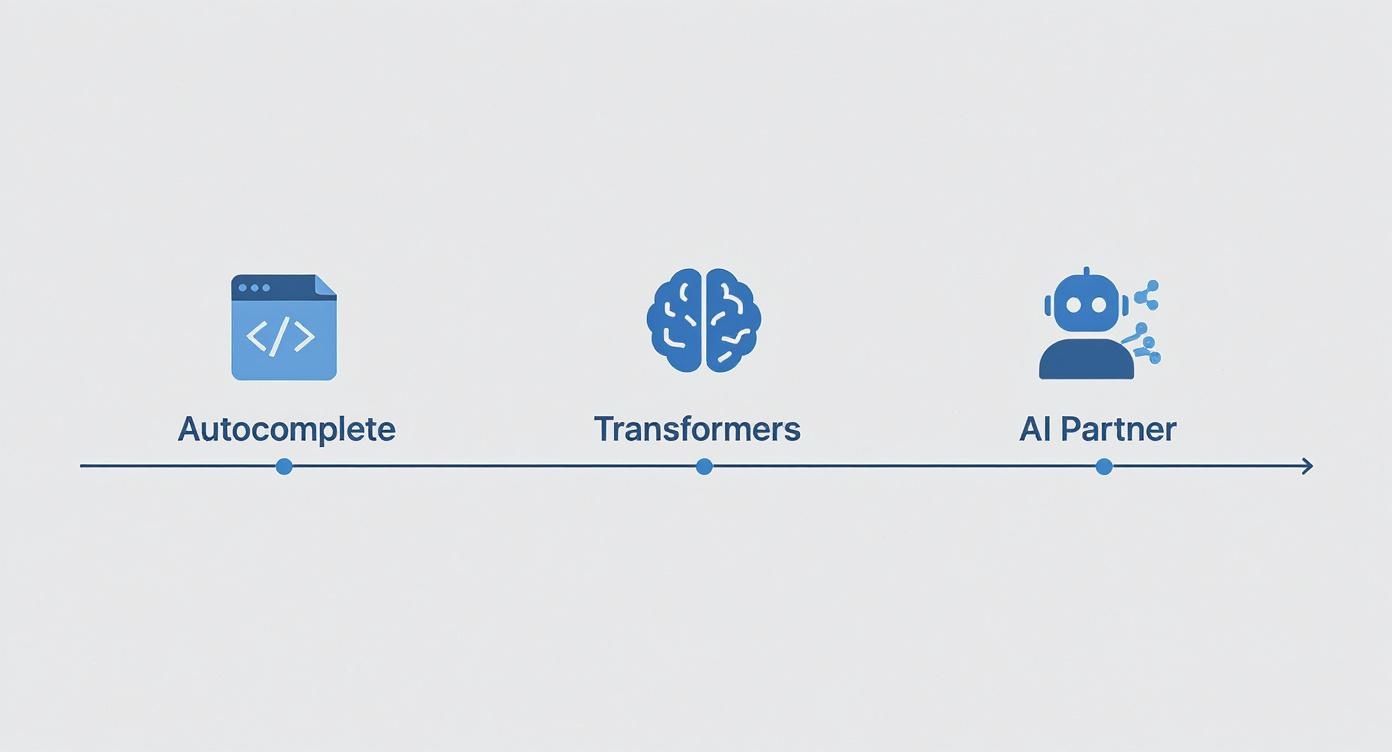
This evolution represents a huge leap from simple pattern matching to an AI that genuinely grasps what you’re trying to build.
From Comment to Code
One of the most intuitive ways to work with an AI assistant is by turning a simple thought into working code. You just write a comment in plain English describing what you want a function to do.
For instance, you could type:
// Create a JavaScript function that fetches user data from an API and handles errors
Before you even start writing the function yourself, the AI pair programmer jumps in. It reads your comment, understands the goal, and immediately generates the entire code block for you. It’ll include the async fetch call, the JSON parsing, and even the try...catch blocks for solid error handling. That instant feedback is a core part of the experience.
Real-Time Code Completion and Refactoring
Modern AI goes way beyond just suggesting the next variable name. We’re talking about multi-line code completions that can flesh out entire loops, if-else statements, or complex logical structures based on the code you’ve already written. It saves a ton of typing and frees up mental energy you’d otherwise spend on boilerplate.
Refactoring also becomes more of a conversation. You can just highlight a messy or outdated chunk of code and tell the AI what to do using an inline chat.
You might instruct it: “Refactor this
forloop to use a more efficient.map()function and make it more readable.” In a flash, your old code is swapped out with a cleaner, more modern version.
This is huge for updating legacy codebases or just ensuring the new code you’re writing is top-notch from the start. You can dive deeper into how AI is being used for code to see its wider impact.
Automated Test Generation
We all know writing tests is crucial, but it can be a real grind. An AI pair programmer can take a huge amount of that repetitive work off your plate. Just point it at a function, and it can generate a whole suite of unit tests for you.
- Happy Path Tests: It writes tests for the expected inputs and outputs.
- Edge Case Tests: It thinks through potential curveballs, like null inputs or empty arrays, and creates tests to cover them.
- Error Handling Tests: It makes sure your code fails correctly when it’s supposed to.
This doesn’t just speed things up; it promotes better testing habits because the barrier to getting started is practically gone. Your job shifts from painstakingly writing every test to simply reviewing and tweaking the AI’s very intelligent first draft.
Boosting Your Team’s Coding Workflow
The real magic of an AI pair programmer isn’t just about making one developer faster—it’s about leveling up the entire team. When everyone on the team starts using these tools, they become a force multiplier, fundamentally changing how engineers collaborate, learn, and ship code.

This is where you see the biggest return. The AI smooths out the rough edges in common workflows, whether it’s getting a new hire up to speed or making sure your code quality stays high across the board.
Accelerating Onboarding and Knowledge Sharing
Throwing a new engineer into a huge, unfamiliar codebase is a classic trial by fire. It usually means weeks of a senior developer’s time spent hand-holding and answering questions. An AI pair programmer completely flips that script.
Now, new hires can just ask the AI to explain a confusing function or untangle a piece of legacy code. This self-service approach empowers them to get productive way faster, and it keeps them from having to interrupt a senior dev for every little thing.
Enforcing Consistency and Speeding Up Reviews
Keeping code consistent across a team can feel like herding cats. But an AI partner can be configured with your team’s specific style guides and best practices, acting as a gentle guardian that nudges every developer toward writing clean, uniform code right from the start.
This has a massive knock-on effect on code reviews.
- Pre-emptive Quality Checks: The AI catches common mistakes, style guide violations, and anti-patterns long before a human ever lays eyes on the pull request.
- Faster Turnaround: Human reviewers can finally stop arguing about syntax and focus on what really matters: the high-level logic and architectural decisions.
- Reduced Senior Dev Overhead: Your most experienced engineers are freed from the drudgery of nitpicking and routine mentoring, letting them tackle the complex problems they were hired to solve.
The goal is to automate the mundane so humans can focus on the meaningful. When an AI handles the first pass of a code review, it elevates the quality of what a senior developer even sees.
It’s no surprise that these AI assistants have seen explosive adoption. What’s interesting is that much of this growth is happening on smaller teams; 51% of active AI users in software development are on teams with 10 or fewer developers. This tells us that even small, nimble organizations are finding huge value in these tools. The economic potential is staggering, with some research suggesting AI developer tools could add over $1.5 trillion to the global GDP. You can find more details in these AI code statistics and see how they’re reshaping development teams.
This allows small teams to operate with the efficiency and discipline of a much larger organization, helping them punch well above their weight.
The table below breaks down how an AI pair programmer changes the game for common developer tasks, highlighting the benefits for both individuals and the team as a whole.
AI Pair Programmer Use Cases and Benefits
| Developer Task | Traditional Approach | AI Pair Programmer Approach | Key Benefit |
|---|---|---|---|
| Onboarding a New Hire | Weeks of senior dev hand-holding and Q&A sessions. | New hire uses AI to ask questions and get instant context on the codebase. | Faster Onboarding: Juniors become productive in days, not weeks. |
| Writing Unit Tests | Manually writing repetitive, boilerplate test code for each function. | AI generates comprehensive test suites based on the code’s logic. | Increased Test Coverage: More robust code with less manual effort. |
| Code Review | Senior devs spend hours on syntax, style, and minor logic fixes. | AI pre-screens for errors, allowing humans to focus on architecture. | Faster Reviews: PRs move faster, freeing up senior dev time. |
| Debugging | Hours spent using console.log to trace a mysterious bug. |
AI analyzes the code and error messages, suggesting potential fixes. | Quicker Bug Resolution: Less time hunting, more time fixing. |
As you can see, the AI isn’t just about writing code faster; it’s about making the entire development lifecycle smarter and more efficient.
Measuring the Real Impact of AI Coding Tools
Let’s be honest: bringing in any new tool, especially an AI pair programmer, needs more than just a thumbs-up from the dev team. While hearing that everyone feels faster is great, engineering leaders need cold, hard data to justify the investment and see a real return. It’s about moving from gut feelings to solid metrics that show real-world improvements in how we build software.
This isn’t just a hypothetical, either. The rush to adopt AI is happening now. In 2024, 78% of organizations were already using AI, a massive leap from 55% the year before. And it’s paying off. Microsoft’s research shows companies are seeing an average return of 3.5 times on their AI investments. That’s a powerful business case. You can dig into more stats like this in this overview of generative AI statistics.
Establishing Your Baseline
Before you can see how far you’ve come, you need to know where you’re starting. The very first step is to get a clear picture of your team’s performance before you roll out an AI coding assistant. This baseline is your “before” photo; without it, you can’t prove there’s an “after.”
You’ll want to focus on metrics that truly reflect the development lifecycle. These aren’t vanity numbers—they’re the vital signs of your team’s health and speed.
- Pull Request (PR) Cycle Time: How long does it take to get code from a new PR into the main branch? This is a fantastic indicator of your entire team’s efficiency and how well they collaborate.
- Code Commit Frequency: Are developers checking in their work often? Frequent, small commits usually mean steady progress and fewer big, painful merges.
- Bug Introduction Rate: What percentage of commits end up causing new bugs? This is a direct measure of code quality and the impact on stability.
- Developer Satisfaction: Don’t forget the human element. Simple surveys can tell you a lot about how your team feels about their workflow. Happy, empowered developers tend to be more productive.
Tracking and Proving ROI
Once your team is up and running with an AI pair programmer, keep a close eye on those same KPIs. You’re looking for positive trends—is PR cycle time shrinking? Are commits happening more frequently? Are bug rates dropping? To get a deeper understanding of how to quantify these changes, it’s worth checking out a comprehensive guide to engineering productivity measurement.
The real goal here is to connect these improvements back to what the business cares about. A 20% reduction in PR cycle time isn’t just a win for the engineering department; it directly translates to getting new features into the hands of customers faster.
This data-driven approach lets you build a rock-solid case. Instead of saying, “I think the team is faster,” you can walk into a meeting and report, “Since implementing this tool, we’ve measurably improved efficiency and quality.” That’s how you prove its value to the entire company.
Common Mistakes and How to Avoid Them
Getting an AI pair programmer can feel like you’ve suddenly gained a superpower. But just like any powerful tool, it’s easy to stumble if you aren’t careful. The biggest mistake is simply accepting every suggestion the AI spits out without a second thought. That’s a surefire way to run into problems.
The most common trap is becoming over-reliant on the AI. It’s tempting to treat its output as gospel—as finished, perfect code. This not only invites subtle bugs into your codebase but can also dull your own problem-solving instincts over time. Remember, the goal is collaboration, not blind delegation.
Security is another huge blind spot. AI models are trained on oceans of public code, so they have no concept of your app’s specific security needs. It might generate a perfectly functional snippet that also happens to have a glaring vulnerability, like an opening for SQL injection or mishandled user data.
Treat AI Code as a First Draft
The best way to think about AI-generated code is to see it as a first draft from a very fast, but very junior, developer. It’s a great starting point, but it’s not the finished product. Your role is to be the senior developer in this partnership—the one who reviews, refines, and ultimately approves the work.
This means you absolutely have to:
- Understand the “Why”: Never just copy and paste. Take a moment to read the code and grasp its logic. Does it actually fit into the bigger picture of your application?
- Run It Through Your Linters and Tests: All those quality checks you have in place? They’re more important than ever. Make sure the AI’s code passes the same strict standards you’d apply to your own.
- Manually Verify Critical Logic: When it comes to complex business rules or anything security-related, you need to be hands-on. Step through the code yourself to confirm it does exactly what you expect, without any unwelcome surprises.
Sharpen Your Prompt Engineering Skills
The quality of the code you get out of an AI pair programmer is directly tied to the quality of the instructions you put in. Vague, lazy prompts almost always result in generic or just plain wrong code.
Think of your AI as an overly-ambitious intern. The more context you provide, the more likely it will complete the task exactly the way you want. A good prompt is a good specification.
So, instead of just typing “fix this bug,” give it some real context. Paste in the error log, describe the correct behavior, and even point it to the specific files involved. This little bit of effort upfront will save you a ton of time and headaches later. For a deeper dive, our guide on AI for code debugging has a lot of practical tips you can use right away.
At the end of the day, an AI pair programmer is there to amplify your skills, not replace them. By staying engaged, keeping a critical eye on its suggestions, and guiding it with clear instructions, you’ll steer clear of the common pitfalls and really tap into what these tools can do.
Got Questions? We’ve Got Answers
It’s totally normal to have questions—and maybe a little skepticism—as AI coding tools become more common. An AI pair programmer changes how we work, so let’s tackle the big questions head-on.
Will an AI Pair Programmer Take My Job?
The short answer? Nope. Think of these tools as assistants, not replacements.
An AI pair programmer is fantastic at handling the tedious, boilerplate stuff and churning out code from clear instructions. But it doesn’t have your critical thinking, your understanding of the business, or the architectural vision needed to build great software.
Here’s a good way to look at it: the AI can write a function, but it can’t decide if that function should even exist. Your job shifts. You become less of a typist and more of a director, guiding the AI, reviewing its work, and focusing on the high-level problem-solving and system design that truly matter.
Is My Code Kept Private and Secure?
This is a huge one, and rightly so. The good news is that it all comes down to the provider you choose. Reputable tools like GitHub Copilot and Cursor take this very seriously and have enterprise-grade security and privacy policies in place.
For their business and enterprise plans, you can typically expect:
- Your code is your code: It isn’t used to train their public models.
- Your data is locked down: It’s encrypted both when it’s sent and when it’s stored.
- They’re upfront about data: Their policies clearly state how long your data is kept and why (usually just to maintain your conversation history).
Bottom line: always read the privacy policy before you let any tool touch your code, especially if you’re working on a proprietary codebase.
How Do I Pick the Right Tool?
The best AI pair programmer for you really depends on what you do every day—your go-to languages, your team’s stack, and what you’re trying to accomplish. Some tools are amazing with Python and data science, while others are geared more toward JavaScript and frontend work.
My advice is to start with your main goal. Are you hoping to write tests faster? Refactor some ancient legacy code? Or just get a handle on a new framework? Most of these tools have free trials, so take them for a spin. See which one feels right and actually gives you useful suggestions for the real-world tasks you’re facing.
Ready to level up your coding workflow? Zest shows you how to measure your AI’s impact, share what works, and help your whole team ship better code, faster. Learn more about Zest.
Master Your AI Pair Programmer
Turn your AI assistant into a true force multiplier by focusing on smart collaboration and measurable impact.
📊 Core Metrics
- PR Cycle Time — Measure from PR creation to merge to see direct velocity gains.
- Bug Introduction Rate — Track how AI-assisted code impacts overall quality and stability.
- Developer Satisfaction — Survey your team to quantify morale and workflow improvements.
🕹️ My Cheatcodes
- 🌱 Human in the Loop — Treat all AI output as a first draft, not a final product.
- 🦎 Context is King — Provide detailed prompts with examples and error logs for better results.
- ⚡ Measure Before & After — Establish baseline metrics to prove ROI to leadership.
✅ Before Merging AI Code
- 🔍 Validate the logic and ensure it solves the right problem.
- 📊 Run all existing tests and linters against the new code.
- 🧭 Manually verify security-sensitive and critical business logic.
- 📈 Confirm code adheres to team style guides and best practices.
Gallery
Lemon shots



