
Ai Coding Agents: ai coding agents for smarter, faster development

Imagine having an expert pair programmer on call 24/7, ready to tackle a complex feature or hunt down a nasty bug with just a little direction from you. That’s the promise of an AI coding agent, a new breed of tool that can independently handle multi-step software development tasks. This is a huge leap from simply suggesting the next line of code—it’s a fundamental change in how we’ll work with AI.
What Are AI Coding Agents And Why Should You Care
At its heart, an AI coding agent is a system that can take a high-level goal, figure out the smaller steps needed to get there, and then actually execute those steps in your development environment.
Think about it this way: an AI coding assistant (like your standard autocomplete) might suggest how to finish a single line. But you can give an AI coding agent a prompt like, “Refactor our user authentication service to use JWT tokens,” and it will get to work on its own. It’s this ability to act, not just suggest, that sets agents apart.
To really get what makes these agents so powerful, it helps to look under the hood at their core components.
The Core Components of an Agent
Generally, you’ll find three key pieces working together:
- Large Language Model (LLM): This is the brain. The LLM provides the core reasoning and code-generation power, allowing it to understand your instructions and the context of your codebase.
- Planning Engine: This is the strategist. It takes your big-picture goal and breaks it down into a logical, step-by-step plan—a checklist of tasks the agent will follow to get the job done.
- Tool Integration: This is what gives the agent hands. It allows the agent to interact with your IDE, read and write files, run terminal commands, execute tests, and use other dev tools just like you would.
A Seismic Shift for Developers
This isn’t just another small productivity hack; it signals a new chapter in software development. And the market is taking notice. The wider AI agents market is expected to skyrocket from $5.26 billion in 2024 to an incredible $52.62 billion by 2030.
Within that explosion, the coding and software development space is leading the pack with the highest predicted growth rate. You can find more details in this market projection report about the rapid adoption of AI agents.
This insane growth is happening for a simple reason: agents take on the tedious, repetitive work that eats up a developer’s day and often leads to burnout.
An AI assistant is like a GPS suggesting your next turn. An AI coding agent is like a self-driving car that can get you to your destination, navigating traffic and making decisions on its own. Your job changes from being the driver to being the director.
By handing off tasks like writing boilerplate code, generating unit tests for an entire module, or upgrading dependencies across a dozen microservices, agents free you up. You get to spend more time on what really matters: solving tough architectural challenges, designing brilliant new features, and building things your users love. It’s not about replacing developers; it’s about making them more powerful than ever before.
AI Coding Assistant vs AI Coding Agent
To make the distinction crystal clear, it helps to see a side-by-side comparison. Assistants are reactive and work at a micro-level, while agents are proactive and operate on a macro-level.
| Capability | AI Coding Assistant (e.g., Basic Copilot) | AI Coding Agent |
|---|---|---|
| Scope | Single file or function, line-by-line suggestions. | Entire codebase, multi-file changes, and complex tasks. |
| Autonomy | Requires constant human guidance and prompting. | Works independently after receiving a high-level goal. |
| Task Complexity | Good for boilerplate, syntax, and simple functions. | Can handle refactoring, debugging, feature implementation, and migrations. |
| Interaction Model | Suggests code as you type (inline completion). | Engages in a back-and-forth dialogue; can execute commands and run tests. |
| Context | Limited to the open file and immediate context. | Can read files, browse the entire repo, and access the terminal. |
Ultimately, understanding this difference is key. While assistants give you a nudge in the right direction, agents can actually run the race for you. Learning to manage these powerful new workflows is the next frontier for every engineering team.
How Modern AI Coding Agents Actually Work
To get the most out of AI coding agents, you have to peek under the hood and understand how they “think.” It’s less about a single complex algorithm and more about a logical, step-by-step process. I like to think of an agent as a master chef in a busy kitchen. You don’t just hand them an egg and expect a perfect souffle; you give them a high-level goal, and they use their skills, tools, and experience to get it done.
This process isn’t magic. It’s a deliberate workflow we can break down into distinct layers. Once you understand this internal architecture, you’ll find yourself writing better prompts, knowing what to do when an agent gets stuck, and becoming a skilled operator who can direct the AI with real precision.
The diagram below shows this core workflow, illustrating how an AI agent goes from understanding a goal to creating a plan and, finally, getting the job done.
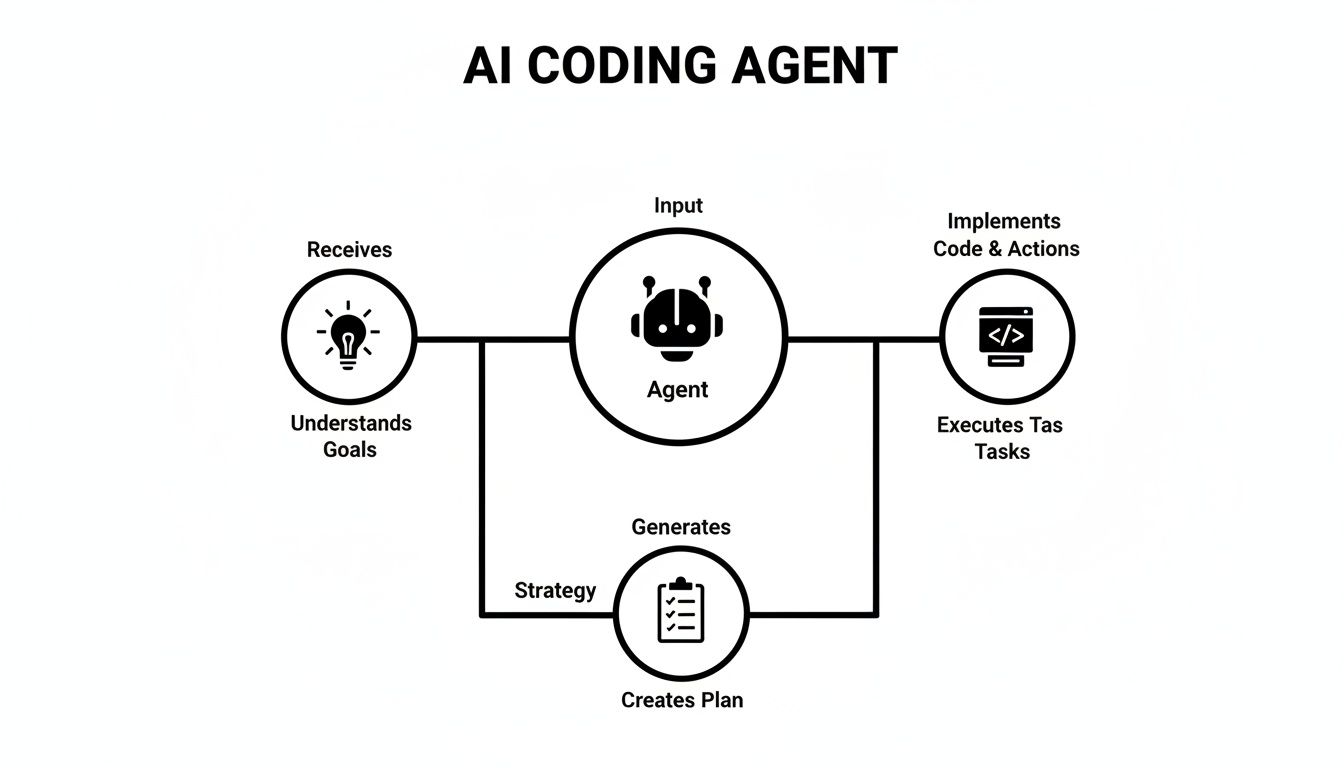
This model really highlights what makes an agent different from a simpler tool that only performs one isolated task. At its core, an agent’s operation breaks down into three fundamental layers.
The Perception Layer: Your Agent’s Eyes and Ears
Before a chef can even think about cooking, they need to read the recipe and see what ingredients are on the counter. For an AI coding agent, this is the Perception Layer. This is where the agent takes in and makes sense of your request and its surroundings. It’s not just reading your prompt; it’s understanding the entire development environment.
This layer is responsible for a few key things:
- Parsing Your Intent: The agent deciphers your natural language instruction—something like, “Fix the login bug from ticket #432”—to figure out what you actually want to achieve.
- Analyzing the Codebase: It scans relevant files, maps out the dependencies between different modules, and builds a mental model of your code’s structure.
- Integrating External Tools: It can read error logs from a terminal, pull details from a bug report in Jira, or even look at the output of a failing test suite to gather clues.
An agent without a good perception layer is basically flying blind. Giving it clear context in your prompts, like specific file names or error messages, is like handing that chef a well-written recipe with every ingredient neatly labeled.
The Planning Layer: The Agent’s Brain
Once the chef understands the recipe, they don’t just start throwing ingredients into a bowl. They form a plan of action: preheat the oven, chop the vegetables, prepare the sauce. For the agent, this strategic thinking happens in the Planning Layer. Frankly, this is the component that truly separates a genuine agent from a simple AI assistant.
This layer deconstructs a vague, high-level goal into a concrete, ordered sequence of executable steps. A request like “refactor this module” becomes a detailed plan:
1. Read file X,2. Identify duplicated logic,3. Create new utility function Y,4. Replace duplicated code with calls to Y,5. Run unit tests to verify.
The quality of this plan is everything. A solid plan ensures the agent moves forward logically, avoids hitting dead ends, and can even figure out how to correct its course if one of the steps fails.
The Action Layer: The Agent’s Hands
With a clear plan ready, the chef finally starts cooking. For an AI coding agent, this is the Action Layer. This is where the agent directly interacts with your development environment to execute the steps laid out by the planning layer. It’s the agent’s ability to do things, not just suggest them.
The action layer performs tasks you’d expect a human developer to do:
- Writing and Modifying Code: Opening files, deleting lines, adding new functions, and refactoring existing blocks of code.
- Executing Commands: Running terminal commands like
git commit,npm install, or kicking off a test script. - Interacting with the IDE: Using the editor’s built-in tools to perform actions, just like you would.
This ability to take direct action is what makes AI coding agents so powerful. They don’t just give you suggestions you have to implement yourself; they actively participate in the development process, carrying out complex workflows on their own from start to finish.
Getting AI Agents Plugged Into Your VS Code Workflow
Alright, enough with the theory. The real magic happens when you bring AI coding agents into the place you work every day: your editor. For most of us, that’s Visual Studio Code. Thanks to its massive extension marketplace, VS Code is the perfect playground for embedding these tools right into your coding flow.
Getting started is surprisingly simple. It’s less about a complicated setup and more about picking the right tool and learning its language.
Just pop open the VS Code Marketplace and search for terms like “AI agent,” “AI chat,” or “code generator.” You’ll find that a lot of the newer AI assistants have agent-like skills baked right in. They don’t just autocomplete a line of code; they can read your project files, run terminal commands, and follow a multi-step plan. Once you install one, it usually lives in a chat panel right inside your editor.
A little bit of setup goes a long way. You’ll likely need to add an API key from a service like OpenAI, Anthropic, or Gemini. It’s also a great idea to dive into the settings and tell the agent to ignore certain folders (I’m looking at you, node_modules) to keep its context clean and focused.
Spinning Up a Full-Stack Feature from a Single Prompt
Let’s say you need to build a new “user profile” page. Normally, this means jumping between files to create a backend endpoint, tweak a database schema, and then build the frontend component to show it all. An AI coding agent can tackle the grunt work for you with one solid prompt.
The key is to be descriptive. Don’t just ask it to “make a profile page.” Give it a clear, structured plan:
“I need to build a user profile feature. Start by creating a new Express.js route in
/routes/user.js. The GET route/api/users/:idshould fetch a user’sname,biofrom our MongoDBuserscollection. Then, create a new React component at/components/UserProfile.jsthat fetches this data and displays it.”
From there, the agent gets to work. It scaffolds the new files, writes the API logic, and generates the basic React component. What used to be an hour of tedious setup becomes a two-minute task, leaving you with the fun part—wiring up the finer details and handling the complex logic. If you want to get better at writing prompts, our guide on how to code with ChatGPT, Claude, Gemini, and Copilot has some great tips.
Letting the Agent Squash Bugs from a Failing Test
Automated debugging is easily one of the coolest uses for AI coding agents. When a unit test breaks, the error message and stack trace are the perfect breadcrumbs for an agent to follow.
Imagine a test for your shopping cart logic is failing with a TypeError: Cannot read properties of null (reading 'price'). Instead of scratching your head, you can just hand the problem over to your agent:
“The unit test in
cart.test.jsis failing with the error:TypeError: Cannot read properties of null (reading 'price'). The test is supposed to verify that the total price is calculated correctly. Please analyzecart.jsand the test file to find the root cause and propose a fix.”
The agent will read both files to get the full picture. It will follow the logic of the test, pinpoint where the code is trying to access a price on a null object, and then write the corrected code. It might add a simple null check or suggest a way to ensure items always have a default price. Problem solved.
Refactoring and Documenting That Old, Messy Module
We all have that one file in the codebase. You know the one—a tangled mess of poorly named functions with zero comments. Tackling technical debt like this is where an AI agent can be a real lifesaver.
You can give it a high-level command to clean up that legacy utils.js file:
"I want to refactor the legacy file
lib/utils.js. Here’s the plan:
- First, rename all functions to follow standard camelCase.
- Then, add JSDoc comments to every function explaining what it does, its parameters, and what it returns.
- Look for any duplicated logic and merge it into a single, reusable function.
- Finally, update the file with all the changes."
The agent will meticulously go through the file, step by step, and spit out a much cleaner, more maintainable module. Handing off these kinds of time-sucking tasks frees up your brainpower for the creative, high-impact work that really matters. And if you’re curious about different AI-native editors, this ChatGPT vs Cursor comparison offers a great look at what else is out there.
Mastering the Art of Prompting Your AI Agent
The single biggest factor in getting real value from an AI coding agent is how you talk to it. If you give it vague commands, you’ll get back generic, often broken code. But if you give it precise, context-rich instructions, you’ll get high-quality results that genuinely speed up your work. The goal is to move from being a casual user to a power user—someone who can direct their AI partner with the clarity of a seasoned project manager.

This is about more than just asking a question. It’s about packaging up all the necessary information to remove any guesswork. Think of a well-crafted prompt as a perfect bug report or a detailed work ticket—it guides the agent directly to the right solution without a lot of back-and-forth.
The Role, Context, Action Framework
A simple but incredibly effective way to structure your prompts is the Role, Context, Action (RCA) framework. It’s a mental checklist to make sure you’ve given the agent everything it needs to do its job right.
Let’s break it down.
- Role: First, tell the agent who it is. Setting a persona primes the model to use the right technical language, style, and domain knowledge. Something like, “You are a senior backend developer specializing in API security.”
- Context: This is where the magic happens. Give the agent all the background details it needs. This means file names, relevant code snippets, error messages you’re seeing, and a clear picture of your end goal.
- Action: Finally, give it a clear, direct, and actionable command. Tell it exactly what to do. For instance, “Write a middleware function that validates the JWT token found in the request header.”
Using this framework consistently turns your simple requests into comprehensive directives. This practice is the core of prompt engineering, a discipline focused on designing inputs that get the best possible outputs from AI models. If you want to go deeper, check out our guide on what is prompt engineering.
Breaking Down Complex Tasks
For anything more complicated than a single function, don’t throw one giant instruction at your agent. It’s no different from a human developer; an AI works best when it can tackle smaller, well-defined sub-tasks. If you want to build an entire feature, break it down into a numbered list of steps.
Imagine you’re a team lead assigning work. You wouldn’t just say, “Build the checkout page.” You’d provide a plan: “First, create the API endpoint. Next, build the frontend form. Then, add the validation logic. Finally, write the tests.” You need to treat your AI agent with that same level of clarity.
This step-by-step approach doesn’t just produce better code; it makes debugging a whole lot easier. You can review the agent’s work at each stage, provide feedback, and correct its course before it wastes time building on a shaky foundation.
Advanced Prompting Techniques
Once you have the basics down, you can start using more advanced techniques to fine-tune what the agent produces. These methods give you more control over its reasoning process, leading to code that’s far more robust and reliable.
One of the most powerful is called Chain of Thought (CoT) prompting. It’s simple: before asking the agent to write the code, tell it to explain its plan first.
- Example CoT Prompt: “Before you write any code, explain your step-by-step plan for refactoring the
ApiService.jsfile to use theasync/awaitsyntax. Tell me which functions you will change and why.”
This forces the agent to “think out loud,” giving you a chance to approve its logic before it even starts coding. It’s a fantastic way to catch misunderstandings early and make sure its plan aligns with your project’s architecture. This one small tweak to your prompting style can dramatically improve the reliability of your AI coding agent.
Measuring the True Impact on Your Team
As an engineering leader, the real question is simple: are these AI coding agents actually making our teams better? To get to the bottom of it, we need to look past flashy but ultimately empty metrics like “lines of code generated.” Real improvement isn’t about volume; it’s about better velocity, higher quality, and overall efficiency.
Bringing these tools into your workflow means taking a clear-eyed look at how they perform in the real world. A data-driven approach is the only way to see exactly where agents are giving your team a boost and where they might be creating hidden friction or even technical debt. The goal is to build a concrete picture of your return on investment.
Moving Beyond Vanity Metrics
The most common mistake I see is tracking metrics that look impressive but don’t mean much. An agent can spit out a thousand lines of code in a minute, but if that code is buggy, inefficient, or just gets thrown out in the next pull request, it’s not progress—it’s just noise.
Instead, we need to focus on key performance indicators (KPIs) that actually reflect the health and productivity of an engineering team. These are the numbers that tell the true story of how work gets done. You can find a deeper exploration of what to track in our guide to software engineering productivity metrics.
Here are the metrics that really matter:
- Time to First Commit: How fast can a developer get started on a new task? If you see a big drop here, it’s a great sign that agents are handling the initial grunt work and boilerplate, letting developers jump straight into the core logic.
- PR Review Cycles: How many rounds of feedback does a pull request go through before it’s merged? If agents are helping produce cleaner, more consistent code, you should see this number go down.
- Code Churn: What percentage of code gets rewritten or deleted shortly after being committed? High churn on AI-assisted code is a major red flag. It suggests the generated output isn’t hitting quality standards or fitting into the project’s architecture.
Establishing Observability for Your Agents
You can’t improve what you don’t measure. This is where modern observability and workflow management tools are indispensable. These platforms can give you dashboards that visualize the impact of AI coding agents, turning a flood of abstract data into clear, actionable insights for your whole team.
Observability is the key to adopting AI responsibly. It lets you prove the value, spot bad habits, and make sure your team isn’t just using AI, but using it effectively.
The industry is catching on to this fast. Production adoption of AI agents is at a critical point, with 57% of organizations now running them in production environments. But progress often stalls due to worries about quality and reliability—the top barrier cited by 32% of respondents. To get past this, a whopping 89% of organizations have put monitoring and visibility solutions in place, making observability the standard for any serious agent deployment. You can find more insights in the latest survey on the state of agent engineering.
By tracking the right KPIs and using tools to see them clearly, you change the conversation about AI from speculation to one based on hard data. This empowers engineering leaders to show a clear ROI, justify the investment, and make smart calls on how to scale the use of agents across the entire organization.
Navigating the Risks of Agent-Driven Development
Let’s be honest: while AI coding agents are incredibly powerful, they aren’t magic. Jumping in without a clear-eyed view of the risks is a recipe for trouble. The real danger isn’t that an agent will write code that flat-out breaks; it’s that it will produce code that works but is subtly flawed, inefficient, or a nightmare to maintain down the road.
Ignoring these challenges can slowly erode code quality, open up security holes, and create a team that’s too dependent on the tool.

Think about it: an agent might solve a problem but completely ignore your team’s established architectural patterns. Or it could introduce a performance bottleneck that you won’t notice until you’re under heavy load. This is precisely why human oversight isn’t just a good idea—it’s non-negotiable.
The Peril of Blind Trust
One of the biggest traps developers can fall into is accepting AI-generated code without a deep, critical review. Let’s face it, reviewing code is often harder than writing it. When you’re up against a tight deadline, it’s tempting to glance at a chunk of AI code, see that it looks plausible, and hit “merge.”
This creates a massive blind spot. At the end of the day, the developer is responsible for the code, not the AI. If you don’t truly understand what the agent produced, how can you possibly debug, extend, or secure it in the future?
Think of an AI coding agent as a brilliant, incredibly fast intern who has zero long-term memory. It can execute the task you give it right now, but it has no idea about the architectural decisions made last week. Every single piece of its work needs the same level of scrutiny you’d give a new hire’s first pull request.
Security Vulnerabilities and Code Quality
AI models learn from a massive ocean of public code on the internet. That data includes elegant solutions and best practices, but it also includes outdated security patterns and deprecated libraries. An agent could easily replicate a common vulnerability without knowing any better.
For example, improperly managed credentials are a constant risk, leading to things like vulnerabilities related to leaked LLM API keys that can expose your entire system.
This isn’t a reason to avoid agents, but it’s a huge reason to double down on solid engineering fundamentals. Your existing best practices are your best defense:
- Human Code Reviews are a Must: Every line of code an agent writes needs a human to check it for logic, security, and whether it fits your project’s standards.
- Lean on Automated Testing: A solid suite of unit, integration, and end-to-end tests will be your safety net, catching regressions the human eye might miss.
- Use Static Analysis Tools: Plug security scanners and quality checkers right into your CI/CD pipeline. They can automatically flag common anti-patterns and vulnerabilities before they ever reach production.
Ultimately, AI coding agents amplify a developer’s existing skills—they don’t replace them. They make good developers faster, but they can’t make an inexperienced developer good. Success hinges on a disciplined engineering culture where critical human oversight is central to the process.
To put a finer point on it, here’s a breakdown of common risks and how to get ahead of them.
Risk Mitigation Strategies for AI Coding Agents
This table outlines the key areas of concern when integrating AI agents into your workflow and offers concrete strategies to keep your projects on track.
| Risk Area | Potential Issue | Mitigation Strategy |
|---|---|---|
| Code Quality | Agents produce inefficient, non-standard, or hard-to-maintain code (“spaghetti code”). | Mandate human code reviews for all AI-generated contributions. Use linters and static analysis to enforce coding standards automatically. |
| Security | Introduction of vulnerabilities from training data or insecure coding patterns. | Integrate SAST/DAST tools into the CI/CD pipeline. Train developers to specifically audit AI code for common security flaws (e.g., injection, credential leaks). |
| Over-Reliance | Developers lose critical problem-solving skills and blindly trust AI suggestions. | Promote a “human-in-the-loop” culture. Use agents for boilerplate and idea generation, but reserve complex logic for human developers. |
| Intellectual Property | Inadvertent use of code with restrictive licenses or exposure of proprietary code to the model. | Use enterprise-grade agents with clear data privacy policies. Implement internal checks to ensure no sensitive code is used in prompts. |
| Testing Gaps | AI generates code that works for the “happy path” but misses crucial edge cases. | Enforce a Test-Driven Development (TDD) workflow. Write failing tests first, then ask the agent to write the code that makes them pass. |
By thinking through these issues proactively, you can build a workflow that gets the best out of AI agents while keeping quality and security front and center.
Frequently Asked Questions
It’s natural to have questions as you start exploring AI coding agents. They’re powerful, but figuring out where they fit and what they mean for your team can be tricky. Here are some straightforward answers to the questions we hear most often.
How Are AI Coding Agents Different From GitHub Copilot?
Think of it like this: GitHub Copilot is an expert pair programmer sitting next to you. It’s fantastic at suggesting the next line of code, completing a function, or giving you a quick snippet. It works with you, in the moment.
An AI coding agent, on the other hand, is more like a junior developer you can delegate a whole task to. You can give it a high-level goal, like “refactor this entire module for better performance,” and it will plan the steps, read the files, write the code, run the tests, and even fix its own mistakes.
Copilot helps you write the code; an agent takes on the entire workflow.
What Is the Best Way to Start Using AI Coding Agents on My Team?
Don’t try to boil the ocean. The smartest way to start is with a small, focused pilot project.
Pick a task that’s a known time-sink for your team. Maybe it’s writing unit tests for new API endpoints or migrating old code to a new framework. Give a small group the tools, show them how to write good prompts, and measure what happens.
This approach lets you learn the ropes, figure out what works for your team, and build a solid case for a bigger rollout.
Will AI Coding Agents Replace Software Developers?
No. The goal isn’t replacement; it’s amplification. Agents are here to take over the tedious, repetitive parts of the job—the boilerplate code, the mind-numbing refactoring, the endless test writing.
This frees up developers to focus on what they do best: architecting elegant systems, solving thorny problems, and coming up with creative solutions. The developer’s role will shift from just writing code to directing agents to achieve a goal.
The developers who learn to work with these tools won’t be replaced. They’ll just become dramatically more effective than those who don’t.
Level Up Your AI Agent Workflow
Mastering AI coding agents means shifting your role from coder to director, amplifying your impact by delegating entire workflows.
📊 Core Metrics
- Time to First Commit — Track the speed from task creation to initial PR.
- PR Review Cycles — Measure the back-and-forth needed to merge AI-assisted code.
- Code Churn Rate — Monitor how much AI-generated code is rewritten or deleted post-merge.
🕹️ My Cheatcodes
- 🌱 Context is King — Feed the agent specific files, error logs, and goals.
- 🦎 Break It Down — Deconstruct large features into small, sequential steps for the agent.
- ⚡ Chain of Thought — Ask the agent to explain its plan before it writes any code.
✅ Before Merging AI Code
- 🔍 Mandate a thorough human code review
- 📊 Run the full automated test suite
- 🧭 Verify code aligns with project architecture
- 📈 Scan for security vulnerabilities with SAST tools
Gallery
Lemon shots



