
What Is an AI Coding Agent and How Does It Work

Let’s be clear: an AI coding agent isn’t just a souped-up autocomplete. It’s an autonomous partner that can understand your project’s goals, map out a multi-step solution, and then get to work across your entire codebase.
Think of it less like a tool that suggests the next line of code and more like a proactive developer joining your team.
What an AI Coding Agent Really Is
To get your head around what an AI coding agent is, you have to ditch the idea of a simple assistant. A traditional coding assistant, like the autocomplete you’re used to, is reactive. It waits for you to start typing and then offers a suggestion. It’s a calculator—you punch in the numbers, it gives you the answer.
An AI coding agent, on the other hand, is like hiring a dedicated financial advisor. You don’t ask it for a single stock price; you give it a high-level goal, like “plan my retirement.” The advisor then dives into your entire financial picture, creates a long-term strategy, and starts making moves to execute it.
That’s the core difference: it’s proactive and goal-oriented. The agent doesn’t just write a snippet of code; it reasons about the codebase as a whole.
From Suggestions to Solutions
The real shift here is from reactive code hints to autonomous problem-solving. An AI coding agent can take on complex, end-to-end development tasks that, until recently, felt like science fiction for a software tool. This power is why the market is exploding.
The global AI coding assistant market is projected to skyrocket from around USD 8.5 billion in 2026 to a massive USD 47.3 billion by 2034. That’s not just steady growth; it’s a sign of a fundamental change in how we build software. You can dig into more of the numbers with these AI coding assistant statistics.
So, what does this actually look like in a real-world workflow? Here are a few examples:
- Refactor Legacy Systems: You can point an agent at a clunky, old function and tell it to modernize it. The agent will analyze all the dependencies, rewrite the code using current best practices, and even write new tests to make sure it didn’t break anything.
- Build Features from Scratch: Give the agent a user story or a feature spec. It will then plan out the entire implementation, create the necessary files, write the components, and wire everything into your existing application logic.
- Debug Complex Issues: Instead of just highlighting a syntax error, an agent can trace a bug through multiple files, figure out the root cause, propose a fix, implement it, and then verify that the solution actually works.
An AI coding agent is your partner in the development process. It’s built to take high-level intent and turn it into working, production-ready code. It’s the difference between getting a hint and getting the job done.
2. How an AI Coding Agent Thinks and Acts
To really get what makes an AI coding agent different, you have to peek behind the curtain. It’s not just spitting out code based on a prompt; it’s a deliberate, multi-step process that feels a lot more like how a human developer tackles a problem.
Imagine you’re a chef in a busy kitchen. A customer’s order is your goal. Your ingredients and pantry are the project files. The agent is like an experienced chef who doesn’t just start throwing things in a pan. First, they read the order, check the ingredients, and map out a plan.
That’s exactly what an agent does. When you give it a task, it doesn’t just look at your words. It dives into the relevant parts of your codebase to get its bearings. This is its context window—its understanding of your project’s layout. The bigger the context window, the more of the “pantry” it can see at once, leading to much smarter decisions.
The Agentic Loop in Action
Once it has the context it needs, the agent kicks off what’s called an agentic loop. This is a simple but powerful cycle: think, plan, and then act. It’s what separates a true agent from a simple code completion tool.
Instead of guessing, the agent forms a high-level strategy. It breaks your big request down into a series of smaller, logical steps. Need to add a new feature? The plan might look like: “1. Create a new API endpoint. 2. Write the business logic. 3. Add a unit test. 4. Update the documentation.”
This diagram gives you a simple visual of how an agent moves from a goal to a finished task.
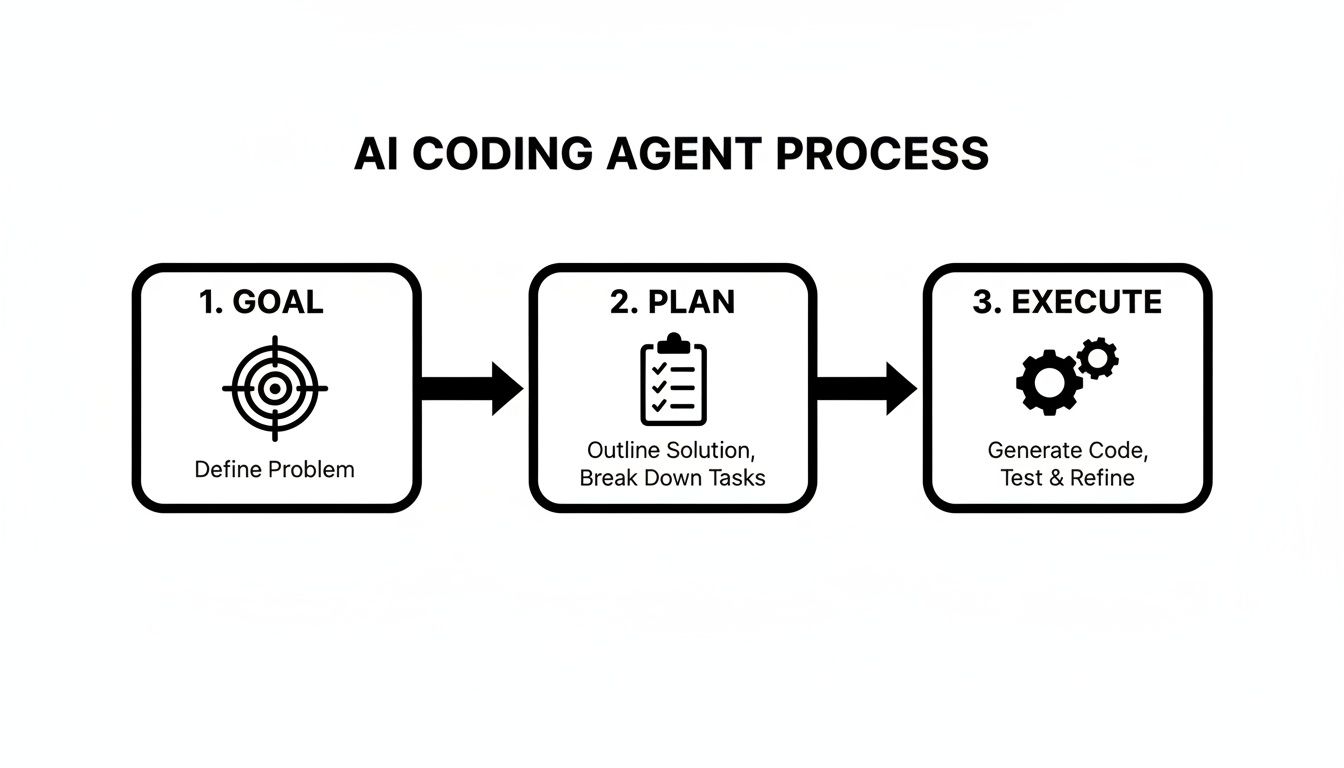
It’s a methodical process. The agent always starts with a clear understanding of the goal before it ever touches a line of code.
From Plan to Execution
With a solid plan in hand, the AI coding agent gets to work. It might create a new file, refactor an old function, or write those unit tests it planned. After every single action, it stops and checks its work. Did the code compile? Did the tests pass? Is this what the user actually wanted?
This feedback loop is everything. The agent uses the results of its actions to adjust its plan on the fly. If something breaks, it tries to fix it. This continuous cycle of Plan -> Execute -> Verify keeps going until the original goal is complete. To get the most out of this, you can even train your AI coding agent on your own data to make it an expert in your specific systems.
The real “intelligence” of an agent lies in its ability to self-correct. It’s not about being perfect on the first attempt. It’s about having a system to observe, learn from mistakes, and try a different approach.
The engine driving all this is a Large Language Model (LLM)—the “brain” of the operation. The LLM handles the reasoning and code generation, while the agentic framework gives it the structure to execute complex, multi-step tasks without getting lost. To get better at giving it instructions, check out our guide on what prompt engineering is.
AI Coding Assistant vs AI Coding Agent
It’s easy to confuse these two, but their capabilities are worlds apart. A basic assistant is a helper; an agent is a partner.
Here’s a quick breakdown of the key differences:
| Capability | AI Coding Assistant (e.g., Basic Copilot) | AI Coding Agent |
|---|---|---|
| Scope | Single-file or function level. Suggests code snippets. | Multi-file and project-wide. Can orchestrate complex changes. |
| Autonomy | Low. Requires constant human direction and prompting. | High. Can operate independently to achieve a goal. |
| Task Complexity | Best for line-by-line completion and simple functions. | Handles complex tasks like feature implementation or bug fixing. |
| Workflow | Reactive. Responds to what you type. | Proactive. Creates a plan and executes it step-by-step. |
| Context | Limited to the immediate code you are working on. | Can analyze the entire codebase to make informed decisions. |
| Interaction | Primarily a code suggestion tool. | A conversational partner that can plan, execute, and self-correct. |
An assistant is great for speeding up your typing, but an agent can take on entire chunks of your workload, letting you focus on the bigger picture.
Putting Your AI Coding Agent to Work
Okay, the theory behind an AI coding agent is interesting, but let’s be real—the magic happens when you see it in action. This is where we stop talking about concepts and start tackling the real, everyday tasks developers face. An agent isn’t just for shiny new projects; its real strength is its ability to dive into the messy reality of an existing codebase and make sense of it.
Untangling Legacy Code
Let’s start with a classic developer nightmare: refactoring a gnarly, legacy function. We’ve all seen them. Functions that have been patched and expanded over years, packed with nested if-else statements and zero error handling. Your job is to modernize it.
Normally, this means spending hours carefully tracing every dependency and possible execution path. With an agent, you just tell it what to do: “Refactor this processUserData function. I need you to use modern async/await, add proper try-catch blocks everywhere, and make sure the output doesn’t change.”
The agent digs in, analyzes the function and where it’s called, and spits out clean, modern code. It’s not just more readable; it’s genuinely more reliable.
From Vague Mocks to Functional Components
Here’s another one: turning a design mockup into a working component. You get a static image for a new user profile card. The old way? You’d start by hand-coding the HTML and CSS, then write the JavaScript logic, and finally hook it all up to your state management library. It’s a grind.
With an AI coding agent, the whole process gets a massive speed boost.
You can feed the agent the mockup and say, “Create a React component from this design. It needs to pull user data from our /api/user/{id} endpoint and hook into the Redux store.” In just a few minutes, you get a fully formed component file with clean JSX, styled-components or Tailwind CSS classes, and all the necessary hooks for state and data fetching. A task that used to take half a day is now done in minutes.
The great thing is, your AI coding agent can jump into almost any project, from massive enterprise apps to more niche areas like building Web3 applications. This adaptability is what makes these agents feel like a true co-pilot.
Bringing it All into Your IDE
The real game-changer is how these tools fit right into your workflow. Tools like Cursor and extensions for VS Code put the agent’s power directly inside the editor where you already live. For a deeper dive into making the most of these, check out our guide on how to code with ChatGPT, Claude, Gemini, and Copilot.
This screenshot shows exactly what that looks like—an AI agent embedded in a familiar IDE, ready to help with the heavy lifting.

The key takeaway is that the agent works with you, right where you are, which makes using it feel natural and seamless. And it’s not just a niche tool for early adopters anymore. A recent State of Agent Engineering report found that 67% of organizations with over 10,000 employees are already using AI agents in production. It’s not just a big-company thing either; 50% of companies with fewer than 100 employees have them deployed, too.
Mastering Your Collaboration with AI
To really get the most out of your AI coding agent, you need a mental shift. Stop thinking of it as a tool you give commands to, and start seeing it as a structured collaboration.
Think about how you’d onboard a new junior developer. You wouldn’t just toss a ticket over the fence with “build the new feature” and walk away. You’d sit down with them, explain the context, set clear expectations, and provide feedback along the way.
That’s the exact same mindset you need with your AI partner. Vague, high-level requests are a recipe for confusing or just plain wrong results. The secret to turning frustrating interactions into productive sessions is all in how you communicate.
Provide Rich Context and Clear Intent
An AI agent’s biggest weakness is its lack of context. It only knows what you tell it and what it can see in the files you share. A prompt like “fix the bug” is almost useless on its own.
A much better approach is to give the agent everything it needs to succeed.
That means pointing to the exact files and functions involved, describing what the code should do, and explaining the incorrect behavior you’re currently seeing.
- Weak Prompt: “Fix the login button.”
- Strong Prompt: “The login button in
src/components/Login.jsisn’t disabling after a successful API call. When a user clicks it, it should call thehandleLoginfunction, which returns a promise. The button needs to stay disabled until that promise resolves or rejects.”
See the difference? That level of detail gives the agent a clear starting point and a precise definition of “done.” You’re not just pointing at a problem; you’re handing over the blueprint for the solution.
“An AI tool can only resemble an intern with anterograde amnesia… For every new task this ‘AI intern’ resets back to square one without having learned a thing!”
This quote nails a critical point: agents don’t have long-term memory between sessions. Every new conversation starts from a completely blank slate. That’s why providing complete context every single time is non-negotiable for getting good results.
Practice Good Session Hygiene
Since agents have no memory, each conversation is a self-contained unit. If you try to mix multiple, unrelated tasks within a single chat, you’re going to confuse the agent. It will try to apply context from one problem to another, and things will get messy.
This is where session hygiene becomes essential.
Treat each distinct task as its own separate conversation. Just finished refactoring an API endpoint? Great. Now start a fresh chat before you begin working on that UI component. This simple habit prevents context from “bleeding” over and keeps the agent’s work focused and effective.
- Start a new session for each new task.
- Clearly define the scope right at the beginning.
- Close or reset the session once the task is complete.
By breaking your work down into small, well-defined tasks and maintaining clean session boundaries, you create a far more predictable and powerful workflow. This is how you turn an AI from a hit-or-miss tool into a reliable coding partner you can count on.
How to Measure and Improve Your AI Workflow
It’s one thing for a developer to get a productivity boost from an AI coding agent. It’s another thing entirely to scale that advantage across an entire engineering team. Just handing everyone a new tool and hoping for the best is a recipe for wasted potential.
If you can’t see how the tool is being used, you have no way of knowing what’s working, what isn’t, or how to help everyone get better. This is where you have to start thinking about managing and measuring your AI workflow. The goal is to get beyond just hearing about individual successes and build a system that uses real data to make the whole team better, day after day.
Getting the Full Picture with AI Metrics
You can’t improve what you don’t measure. The first step is getting clear visibility into every AI interaction happening across the team. Tools like Zest offer AI Metrics that pull all this activity into a single, real-time view. Think of it as your command center for AI-assisted development.
This kind of dashboard helps you answer some really important questions:
- What kinds of tasks are actually saving us the most time?
- Where are people getting tripped up or running into dead ends?
- Are some developers stuck in long, frustrating back-and-forth sessions with the AI?
By bringing every task, tool, and minute into one feed, you can finally spot the patterns and see the real return on your investment in AI.
This view lets you stop relying on gut feelings and start using hard numbers to shape your AI strategy and training.
Turning Individual Wins into a Team Playbook
Once you can see what’s happening, you can start building a culture where everyone learns from each other’s successes. It’s all about capturing what works and making it incredibly easy for others to do the same.
A great way to do this is by creating a shared library of the team’s best prompts and strategies, often called ‘Cheatcodes’. When a developer has that “aha!” moment—finding the perfect prompt to refactor gnarly legacy code or generate a tricky set of tests—that insight shouldn’t just stay with them. Capturing it creates a playbook that helps everyone, from new hires to seasoned pros, get up to speed much faster.
This is more important than ever. The market for coding AI tools has exploded, hitting a $4 billion valuation. Within that space, major players like GitHub Copilot, Claude Code, and Anysphere’s Cursor already hold over 70% of the market share, with each of them flying past the $1 billion annual recurring revenue mark. You can discover more insights about the coding AI market on cbinsights.com.
As these tools become table stakes, the real edge won’t come from just having them. It’ll come from being the team that masters them.
The difference between a good team and a great team is how quickly they learn and adapt. An effective AI workflow turns individual experiments into repeatable, team-wide advantages.
Smart systems can also give proactive advice. AI Hints, for example, can automatically flag when a prompt is weak or a session seems to be going nowhere. This creates a quick learning opportunity right in the moment, helping developers fix their approach instead of wasting an hour spinning their wheels.
By combining metrics, shared knowledge, and automated feedback, you build a high-performance engineering culture that gets sharper with every line of AI-assisted code.
Putting Guardrails on Your AI Agent: Security and Governance

Bringing an AI coding agent into your daily workflow can feel like a superpower, but with great power comes great responsibility—especially around security. Every time your agent sends a chunk of code to a cloud model for help, you’re essentially sharing it. Without the right precautions, you could be accidentally leaking proprietary code or sensitive intellectual property.
The real trick is to find that sweet spot between moving fast and staying safe. You want your team to build amazing things faster, not open up new security holes. This is where having a clear game plan for governance is absolutely essential.
How to Build a Secure AI Coding Policy
First things first: you need to set clear rules for how your team handles AI-generated code. Think of it as a quality checkpoint. No code, whether it comes from a senior dev or an AI, should ever make it to production without being thoroughly checked and tested. It’s just good software practice.
A solid governance framework should cover a few key bases:
- Mandatory Code Reviews: A human developer needs to put their eyes on every single piece of AI-generated code. This isn’t just about making sure it works; it’s about confirming it fits your project’s architecture and meets your security standards.
- Automated Security Scans: Plug static analysis security testing (SAST) tools directly into your CI/CD pipeline. This way, you can automatically screen AI-generated code for common vulnerabilities before it ever becomes a problem.
- Clear Data Rules: Decide what’s off-limits. Clearly define what kinds of code or data are just too sensitive to ever be sent to an external AI service.
If you’re looking for ways to make this process smoother, you might want to explore more about AI code review automation.
Here’s the bottom line: you are ultimately responsible for any code an AI writes for you. Treat its output with the same healthy skepticism you’d apply to a new junior developer’s first pull request. It’s the smartest way to stay secure.
In the end, it really comes down to choosing your tools wisely. Look for an AI coding agent and management platform that offers serious, enterprise-level security features. That might mean on-premise deployment options or vendors with airtight data handling agreements. True innovation means getting all the benefits of AI without ever having to compromise on your security.
Answering Your Questions About AI Coding Agents
The more people talk about AI coding agents, the more questions pop up. It’s a new frontier, so it’s natural to be curious (and maybe a little skeptical). Let’s clear up some of the most common questions developers have.
Is an AI Agent Just a Smarter Copilot?
This is a big one, but the answer is a firm no. They might seem similar, but they play fundamentally different roles.
Think of GitHub Copilot as the ultimate pair programmer. It’s sitting right there with you, suggesting the next line, finishing your thought, or completing a block of code. It’s reactive and incredibly good at speeding up the code you’re already writing.
An AI coding agent, on the other hand, is more like a junior developer or a project lead you can delegate to. You don’t ask it for the next line of code; you give it a whole task. You might say, “Refactor this entire module to use our new API,” or “Build a sign-up form based on this Figma design.” The agent then figures out a plan, works across multiple files, and handles the task from start to finish.
It’s the difference between getting a helpful suggestion and handing off an entire task.
Will AI Agents Steal My Job?
Nope. The goal here is collaboration, not replacement.
These agents are built to take on the grunt work—the repetitive, boilerplate, and frankly, boring parts of development. This frees you up to focus on the things humans do best: thinking about system architecture, designing a great user experience, and solving tricky, creative problems.
An AI coding agent can build the scaffolding, but it still needs a human to provide the architectural vision, review the code, and make sure the end result actually solves the business problem. They’re here to amplify your skills, not make them obsolete.
What’s the Best Way to Get Started?
Jumping straight into a critical, complex feature with an agent can be a recipe for frustration. The smart way to start is by picking off small, low-risk tasks that deliver real value. This helps you get a feel for how the agent “thinks” and learn how to communicate your intent clearly.
Here are a few easy first steps to try:
- Write some unit tests. Find a function that’s well-defined and ask the agent to create a complete test suite for it.
- Refactor a small function. Take a messy bit of code and give the agent a clear goal, like “Make this more readable” or “Add proper error handling.”
- Document your code. Point the agent at a file that’s missing comments and ask it to generate clear documentation.
How Do We Make This Work for the Whole Team?
Using an AI coding agent effectively across a team all comes down to consistency. If everyone is doing their own thing, you’ll get a mixed bag of results. The key is to establish a shared playbook for how you prompt, provide context, and review AI-generated code.
This is also where measurement becomes your best friend. When you can see which prompts are working and which ones are falling flat, you can start to build a shared library of “cheatcodes.” This turns one person’s successful experiment into a reliable process the whole team can benefit from.
Ready to see how your team is really using AI coding agents? Zest gives you the metrics and insights you need to go from individual experiments to a repeatable, team-wide advantage. Get started for free at meetzest.com.
Master Your AI Coding Agent
Turn individual experiments into a repeatable, team-wide advantage by building a shared playbook for your AI coding agent.
🤖 AI Agent Metrics
- Task Delegation Rate — Percentage of low-risk tasks (e.g., test writing, documentation) successfully offloaded to the agent.
- Autonomous Task Completion — Number of multi-step features or refactors completed by the agent with minimal human intervention.
- Team Adoption Velocity — How quickly new team members can successfully leverage the shared prompt playbook for a real task.
🕹️ My Cheatcodes
- 🌱 Delegate, Don't Dictate — Treat the agent like a junior dev. Give it goals (e.g., "Refactor this module"), not just line-by-line instructions.
- 🦎 Start with Low-Risk Wins — Build confidence by first using the agent for boilerplate tasks like writing unit tests or documenting code.
- ⚡ Measure to Master — Use metrics to identify which prompts and workflows deliver the best results, then share those "cheatcodes" with the team.
📈 Reflection Points
- 💡 Am I treating my agent like a code completer or a true task delegator?
- 🧩 What's one repetitive coding task my team could fully automate with an agent this week?
- 📘 Does my team have a central place to share and refine our best AI agent prompts and strategies?
Gallery
Lemon shots



