
A Developer's Guide to AI Code Review
If you’re staring at a mountain of code generated by an AI assistant, you’re in good company. AI coding tools have kicked development into high gear, but they’ve also created a brand new headache: how do you maintain quality when code is being written at machine speed? This is where AI code review stops being a futuristic nice-to-have and becomes an absolutely essential part of your workflow.
The New Reality of Software Development

Let’s be honest, the pace of software development has changed for good, and AI coding assistants are leading the charge. They help us build faster, but that speed comes at a price. We’re now dealing with a massive volume of code that all needs to be checked, and our traditional, manual review processes just can’t keep up. It’s a classic bottleneck.
Think of it like this: if AI code generation is your super-fast production line, then AI code review is the automated quality control that scans every item before it goes out the door. It’s there to spot the defects and make sure everything meets your standards. Without that automated check, you’re running a huge risk of shipping bugs, security holes, and a whole lot of technical debt.
The Scale of AI-Generated Code
The sheer amount of code being cranked out by AI is mind-boggling. An incredible 41% of all code written worldwide is now generated by AI. That’s about 256 billion lines of code in just one year. And this isn’t just happening in startups; even at Google, 25% of their internal code is AI-assisted. You can read more about the rise of AI-generated code statistics to see how big this shift really is.
This new reality makes one thing crystal clear: relying only on human reviewers is no longer sustainable. The volume is just too high. We need a smarter, automated partner to help carry the load. A good AI code review process acts as a force multiplier for your team, bringing some serious benefits to the table:
- Increased Velocity: You can merge pull requests faster without cutting corners on quality. The automated checks take care of the first pass, clearing the way for a quicker final approval.
- Improved Consistency: AI tools are relentless when it comes to enforcing coding standards. They catch stylistic slips and ensure the entire codebase follows the same rules, every single time.
- Enhanced Focus: By handing off the routine checks to a machine, you free up your senior developers to focus on what they do best—tackling complex architecture, mentoring junior devs, and solving tough business problems.
At the end of the day, bringing AI code review into your process isn’t about replacing developers. It’s about giving them the right tools to handle the speed and scale of modern software development, so that building faster also means building better.
How Does AI Code Review Actually Work?
At its heart, an AI code review acts like an initial sanity check, much like the first pass a human reviewer would perform. Instead of a developer having to manually scan for common slip-ups, a sophisticated AI model takes on that first layer of analysis. It automatically flags potential bugs, security gaps, and style inconsistencies before a single teammate even looks at the code.
These tools are built on Large Language Models (LLMs) that have been meticulously trained on billions of lines of code from open-source projects. This massive training dataset teaches them to recognize patterns—both good and bad. They learn what a secure database query looks like, how to identify a potential memory leak, and what it means to write clean, readable code based on established best practices.
It’s helpful to think of it as a super-fast junior developer who has seen just about every common coding mistake out there. It handles the tedious, low-level checks like forgotten error handling or inefficient loops, doing so with incredible speed and consistency. This automated screening is a game-changer.
By taking over the first line of defense, AI lets senior developers skip the nitpicking over syntax and focus on what really matters: the architectural vision, the business logic, and the overall health of the codebase.
The Automated Workflow
The real beauty is how smoothly this all fits into a modern development workflow. The moment a developer opens a pull request, a webhook typically triggers the AI review tool. The model then gets to work, analyzing the proposed changes not in isolation, but within the full context of the surrounding code. It understands how a new function might interact with an existing class, giving it a much deeper perspective.
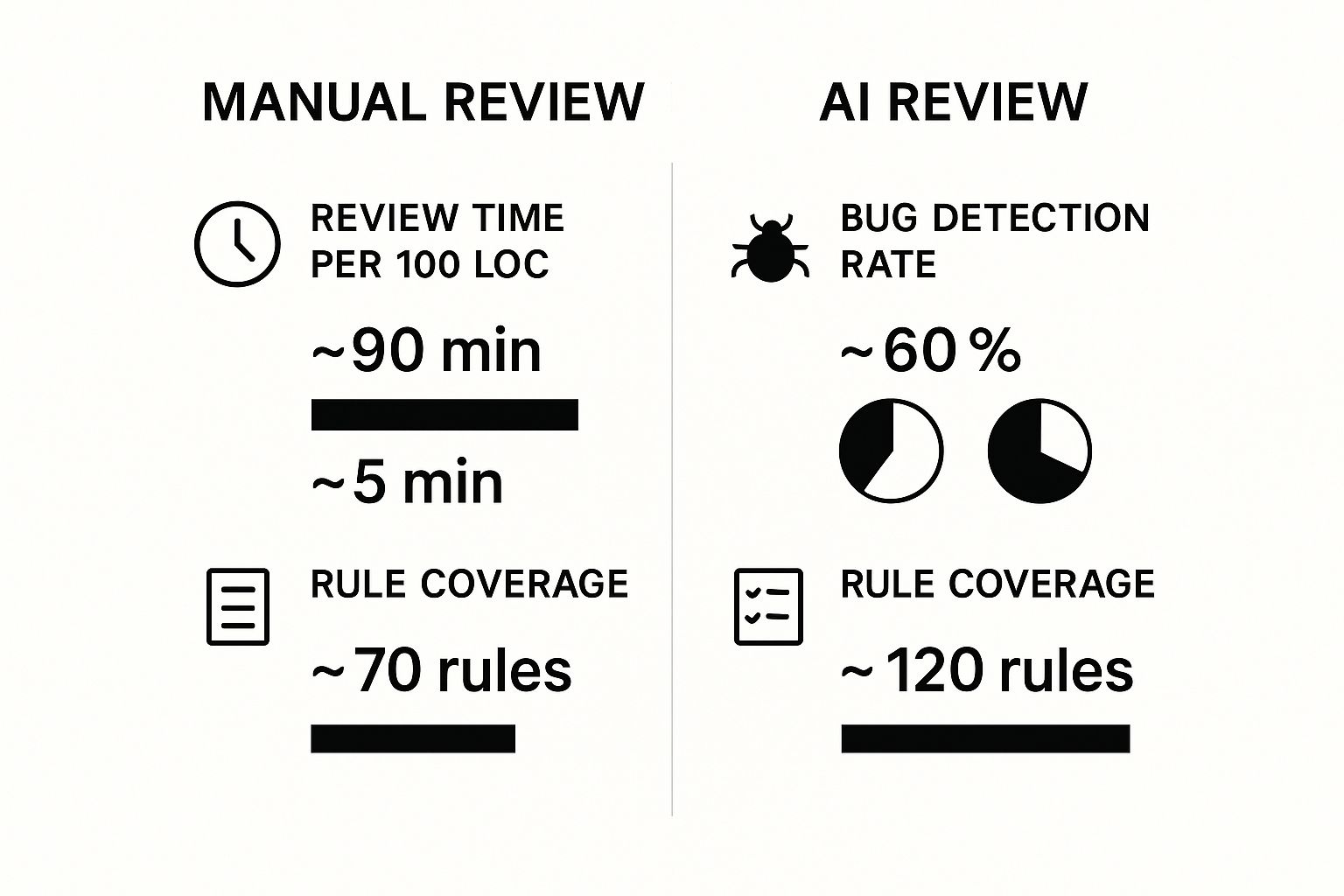
In just a few minutes, the AI delivers its feedback as comments directly in the pull request—exactly where a human reviewer would leave them. These suggestions can be anything from a simple style fix to a critical security vulnerability, often complete with a code snippet that can be applied with a single click. This instant feedback lets developers fix minor issues on the spot, long before a senior engineer spends time on a manual review.
The infographic below shows just how much more efficient this process is compared to a fully manual one.
Human Review vs AI Code Review
While AI is incredibly powerful, it’s not meant to replace human expertise entirely. Instead, it creates a partnership where each plays to its strengths. The AI handles the repetitive, high-volume checks, while human reviewers provide the deep architectural and business context that only a person can.
| Aspect | Human Code Review | AI Code Review |
|---|---|---|
| Primary Focus | Architectural soundness, business logic, long-term maintainability, and mentoring. | Finding bugs, security vulnerabilities, style violations, and performance hotspots. |
| Speed | Can take hours or days, depending on PR size and reviewer availability. | Typically completes its review in minutes, regardless of the time of day. |
| Consistency | Can vary based on the reviewer’s experience, mood, or workload. | 100% consistent, applying the same set of rules to every line of code. |
| Context | Understands the “why”—the business goals and team conventions behind the code. | Understands code context but lacks awareness of external business drivers. |
| Breadth | Limited to the reviewer’s specific knowledge and what they have time to check. | Can check against thousands of rules and a massive database of known issues. |
Ultimately, this combination is what makes the process so effective. The AI acts as a powerful filter, catching the majority of common issues and freeing up human reviewers to do what they do best: think critically about the bigger picture.
The Real Benefits of AI in Your Workflow
So, what does bringing AI into your review process actually do? It’s less about theory and more about scoring some immediate, practical wins for your team.
Think of an AI code review tool as a “quality guardrail.” It helps your developers move quickly without constantly worrying about knocking things over or sacrificing the stability of the codebase.
This isn’t just about speed for speed’s sake. It’s about building a sustainable pace that’s backed by solid quality. The AI is a tireless enforcer of your team’s coding standards on every single pull request, making sure the entire codebase stays clean and consistent. It also acts like an always-on security analyst, catching common vulnerabilities before they ever see the light of day in production.
Automating the Tedious Stuff
One of the biggest wins is automating the grunt work that eats up a developer’s time and energy. Instead of manually hunting for style mistakes, unused variables, or missing comments, they can just hand that job over to the AI.
This is a huge boost for morale and productivity. It frees up your developers to focus on what they do best: solving the complex, interesting problems that push your product forward. When they know a reliable first-pass review is already done, they can merge code with more confidence, cutting down on the friction and headaches of the usual review cycle.
A recent developer survey really puts a spotlight on this. While 59% of developers say AI has improved their code quality, the real magic happens when you pair AI review with AI-assisted coding. For teams reporting high productivity, a whopping 81% of those using AI code review also saw better code quality. That’s a massive jump compared to the 55% of fast teams who didn’t use it. You can explore more findings on the state of AI code quality to see how this balanced approach really pays off.
Improving Long-Term Code Health
Beyond catching today’s bugs, AI tools are great at spotting ways to make the code better for the long haul. They can suggest refactoring a tricky function, recommend a more efficient algorithm, or point out code that could be simplified to make it easier to maintain down the road.
This proactive approach is your best defense against the slow, creeping buildup of technical debt. By making these small, continuous improvements, you ensure the codebase stays flexible and easy for anyone to work with for years to come.
In the end, all these benefits add up. You get a more resilient, secure, and manageable project. The AI becomes a true partner in building not just code that works, but quality code that lasts.
AI Code Review in Action with Practical Examples
It’s one thing to talk about the benefits of AI code review, but it’s another thing to see it in action. So, let’s get practical and walk through how these tools handle a real piece of code.
The secret to getting great feedback from an AI isn’t some kind of magic incantation. It’s all about asking the right questions. When you give the AI a clear, structured prompt, you’re essentially telling it what to look for—performance bottlenecks, security holes, messy code—and that’s how you get back genuinely useful insights instead of vague suggestions.
Your Reusable Prompt Checklist for Code Reviews
Think of the prompt below as your go-to template. You can copy and paste it right into your pull request descriptions or your favorite AI chat tool. It’s designed to give you a solid first-pass analysis on any chunk of code you’re working on.
✅ Prompt
“Act as an expert senior software engineer and review this pull request. I need a comprehensive analysis that covers a few key areas:
- Correctness & Bugs: Are there any logic errors, off-by-one mistakes, null pointer issues, or potential race conditions hiding in here?
- Security: Scan for the usual suspects—SQL injection, XSS, insecure object references, or any error handling that might leak sensitive information.
- Performance: Point out any inefficient code. I’m talking about slow algorithms, extra database queries, memory leaks, or anything that might block operations and slow things down.
- Maintainability & Style: Does this code follow SOLID principles? Is it DRY, or is there a lot of repetition? Are there any overly complex functions or confusing variable names? Let me know where it could be refactored.
- Documentation: Are the comments clear, especially for the tricky parts? Missing or confusing comments can be a real headache later.
For every issue you find, please explain what the problem is and suggest a concrete code fix. A clear, formatted response would be great.”
A Real-World Python Example
Alright, let’s put that prompt to the test. Imagine a developer on your team submits a new Python function. It’s supposed to grab user data from a database. At first glance, it looks fine.
But there’s a nasty security bug lurking just beneath the surface.
Here’s the code snippet they submitted: import sqlite3
def get_user_data(user_id): db = sqlite3.connect(‘app.db’) cursor = db.cursor() # This line contains a SQL injection vulnerability query = f"SELECT * FROM users WHERE id = {user_id}" cursor.execute(query) user_data = cursor.fetchone() db.close() return user_data
Now, let’s see what happens when we run this code and our prompt through an AI review tool. The AI doesn’t just skim it; it digs in and checks the code against every single point we asked it to.
The AI’s Feedback
This is the kind of detailed, genuinely helpful feedback you can expect to get back:
AI Code Review Summary
- Correctness & Bugs: The core logic looks fine. It connects to the database and fetches a record as intended. No obvious bugs here.
- Security: Critical Vulnerability Found. The function uses an f-string to put the
user_iddirectly into the SQL query. This is a classic SQL injection attack waiting to happen. An attacker could pass in a malicious string as theuser_idand execute their own commands on your database.- Performance: For a single request, this is okay. But creating a new database connection every time the function is called is inefficient and won’t scale well. You should look into connection pooling.
- Maintainability & Style: The code is straightforward and easy to read. No major issues on this front.
Suggested Fix for Security Vulnerability:
To fix the SQL injection risk, you need to use a parameterized query. This approach separates the command from the data, making sure the user input is treated as a simple value, not as executable code.
Corrected Code
def get_user_data(user_id): db = sqlite3.connect(‘app.db’) cursor = db.cursor() query = “SELECT * FROM users WHERE id = ?” cursor.execute(query, (user_id,)) # Use a tuple for parameters user_data = cursor.fetchone() db.close() return user_data
This is where the value of an AI review really shines. It spotted a huge security hole that a human reviewer, especially one in a hurry, might have easily missed. Not only that, but it also explained the why behind the problem and gave a perfect, ready-to-go fix. This is exactly how AI helps teams write better, more secure code without slowing down.
More Practical Use Cases: A Deployment Checklist
AI isn’t just for reviewing individual functions. You can also use it to validate complex processes, like confirming a deployment is configured correctly. Here’s a prompt and example response you can reuse as a checklist when confirming an Astro → Cloudflare Workers deploy is done right:
✅ Prompt
“Checklist: confirm my Astro site is deployed on Cloudflare Workers with best-in-class performance, SEO, and DX. Verify adapter, asset storage, caching, hydration, and SSR/SSG choices. Give me a clear yes/no on each item and point out fixes if something’s missing.”
📝 Example Response
Astro on Cloudflare Workers — Deployment Checklist
- Adapter → Using
@astrojs/cloudflareor@astrojs/cloudflare/worker? → ✅ Yes - Static vs SSR → Static pages prebuilt + only SSR where required (API, auth, etc.) → ✅ Yes
- Cold start avoidance → Worker bundle < 1MB, no heavy deps → ✅ Yes
- Assets → Offloaded to R2 / Cloudflare Images, not bundled in Worker → ❌ No → Fix: move images to R2 and rewrite URLs
- Caching → Edge cache headers set (
Cache-Control,stale-while-revalidate) → ✅ Yes - SEO → Title/meta tags verified, hreflang (if multilingual), robots.txt and sitemap.xml generated → ✅ Yes
- Core Web Vitals → Partial hydration configured, Lighthouse score >90 → ✅ Yes
- Global Edge → Tested from multiple PoPs (US/EU/Asia) for <100ms TTFB → ✅ Yes
- Limits → Worker within 30ms CPU budget, script <10MB → ✅ Yes
- Monitoring → Wrangler tail + Analytics enabled → ✅ Yes
Result: 9/10 checks passed. Only asset storage needs fixing.
Choosing and Integrating the Right AI Tool
So, you’re sold on the idea. What’s next? It’s time to bring an AI code review tool into your team’s day-to-day work. The market is packed with options, and they’re not all created equal. Some are simple extensions for your code editor, while others are powerful apps that plug right into your CI/CD pipeline.
Finding the right tool means looking past the hype and focusing on what your team actually needs. You’ll want to check the basics: Does it support your primary programming languages? Does it play nicely with your current setup, like GitHub, GitLab, or Bitbucket? And, of course, are its suggestions genuinely helpful or just more noise?
Popular AI Code Review Tools at a Glance
To give you a starting point, here’s a quick look at a few of the heavy hitters out there. Each one has its own philosophy and fits a different kind of workflow.
| Tool Name | Primary Use Case | Key Integrations | Pricing Model |
|---|---|---|---|
| GitHub Copilot | Great for individual developers who want instant suggestions and security scans right in their editor or on pull requests. | VS Code, JetBrains, GitHub | Freemium (Free for students/OSS), with paid tiers for individuals and businesses. |
| CodeRabbit | Built for team collaboration, this tool gives deep, context-aware reviews on pull requests to improve overall code quality. | GitHub, GitLab | Usage-based, with a free tier for open-source projects and paid plans based on developer count. |
| Amazon CodeWhisperer | A perfect fit for teams already in the AWS ecosystem. It offers code suggestions and security scans that tie directly into AWS services. | VS Code, JetBrains, AWS Cloud9 | Free individual tier, with a professional tier billed per user for advanced features. |
What you’ll notice is that some tools are all about giving in-the-moment feedback while you’re coding, and others are designed to improve the team’s review process after the code is pushed. Your choice really hangs on where you need the most help.
A Straightforward Integration Guide
Once you’ve picked a tool, setting it up is usually pretty painless. Most of these platforms are built to get you started in minutes.
- Authorize Access: First up, you’ll connect the tool to your code repository, usually through OAuth. This just gives it permission to see your code and post comments on pull requests.
- Configure Repository Settings: Next, you’ll tell it which repositories to watch. You can often get specific, like ignoring certain branches or file paths, so you’re not getting feedback on things like auto-generated files.
- Set Up API Keys (If Needed): For more advanced setups or custom workflows, you might need to generate an API key and store it as a secret in your repository or CI environment.
- Trigger the First Review: That’s it! Just open a new pull request, and the AI will kick in, run its analysis, and post its findings.
The real magic happens when your AI reviewer is part of a fully automated system. By plugging it into your CI pipeline, you guarantee that every single change gets a consistent check. This is a huge part of modern development, and you can dig deeper into what is continuous integration to see how it all connects.
Following these steps turns your AI code review from just another task into an automatic quality gate, making sure nothing gets merged without that all-important second set of eyes.
Navigating AI Limitations and Human Oversight
While AI can supercharge your code reviews, we need to have an honest conversation about what it can’t do. At its core, an AI is an incredibly powerful pattern-matcher, but it doesn’t truly understand the code it’s reading. It has no grasp of your business goals, customer needs, or the strategic roadmap you’re following.
Think of it like a brilliant copy editor who can spot every grammatical error but has no clue if your story is any good. The AI can flag an inefficient algorithm, but it can’t possibly know that this code is just a temporary fix scheduled for a complete overhaul next sprint. That’s where human expertise isn’t just helpful—it’s essential.
Creating a Hybrid Review Process
The smartest way forward is a hybrid model where AI and humans work together, each playing to their strengths. The goal isn’t to replace your developers but to augment their skills. By letting the AI handle the grunt work, you free up your team to focus on the high-level analysis that machines just can’t touch.
Here’s how that partnership looks in practice:
- AI Handles the Repetitive Checks: It tirelessly scans for common bugs, style guide violations, and security vulnerabilities. These are the kinds of tedious tasks that burn out human reviewers.
- Humans Focus on the Big Picture: Your developers can then step in to evaluate the code’s architectural design, long-term maintainability, and whether it actually solves the right problem. They provide the “why” behind the code.
This balanced approach helps your team get ahead of problems before they spiral out of control. By making smart, incremental improvements, you can actively learn how to reduce technical debt before it becomes a massive headache.
We’re seeing this nuanced reality play out across the industry. Adoption is still incredibly high—76% of developers are either using or planning to use AI coding tools. But the initial hype has started to level off. Where over 70% of developers once had a positive view, that number has settled to around 60% as teams get more hands-on experience and recognize the limitations.
Ultimately, the future of code review isn’t about choosing between humans and AI. It’s about mastering the art of their collaboration.
AI Code Review: Your Questions Answered
If you’re thinking about bringing an AI code review tool into your workflow, you probably have a few questions. Let’s tackle some of the most common ones we hear from engineering teams.
“Is My Code Safe with an AI Review Tool?”
This is the big one, and for good reason. Trustworthy, enterprise-grade tools are built with security at their core. They typically process your code in-memory, meaning it’s never permanently stored on their servers.
Crucially, they don’t use your private code to train their public AI models. For teams with the strictest security needs, many providers also offer on-premise or private cloud options, giving you complete control. Still, always do your homework and read a vendor’s security and data privacy policies to make sure they line up with your compliance requirements.
“Will AI Take My Job?”
Short answer: Nope. Think of AI as a very smart, very fast junior developer on your team—not a replacement for senior talent. It’s brilliant at catching the low-hanging fruit: common bugs, style guide violations, and known security flaws.
What AI can’t do is understand the why behind the code. It lacks the business context, deep architectural knowledge, and creative spark that a human developer brings to the table. The real goal here is to augment your team, not replace it, freeing up engineers to focus on complex, high-impact problems.
“How Can I Get My Team on Board?”
Change can be tough, so the key is to start small and prove the value. Kick things off with a pilot project on a non-critical feature. This gives you a low-risk way to see the tool in action and gather real data.
Focus on metrics that clearly show the benefits:
- Time Saved: How much faster are pull requests getting reviewed and merged?
- Bugs Caught: What critical issues did the AI find that could have made it to production?
- Developer Happiness: Ask your team directly. Is it helping them avoid tedious, repetitive tasks?
With that data in hand, you can make a compelling case that this isn’t just another tool—it’s something that helps everyone ship better, more reliable software, faster.
Ready to see how AI can improve your team’s coding workflows? Zest provides the insights you need to measure and improve how your team uses AI assistants. Get started for free at Zest.
Gallery
Lemon shots



